Employment Contract
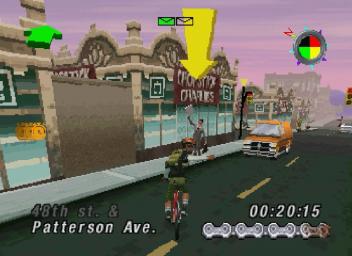
As a bike courier, your job is to pick up and deliver packages in a timely manner. Start by looking for the guy with the package and pick it up by riding up to him. You can identify him by the pickup icon, a giant yellow arrow, above his head.
Once you have the package, find the drop-off guy, who is easy to spot due to the giant dollar sign above his head. Ride by him to drop off the package and collect your payment.
Each delivery mission is paid only on timely completion. Finishing when the timer is in the green pays full price, while yellow results in 75% and red results in 50%. If the timer runs out, you are fired and free to do what you want.
Main Menu
The Main Menu offers five options. Use the D-Pad LEFT/RIGHT to highlight an option, then use the O BUTTON to select it.
GO
Select this to go to the neighborhood selector screen. Refer to the 'Hood Selector section for more information on different neighborhoods.
GT BIKE SHOP
Select this to go to the GT bike shop.
Price: $3325
Cashflow: $320
You can access the bike shop anytime the Main Menu is available to trade in your current bike for a different model. You receive full trade-in value, so you only need to cover the difference. The cashflow figure indicates the combined value of your trade-in and available cash.
MEMORY CHIP
Select this to load or save a game, or to view credits.
You can save your game onto a memory cartridge or system memory to pause for life's necessities. You can save at the end of a mission by pressing the B button to return to the Main Menu, selecting the memory chip icon, and following the on-screen instructions.
If you do not have a memory cartridge or your system memory is full, use the password displayed on the LOAD/SAVE screen to resume later. Write the password down and cycle through letters using the D-Pad, pressing the C BUTTON to select.
To load a saved game, select the memory chip icon from the Main Menu. Saved games are named according to the level achieved, such as "Level 2".
CONTROLLER OPTIONS
Select this to change the default button configuration.
Follow the on-screen instructions to select one of the alternative keypad configurations.