Overview
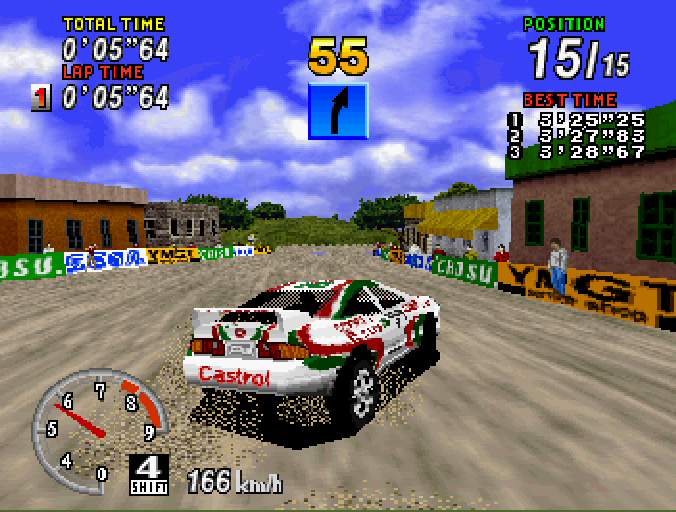
SEGA Rally Championship Net Link Edition allows you to race head-to-head against another player over phone lines. You can dial a friend or locate an opponent online to connect directly for two-player racing action. This addendum covers features unique to the Net Link edition. To use Net Link, you need a Saturn Net Link adapter and a PPP-compatible Internet account. If you lack an Internet account, insert the disc, click "Net Link Zone," and follow on-screen directions to establish an account with WebBullet™ Internet Service. For easier communication, consider using a keyboard with the optional SEGA Saturn Net Link Keyboard adapter. Quick Start
Place the game disc in the Sega Saturn and power on the system. The SEGA Rally Championship and Net Link splash screens will appear, followed by the Net Link main menu. To set up your character, choose Quick Link to create a character and connect with an opponent. Press any button at the X-band splash screen, then choose Setup from the six icons on the Quick Link menu.
•
Choose Character to select a portrait for your persona. Use the D-pad to find a portrait you like, then press A or C to select it.
•
Choose Code Name and Taunt to enter your nickname and challenge message. Use the on-screen keyboard or a connected physical keyboard. Choose Done when finished.
Your racer's portrait, nickname, and taunt are saved to the Saturn's internal memory. These settings will display each time you connect with an opponent for any Net Link game. To change them, return to the Setup menu and repeat the selection steps. Choose Return to go back to the Quick Link main menu.
Dialing an Opponent
Choose Phone Setup to select pulse or touchtone dialing, or to enter a prefix like "9" if needed. This information is saved to the Saturn's memory, so you only need to enter it once unless you change services. Choose Dial from the Quick Link main menu. Type in the phone number using the on-screen or physical keyboard, then choose Dial to connect.
Important: The player who dials pays for the call. You are responsible for all toll, long-distance, or metered local charges. SEGA and WebBullet are not responsible for any telephone charges incurred by using Net Link.
Receiving a Call
Choose Wait from the Quick Link main menu. You can practice racing while waiting; the incoming call will interrupt your practice race. When connected, a screen shows both characters' portraits, names, and taunts. The player who dialed selects the track, then both players select cars and options. The race begins in head-to-head player mode.
•
One player must choose Dial and the other must choose Wait.
•
Ensure you and your opponent agree on roles to avoid connection issues.
Using the Internet
To use the Net Link Zone for locating players or live chat, you need a PPP dial-up account with an Internet Service Provider (ISP).
•
If you already have an ISP account set up for your Saturn, load the disc and choose Net Link Zone from the main menu. •
If you have an ISP account for your computer, follow the Net Link browser manual to enter that information.
•
If you do not have an Internet account, load the disc and choose Yes to sign up with WebBullet™.
Registration is a one-time process requiring a valid credit card. You will be connected to WebBullet's toll-free registration line. Follow the on-screen directions to establish your account.
Please select a dial-up phone number that is a local call for you. SEGA and WebBullet are not responsible for telephone charges. If WebBullet does not have a local number in your area, call customer service at (415) 429-3131 or investigate alternate ISPs.
Once established, account information is saved to the Saturn's internal memory. Ensure the battery tag is removed from the rear of the Saturn so data can be saved. Record your account information in the Net Link Browser 3.0 manual in case the memory is erased. Important Note: If you sign up for WebBullet, you must disconnect, reset the Saturn, and wait approximately 15 minutes for credit card processing before connecting successfully. To view account information, press Start, choose Options from the Command Cluster, and view the General, Network, and Mail Preferences screens.
Your credit card is billed monthly after the free trial period. For questions or cancellations, call WebBullet support at (415) 429-3131 or email support@webbullet.com.
When the modem dials, a "Modem Messages" box appears on screen. This is normal; the characters are standard modem commands. The box disappears once connected.
Game Interface
SEGA Rally Championship Net Link Edition features new menus and options for online play.
Selecting Play Options
The Net Link main menu has three options:
•
Traditional: Standard one or two-player game with no online gameplay. Does not require an Internet account.
•
Quick Link: Dial an opponent or wait for a call. Does not require an Internet account but requires both players to have the Net Link Edition.
•
Net Link Zone: Connects to the Internet to contact other players online. Requires an Internet account.
Click the question mark button in the upper right corner for a brief description of each option.
Creating a Character
In Quick Link mode, create a character to serve as your on-screen persona






 (Rev A).png)

.png)