The Outline of the Game
As you develop the land, your power will gradually be restored. With renewed power you can rid the earth of all monsters.
"ActRaiser" takes place in a world invaded by the forces of evil. As Master, you must defeat all monsters in each Action Mode in order to purify the land that is being dominated by evil. Each land has two separate Action Modes, "ACT I" and each of the six districts has one Action Mode. Upon completing ACT I of an Action Mode, you move into the Simulation Mode. An orderly development of the land will result in an increase of the population, which will raise your level and fighting strength. In the beginning, you will only be permitted entrance to Fillmore. To visit other lands will require that you increase your level. Your first mission will be to purge the land of Fillmore, cultivate it, and raise your level.
Game Progression Flow
•
PURIFY FILLMORE (ACTION MODE: ACT I) •
DEVELOP FILLMORE (SIMULATION MODE)
•
PURIFY FILLMORE (ACTION MODE: ACT II) Action Mode
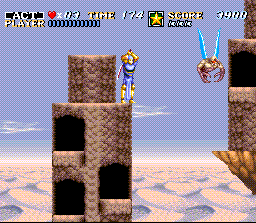
As the once-ruling Master, your task in the Action Mode is to regain control of all the land. To accomplish this task you have chosen the statue of a mighty warrior to embody your spirit. ACT I must be completed before moving into the Simulation Mode. Each land has TWO ACTION MODES. Once you have sealed all the monsters' lairs in the Simulation Mode, you can advance to ACT II. Simulation Mode Overview
The Simulation Mode begins upon completion of ACT I of each lands' Action Mode. Your task here is to develop the land and increase the population. When the population increases to a certain number, the Master's experience will raise a level and his HP will increase. The higher the Master's experience and HP level, the more prepared he will be for the next Action Mode. People will cultivate the land in the direction you advise. Using the Master's resurgence, lead and direct the people through the many incidents and events that take place in the Simulation Mode.
The Sky Palace
Your game will begin in the inner chambers of the Sky Palace. The Angel will help you through the beginning sequences of the game. Read the instructions carefully as they appear on the screen.
Map Screen and Sky Palace Controls
•
X BUTTON: Enlarges your view of the world map.
•
Y BUTTON: Cancels the selected command.
•
A BUTTON: Shrinks your view of the world map.
•
B BUTTON: Shrinks your view of the world map.
•
CONTROL PAD: Controls movement of the Sky Palace, also identifies which command you wish to select.
The Inner Chamber Screen Elements
•
Current Population of Land Plus Total Population of World.
•
Power Needed to Perform Act of Nature.
•
Explanation of Selected Icon.
•
Angel, The Master's Loyal Servant and Counsel.
Sky Palace Commands
From the inner chambers of the Sky Palace you can execute eight different commands. Using the control pad, select the desired command and press B BUTTON.
•
TO MOVE: Selecting this icon allows you to move the Sky Palace. You may also enter the Simulation Mode by selecting this icon.
•
SKY PALACE MOVEMENT: Selecting this icon will change the screen from the inner chambers of the Sky Palace to the map of the world. Use this command to get an aerial view of the developing world.
•
OBSERVE THE PEOPLE: Selecting this icon will allow you to move from the inner chambers of the Sky Palace to the Simulation Mode. This command cannot be used unless the land has first been purified.
•
FIGHT: This icon will allow you to select the fighting and magic icons.
•
FIGHT MONSTERS: Selecting this icon will send your spirit down to embody the mighty warrior statue.
•
SELECT MAGIC: Selecting this icon will allow you to determine the magic spell to use during battle. Various magic spells will be obtained during game play.
•
STATUS: This icon will allow you to access the various status screens.
Master Status Screen
Selecting this icon will display a current status report on the Master. Also displayed will be the population level to be reached before advancing to the next level.
•
LV (LEVEL): Indicates the Master's composite strength.
•
SP: Indicates power needed to perform an Act of Nature.
•
HP: Indicates the Master's physical strength.
•
MP: Indicates Magic Power available to use.
•
TOTAL (COMPOSITE POPULATION): Indicates total number of people inhabiting the world.
•
ITEM: Displays the offerings you have accepted during the Simulation Mode.
•
NEXT (NEXT LEVEL): Indicates the population level needed to advance a level.
•
MAGIC: Displays the magic spells that can be used by the Master.
Cities Status Screen
Selecting this icon will display the status of each town. You can periodically check on the development of each town.
•
AREA (LAND): Displays, by name, all six lands.
•
STAT (POPULATION SPEED): Displays the speed at which each town's population is increasing.
•
ITEM (OFFERINGS): Displays the number of offerings found in each land.
•
↑: Displays the current population of each land.
•
LV (CULTURAL LEVEL): Displays the cultural level of each land. The higher the level, the more developed the land.
.png)


.png)
.png)