Introduction
It is late 1943. American forces, preparing for their island hopping advances towards Japan, have constructed several naval bases on a small chain of islands in the South Pacific.
Japan, seeing the strategic danger, has sent in its own ships to defend its island holdings and prevent the Allies from having a first toe-hold towards the invasion of Japan itself.
The War
In Carrier Aces, the object of the game is to gain control of each of the seven strategic locations in the island chain. Only when the entire theatre is under one nation's control can that side achieve victory.
Each player controls the entire air force of one carrier. With these planes he or she must undertake missions that will determine which side controls a strategic point in the island chain.
The battles for each of these seven Strategic Points can be fought in any order the players choose and may be retaken by the losing side. Each side must pay attention to its plane, fuel and ammunition losses or risk having nothing left to defend its holdings if victory is not swift.
Player Selection
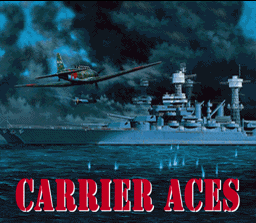
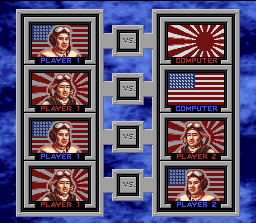
After the title-screen comes up, pressing any button will bring up the player selections screen.
By using the control pad, highlight the desired player selection and press any key.
Training Mission
For those of you who want to practice before the Campaign starts, or if you just desire instant action, we have the training missions. Simply select Training Mission from the Battle Areas menu, and press any button. A Training Mission ends when any player has lost four planes or his or her ship. If you want to go to the Campaign before your Training Mission is over, select Quit Training from the Training Mission Menu and press any button.
On the Training Mission Menu you can select any of the four types of combat, or practice landing your plane on a carrier.
Combat
Fighting is the same whether in Training or Campaign play. It consists of Dogfighting, Strafing, Torpedo Strikes, or Dive Bombing.
Dogfight
When dogfighting, the attacker always appears in the top window, the defender in the bottom. Players fight plane-to-plane, one-on-one until one plane is destroyed.
Using your Nintendo controller, as directed above under Controls, try to shoot each other down with your guns. Fighters can also use rockets, but they are designed to destroy fixed targets, not moving airplanes, and it is nearly impossible to hit with one.
Alternate Views
During dogfights, by hitting the R button on the top right of your controller, you can toggle to an alternate view. For fighters this is a Crosshair view. For both types of bombers this is a Rear Gunner View.
In the Crosshair view, the airplane is replaced by a crosshair for greater accuracy. All controls remain the same.
In the Rear Gunner View, the player observes from the point of view of the bomber's rear gunner. The controls no longer affect his plane which will continue to fly straight until the player returns to the main view. The control pad now moves the gun.
Strafing Attack
When a fighter attacks a ship or ground target, it automatically strafes.
In a strafing run the attacking plane is shown on top, the defending anti-aircraft gun on the bottom. The attacking player's controls function just as in a dogfight, except the plane's turning ability is limited to always approaching the target.
The defending player, controlling the anti-aircraft guns, can shoot down the enemy by firing the guns as mentioned in The Controls above.
•
Button A: Fires the gun.
•
Button Y: Toggles through 20mm guns.
•
Button B: Toggles through 40mm guns.
A good pilot can knock out one or more of your guns. When this happens, use the B and Y buttons to find another usable gun.
Torpedo Strike
When a torpedo bomber attacks a target, it is automatically a Torpedo Strike.
The view and the controls are just like the strafing attack above, except that as soon as a torpedo is released, the bomber will pull up and the Strike is over. The defender controls the anti-aircraft guns as in the Strafing Attack.
Torpedos are very difficult to aim, but nothing in the game does as much damage.
Dive Bomb
When a dive bomber attacks a target, it is automatically a Dive Bomb attack.
The attacking player starts in the sky above the target and dives towards the ship below. The bomber continues towards the ship until a bomb is dropped or the player pulls up. When the bomber gets too low, it will not be able to pull up in time.
The defender controls the anti-aircraft guns as in the Strafing Attack.
Carrier Landing
Whether returning from a Campaign Mission or Training Mission, your successful planes must land on their carrier. To do this, slow down, follow your Landing Signal Officer's directions (shown in the bottom half of the screen), and wait for the stop signal.
The directions the signal man can give you are shown on the inside back cover of this manual. If you are going too high or too fast, your plane will not land, and you'll have to try again on the next pass.
Campaign Play
In the Campaign play, each side undertakes a series of missions until one side has secured that strategic area. When one side controls all seven strategic areas, that side is victorious.
The Battle Areas
On the Battle Areas Menu now select the Strategic Point you want to secure first. There are Seven Strategic Points you must secure:
.png)

.png)
.png)
.png)
