Soccer Rules
In soccer, the object is quite simple: score by kicking the ball into the other team's goal, and prevent the other team from scoring in your goal.
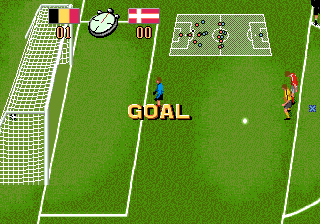
Each goal is worth one point, whether it is made as the result of regular game play or a penalty kick. In order for a goal to be legal, the entire ball must cross over the goal line.
Each team consists of 11 players: forwards, midfielders (or halfbacks), defenders (or fullbacks), and a goalkeeper.
Player Roles
Any player on a team may score for his team, though scoring goals is generally the job of the forwards. The midfielders' main task is to move the ball upfield to the forwards so they can score.
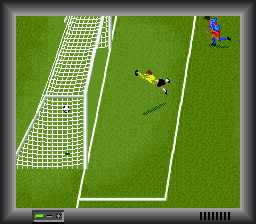
Defenders are given the job of preventing the other team's players from scoring. The goalkeeper has the task of preventing the ball from going into the goal when the other team shoots.
Handling and Offsides
To avoid offside errors, remember: When a player is running forward on an attack, and his team plays the ball, he must have two players between himself and the goal.
A player may use any part of his body to shoot or advance the ball—with the exception of his hands or arms. The goalkeeper, however, may use any part of his body—including his hands and arms—to block or catch the ball.
Game Duration
A soccer game consists of two equal halves, usually 45 minutes in duration. The clock stops only when a goal is scored, when a penalty kick is awarded, when a player is cautioned or ejected from the game, and whenever else the referee deems it appropriate.
Fouls and Restarts
Referees may award two kinds of kicks as a result of rules violations: free kicks and penalty kicks.
Free kicks can be shot to the goal without being touched by another player. They are awarded for more serious fouls such as tripping, kicking, striking, or pushing an opponent, or using one's hands to control the ball.
Penalty kicks are awarded when a free kick violation is made by the defense inside its own penalty area. Free kicks are taken from the point where the penalty occurred. Penalty kicks are taken from the penalty spot in front of the goal.
Out of Bounds Restarts
•
Throw-in: If a team hits or deflects the ball over a sideline, the other team takes a throw-in from the point where the ball crossed the line.
•
Corner kicks: Result for the attacking team when the ball passes out of the field of play on the defending side of the field, and it was last touched by the defending team.
•
Goal kicks: Result when the ball passes over the defending team's goal line and it was last touched by the attacking team.
Card System
A card system is used for fouls. A player receives a yellow card for a major infraction such as tripping, punching, kicking, tackling, or gouging an opponent. The yellow card is designed as a warning to the player.
If that player engages in activity that earns him another penalty, he receives a red card and is ejected from the game. Since each team only has 11 players on its World Class Cup roster, if a player gets ejected, his team must play shorthanded! In addition, the opposing team receives either a direct kick or a penalty kick.
Before You Lace Up Your Cleats
•
1. Make sure the power switch is OFF.
•
2. Insert the Game Pak as described in your Super Nintendo Entertainment System® instruction manual. •
3. Turn the power switch ON.
Main Menu Options
When you see the logo on your screen, press the START BUTTON. You will be presented with the following options. Use the CONTROL PAD to highlight each option and the CONTROL PAD or A and B BUTTONS to change it.
•
LANGUAGE: Chooses whether game text is in English, Spanish, French or German.
•
MATCH TYPE: You will be asked whether you wish to play a 1 player exhibition match, a 2 player exhibition match, begin a new 1 player tournament, or to enter a password which will allow you to resume a playoff previously begun.
•
OFFSIDES: Chooses whether or not offsides penalties are called.
•
FOULS: Chooses whether or not fouls are called.
•
TIME: Selects either 45, 30, or 15 minute halves. Press START to lock in the options and to move to the Team Selection screen.
Entering Passwords and Starting Playoffs
If you choose to enter a password, press the CONTROL PAD horizontally to select the letter and press it vertically to change it. Press the START BUTTON when the password is correct.
If you begin a new playoff, you will be asked to select the team you wish to control throughout the playoffs.
Team and Formation Selection
•
TEAM SELECTION: Choose from among 32 international teams. Each team has varying speed, offensive, and defensive characteristics, illustrated by the bar charts on the display. When you've made your selection, press the B-Button.
•
FORMATION SELECTION: Choose from four different formations: 4-3-3, 4-4-2, 4-2-4, or 4-5-1. The first number refers to the number of defenders, or fullbacks, used by your team (always four). The second number refers to the number of midfielders, while the third number denotes how many forwards you have. When you've made your selection, press the B BUTTON.
 (En,Fr,De,Es).png)



 (En,Fr,De,Es).png)






_1.png)
_1.png)

.png)


 (En,Fr,De,It).png)
.png)
_1.png)







.png)