Introduction
We watch it regularly on television, it is played by millions of people around the world, it has its own superstars and its own vocabulary, it is the most popular sport in the world, it is football! You can now experience all the tension and pleasure of this superb sport on your SNES.
Dino Dini's Soccer™ recreates the true atmosphere of football. This feature-rich game is the most realistic football simulation of all. You can participate in league matches, the World Cup, or friendly matches, against friends or the console. You can play by changing all your playing conditions, against the most famous teams in the world (there is even England).
Dino Dini's Soccer™ was designed for the enjoyment of all types of players. If you don't know this sport yet, you can play against amateurs, but if you already see yourself in the shoes of Stoichkov, then why not face one of the professional teams. Whatever your level, you will love Dino Dini's Soccer™, and don't forget that it's a game of two halves!
Quick Start
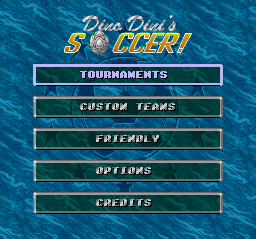
When the title screen appears, choose the Friendly option on the main menu to start playing immediately.
Now, click either on Human vs Computer, or Human vs Human to play either against the console or against a friend. Choose two teams by clicking on their names with any button. Then press the Start button to start the game.
Rules of Football
Football is played between two teams of 11 players (and two substitutes). One of the players on both sides is the goalkeeper; he is the only player allowed to touch the ball with his hands during a match. The goalkeeper's role is to protect his goal against the opposing team, which will try to send the ball between the posts and into the net.
The other players on the team shoot, head, chest-trap, and pass, to try to get the ball into the opponent's goal. There are three types of players:
•
Defenders: their role is to defend their goal by preventing the opposing team from shooting.
•
Midfielders: these players play in the central part of the field, but they can also attack or defend depending on the position of the ball.
•
Forwards: these are your attackers. They will try to score a goal, just like the other players if they get the chance.
•
Referee: okay, okay! He is not a player, but if you do anything not very regular (like bringing Scotland to the final), he will warm your ears.
Controlling a Player
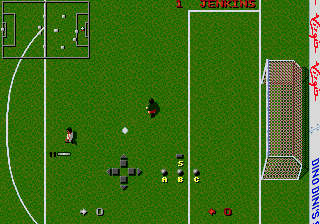
For manually controlled teams, Dino Dini's Soccer combines console and player control. This means that while you control one player, the others will mark other players, run up the field, defend, and tackle opposing team players - depending on the tactics you have chosen.
The console will automatically give you control of the player closest to the ball. As soon as a player on your team takes possession of the ball, you take control of them. This means you control the actions, shots, passes, and defense, and you can keep the ball as long as you want.
The level of ball control depends entirely on the difficulty level you have chosen. You can adjust the level of ball control by choosing Options on the main menu, then Misc. There are four levels: Novice, Amateur, Expert, and Professional. At the Amateur level, the ball "sticks" to the player's foot. At the Professional level, the ball will roll ahead of the player as they run on the field.
Running with the Ball
Again, this depends on the chosen difficulty level. At the Novice level, you can run and change direction as often as you wish and the ball will remain stuck to the player's foot (unless you are tackled, of course).
However, at harder levels, you must change direction carefully, moving to the other side of the ball. At intermediate levels, you will lose control of the ball if you change direction too abruptly.
Passing the Ball
There are two ways to pass the ball. You can make a pass directly to a player. Simply press the B button for a short pass and the A button for a long pass.
You can also judge the approximate position of your players on the radar screen, and shoot in their direction. The Y button allows you to perform a short kick and the Y button a long kick.
Tackles
To tackle another player, get close to them, and press one of the colored buttons. Your player will slide towards the player in possession of the ball and if your tackle works, you will take control of the ball.
If you perform a tackle from behind, the referee may award a free kick or a penalty to your opponent, give you a warning (card), or even send you off the field, so beware.
Free Kicks and Penalties
For free kicks and penalties, a line indicating the ball's path appears. You can move this line, change its height and length, but if it can touch the goals, it will be moved to the left or right. This means you must calculate your shots well if you want to take a direct shot at goal.
Pitch Orientation
You can play Dino Dini's Soccer horizontally or vertically, that is to say from top to bottom or from left to right. You should try both possibilities to see which one you prefer.
To change the pitch orientation, choose Pitch on the Options menu and choose a "Hori" or "Vert" orientation.
Match Duration and Difficulty Level
A match can last from 2 to 20 minutes. To choose a duration
 (En,Fr,De).png)

 (En,Fr,De).png)
 (En,Fr,De).png)
