Hanna Barbera's Turbo Toons
Hanna Barbera's Turbo Toons is an excitingly addictive five player simultaneous racing game. There are over 30 different tracks to choose from, and 6 different classic characters you can race with. In addition to the 6 characters you can race with, many other classic characters will appear at various points in the game.
The game also features four different modes of play: Training mode, Single race mode, League race mode and the thrilling Challenge mode. There are hidden tracks and leagues to be found, in addition to a hidden way of getting your character to take corners very quickly.
Getting Started
Follow these directions to play Hanna Barbera's Turbo Toons:
•
1. With the Power switch off, place the game pak into your Super NES.
•
2. If you have a Multi-Tap™ adapter make sure it is connected to controller socket 2.
•
3. Make sure your television is connected and turned on.
•
4. Turn on the Power switch on the Super NES.
•
5. After a while the Turbo Toons title screen should appear. Pressing START on any controller now, will put you into training mode. Have fun!
•
6. If you haven't got a Multi-Tap™ with three extra controllers, get them. Turbo Toons is at its best with five people playing.
Options Screen
Pressing SELECT (on any controller) while the game is in attract mode will bring up the options screen.
Use up or down on the joypad to select a row. Then use left or right to select an item on the row. Press START to begin a race or SELECT to return to the title screen.
First Row Selects Mode of Game
•
WEIGHTS - TRAINING MODE (DEFAULT)
Second Row Selects Players
•
HUMAN AND COMPUTER PLAYERS (DEFAULT)
Third Row Selects Which League to Play
•
MAGILLA GORILLA'S GOBLET
•
RICOCHET RABBIT'S TROPHY
•
AUGIE DOGGIE'S BOWL * * This league won't be available to begin with.
Fourth Row Selects Which Track to Play
•
RANGER SMITH'S JELLYSTONE PARK
•
BENNY THE BALL'S ALLEYWAY
•
SQUIDDLY DIDDLY'S SEA BED
Fifth Row Selects Passwords
This row is used to select passwords to give you access to extra sections of the game using Yellow, Red, Green, Blue, White or Black blocks. A Password will appear on this row when you reach certain goals in the game.
To change the password, move the cursor to the right to select the colour block you wish to change. Pressing up or down on the joypad will change the colour of the selected block. Once the block is the desired colour press left or right on the joypad to select the next block you wish to change.
A thumbs down mean the current password is no good, a thumbs up means that the password is OK.
How to Race
At the beginning of each race, Captain Caveman will count down on the videoscreen. When he holds up a sign saying "GO!" it's time to start racing! Each race lasts for five laps of the track. The starting positions are random. To get your character moving all you have to do is press the joypad in the desired direction. The character will accelerate automatically so long as the joypad is pressed. If you wish to accelerate more rapidly press the turbo button for a few seconds. This will use up the characters energy, however, so use turbo with caution.
By jumping into other characters you can stun them for a couple of seconds. This can make overtaking a lot easier. There are ways to stop other characters stunning you, but it's up to you to find out how!
As the race proceeds magic crystals will appear. It is normally a good idea to try and collect these. Watch out for other Hanna Barbera Classic Characters popping up during races, they can get in your way and hinder your progress. There are ways to use them to your advantage, but it's up to you to find out how again!
During the race the videoscreen displays the characters in the same order as they are in the race. Beneath each character's face is a bar that represents the amount of energy that character has remaining. Every time you complete a lap, the lap number of the lap you are starting will be displayed on the videoscreen.
When a character starts the final (5th) lap of a race a bell will sound three times. Captain Caveman will wave the winning flag as soon as any character wins the race.
When a character completes a race they will go transparent, the computer will take control of the character and the finishing position will be displayed on the videoscreen. Once all human controlled characters have finished, the race will end.
Single Race Mode
This is a single race of five laps. The computer controlled characters will be tougher to beat than in training mode. You can also chose to race on any of the available tracks.
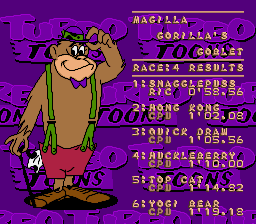
When the race is completed, the final positions will be displayed together with the times taken to complete the race.
League Mode
Each League consists of five
.png)

.png)
.png)
.png)
