Setup
Set up your PlayStation™ game console according to its Instruction Manual. Make sure the power is off before inserting or removing a compact disc. Insert the 3D BASEBALL disc and close the disc cover. Insert game controllers and turn on the PlayStation™ game console. Follow on-screen instructions to start a game. Controls
Options
View the Options screen to make game adjustments.
•
Press the D-Pad UP/DOWN to choose options categories.
•
Press the D-Pad LEFT/RIGHT to make adjustments.
Fielding
•
Auto — You control the pitching/throwing; the computer automatically gets you in position to catch the ball.
•
Manual — You control the pitching/throwing AND getting into position to catch the ball.
Errors On/Off
•
When Errors are ON, players can commit errors. An Error Sign will show the position number of the player who makes the error (example: E-6 for shortstop), then the error is entered in that player's stats.
•
When Errors are OFF, players will not commit errors.
Sound FX
Adjust the sound level from 0 (off) to 10 (loudest).
Van Earl On/Off
Turn Van Earl Wright's play-by-play (ON) or (OFF).
Music
Adjust the music level from 0 (off) to 10 (loudest).
Sound Output
Switch between (stereo) or (mono) sound.
Ten Run Rule
•
Highlight TEN RUN RULE and press D-Pad LEFT/RIGHT to turn ON or OFF.
•
Note: if set to ON, the game is over if a team is winning by 10 runs or more after 4½ innings.
Start Game
Highlight START GAME and press X to display the Starting Lineup screen and make pre-game lineup changes.
Two-Player Games
•
In two player Exhibition Games, Player One is in control of:
•
designating an Exhibition game on the Game Select screen
•
selecting a two player game on the Exhibition screen
•
After selecting a two player game, both controllers make Team, Home Team and Field decisions.
•
On the Starting Lineup screen, Player One gets first look at his team. Press X to select lineup.
•
After Player Two selects lineup, press Start or X to Play Ball!
Starting Lineup
Change the batting lineup, replace the pitcher and fielders or just check out stats on your team.
To Change the Batting Order
1. On the Starting Lineup screen, press ■ to view the Bench screen.
2. Press the D-Pad UP/DOWN to select the player to be changed and press ■.
3. Press the D-Pad UP/DOWN to select the player to replace the first player. Press the D-Pad LEFT/RIGHT to check out all the stats on that player.
4. Press ■ to make the switch.
To Replace a Starter
1. On the Starting Lineup screen, press to view the Bench screen.
2. Press the D-Pad UP/DOWN to highlight player to replace. Press
3. Press the D-Pad DOWN to highlight player from the bench to bring in. There is a space separating the starting players (upper list) from the bench players (lower lists).
4. Press to complete the switch.
To Switch Player Defensive Positions
1. Before the game from the Starting Lineup screen, press (During gameplay press Start to call time-out. Highlight Defensive change and press X).
2. Press the D-Pad UP/DOWN to highlight player to move and press
3. Press the D-Pad UP/DOWN to select the player to switch positions with.
4. Press to make the switch.
To Replace the Pitcher Before a Game
1. On the Starting Lineup screen, press to view the Bullpen screen.
2. Press the D-Pad UP/DOWN to highlight a prospective pitcher. Press the D-Pad LEFT/RIGHT to check out the pitcher stats.
3. Note: In PENNANT RACE mode, pay special attention to the Rest & Stamina (STM) Ratings of a prospective pitcher. See the section "Reading Stats."
4. To select a new pitcher, press to make the switch.
5. Press to return to the Lineup screen.
Current Inning Windows
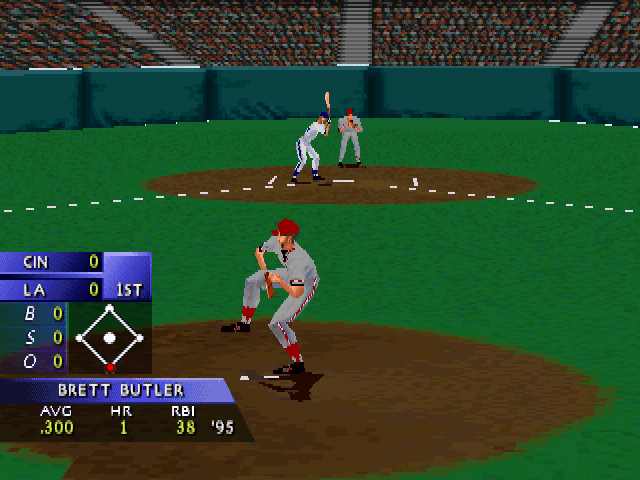
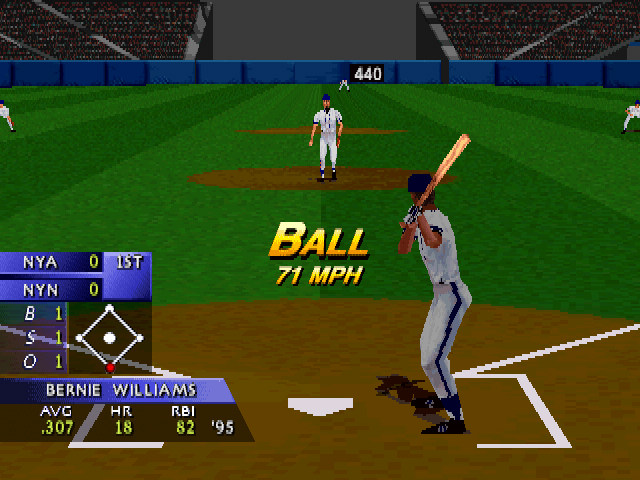
Check the Current Inning Windows for key play making information. Maximize or minimize the windows by pressing L 1.
Time-Out
Call a time-out to display the Offense or Defense menu, and make batting, pitching and fielding changes. See specific sections such as "Batting" and "Pitching" for more information.
•
...Start (when batter is in the box & before the pitcher's wind-up)
Sending in a Pinch Hitter
When you send in a pinch hitter, he will automatically take over the fielding position of the replaced player unless you switch him with another player. See section, "Starting Lineup".
1. Press Start to call a time-out to display the Offense menu.
2. Press the D-Pad UP/DOWN to highlight PINCH HITTER and
.png)



.png)


.png)



.png)















.png)

.png)

.png)
.png)
.png)