GETTING STARTED
1. Set up your PlayStation® game console according to its instruction manual.
2. Make sure the power is OFF before inserting or removing a compact disc.
3. Insert The Simpsons Wrestling game disc securely and close the disc cover.
4. Insert a Controller into Controller port 1.
5. To play a two-player VS Mode Match, insert a Controller into Controller port 2 and turn ON the PlayStation® game console.
6. Follow the on-screen instructions to start a game.
MEMORY CARD
The Simpsons Wrestling allows you to save games, unlocked characters, and settings. To do this, insert a MEMORY CARD into MEMORY CARD slot 1 of the PlayStation game console before starting play.
IMPORTANT
Do not remove a MEMORY CARD while saving or loading. This could damage the data.
Champion Circuit
The most difficult of circuits, available only after completion of the Defender Circuit.
Continue Tournament
If you have saved your circuit progress on a MEMORY CARD, you can load the game here and continue where you left off. Make sure a MEMORY CARD that contains your The Simpsons Wrestling saved game is inserted in MEMORY CARD slot 1.
Practice Game
You can play a quick practice match to try out different characters vs. a computer controlled opponent in a one match game.
•
Use the directional button to highlight PRACTICE GAME and press the X button.
•
Use the directional button to move the red cursor onto the character you want to play and press the X button to Start.
VS Match Game
If only one Controller is plugged into Controller port 1, this menu item will be grayed out, indicating that it is not currently available. Once a Controller is plugged into Controller port 2, either player 1 or player 2 can choose this Menu item by pressing the X button.
This will bring up the Character Selection screen. Player 1 is represented by the red selection cursor; player 2 is represented by the blue selection cursor. Use the directional button to highlight the desired character and press the X button to select this character.
Player 1 and player 2 cannot be the same character. Both players are required to press the X button in order to start the match.
Options
Highlight the OPTIONS menu prompt and press the X button to enter the Options Menu. The following is the list of options that appear in the Options Menu. Use the directional button to highlight the Option Menu prompt in the list that you would like to adjust.
VS Rounds
The VS Rounds Mode allows one to seven rounds. Press the left or right directional button to adjust the number of rounds.
Music Volume
Adjusts the volume level for the music. This setting can also be adjusted during a match from the PAUSE menu. Press the left or right directional button to adjust the volume.
Voice Volume
Adjusts the volume level for the dialogue of the characters. This setting can also be adjusted during a match from the PAUSE menu. Press the left or right directional button to adjust the volume.
Effects Volume
This adjusts the sound effects volume such as hits, power-ups and other general environment effects. This setting can also be adjusted during a match from the PAUSE menu. Press the left or right directional button to adjust the volume.
Vibration
Applicable only if you are using the DUALSHOCK™ analog controller. Press the left or right directional button to adjust the setting.
•
OFF: Vibration is turned OFF for both Controllers.
•
PLAYER 1 ONLY: Vibration is turned ON for Controller 1.
•
PLAYER 2 ONLY: Vibration is turned ON for Controller 2.
•
BOTH PLAYERS: Vibration is turned ON for Controller 1 and Controller 2.
Load Unlocked Data
You can load unlocked characters from an existing single player campaign by highlighting this menu item and pressing the X button.
Credits
This option will play the The Simpsons Wrestling team credits. You may press the START button at any time during the credits to return to the Options Menu.
Accept
For any changes made in the Options Menu, highlight the ACCEPT menu prompt and press the X button to activate your changes. If you make any changes in the menu prompts on this screen and do not ACCEPT, your changes will not take effect for the game.
You may also exit the Options Menu at any time without saving your changes by pressing the Δ button to return to the MAIN MENU.
In-Game Screen Display
•
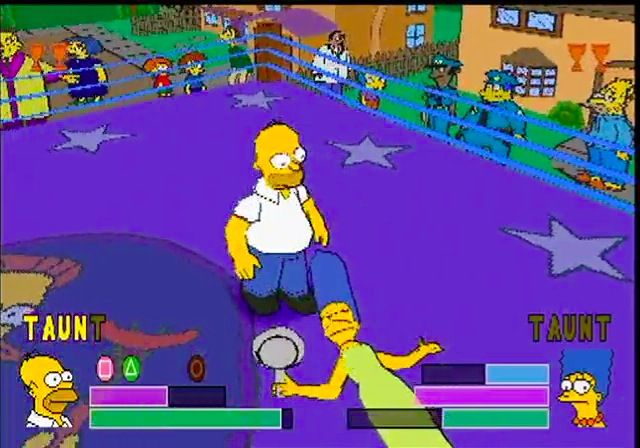
TAUNT Meter - This records the number of letters the player has acquired to form the word TAUNT. When the full word TAUNT is highlighted, press the button to deliver the taunt and reap the benefits.
•
Recovery/Stunned Meter - This blue meter will display if you are being pinned, grappled, or are held in some other way. It also appears when your character becomes "dizzy" or "stunned" as a result of a Taunt or other attack. This also indicates how much time is required before your character will regain consciousness or be able to kick out of being pinned or another hold. Rapidly pressing the X button speeds up recovery.
•
Energy Meter - The Energy Meter displays the available energy for each character with which to perform moves. Your energy decreases when you execute a maneuver. The different maneuvers that you execute cost different amounts of energy. When the corresponding button is lit, this means that you can execute this maneuver by pressing the corresponding button on the Controller. Energy will slowly increase if you do not perform any maneuvers.
Moves and Special Features
For a town that was founded by a wrestler of bears, it's no surprise that a lot of



.png)







.png)
.png)