Setup
Set up your PlayStation® game console according to its instruction manual. Make sure the power is OFF before inserting or removing a compact disc. Insert the BATMAN™ AND ROBIN™ disc and close the disc cover.
Insert game controllers and turn on the PlayStation® game console. Follow on-screen instructions to start a game. Important Notes
BATMAN™ AND ROBIN™ IS FOR ONE PLAYER.
YOU MUST HAVE A MEMORY CARD (SOLD SEPARATELY) TO SAVE GAMES.
PlayStation® Console Diagram Labels
Starting Up
After the initial game logos and introduction sequence, you will see the Main Menu.
Main Menu Options
•
START GAME: Begin a new game.
•
LOAD GAME: Load a previously saved game from a Memory card.
•
OPTIONS: Set up these game options:
•
MUSIC VOLUME: Press to select, and to adjust the slider and then again to confirm your setting.
•
SFX VOLUME: Press to select, and to adjust the slider and then again to confirm your setting.
•
BRIGHTNESS: Press to select, and to adjust the slider and then again to confirm your setting.
•
CONTROLS: Press to select, and to adjust the slider and then again to confirm your setting.
•
CREDITS: Press button to see the game credits.
•
DONE: Return to the Main Menu.
Saving/Loading Games
You must have a Memory Card to save your progress in a game and to load a previously saved game.
To Save a Game
To save games, you must access the BatComputer. Highlight SAVE and press the BUTTON.
You can then select which slot you wish to save to. If all slots are full, you will be asked to select a slot to overwrite (erase) and to confirm that you wish to do so. Select NO if you wish to cancel the command. Press the BUTTON to save your game.
To Load a Game
At the Main Menu, highlight Load Game and press the START or BUTTON. You will come to the load screen.
Highlight the game you wish to load and press the START or BUTTON. The game will load, and you may then resume play from your saved position.
Pause Menu
To pause the game at any time, press the START BUTTON. You will see the following options:
•
SFX VOLUME: Press or to adjust.
•
MUSIC VOLUME: Press or to adjust.
•
QUIT GAME: Quit to main menu. You will be asked "Are you sure?". Press or to toggle YES or NO. Press the BUTTON to confirm.
•
RESUME GAME: Return to game where you paused.
General Display
•
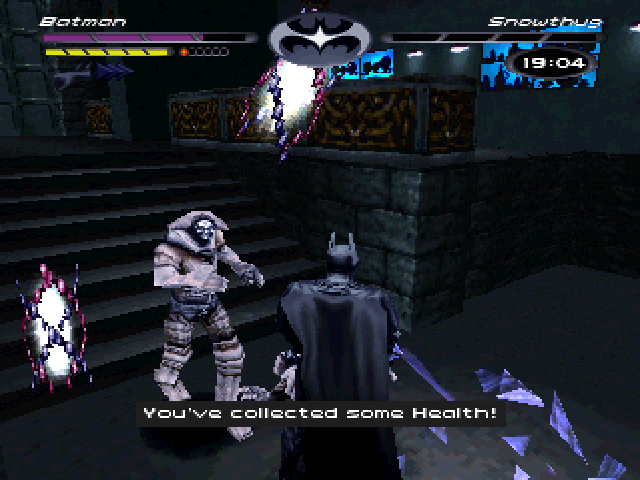
LOGO IN THE MIDDLE FLASHES WHEN A CRIME IS TAKING PLACE
•
VEHICLE'S DISPLAY OF GOTHAM CITY
Batcave Locations
ROBIN'S™ COSTUME VAULT
Enter here, walk up to the door inside and press to change to Robin™. BATGIRL'S™ COSTUME VAULT
Enter here, walk up to the door inside and press to change to Batgirl™. BATLIFT
Walk up to this to exit the Batcave and drive around Gotham City in/on your hero's respective vehicle.
The Batcomputer
To enter the Batcomputer, stand behind the console and press the button. You will see 4 new options:
CLUES
Allows you to view the clues you have collected so far. You may analyze, combine, enhance or zoom in on them to help you to deduce where the next crime is going to be committed. After receiving a clue pickup you can only view the clue properly on the Batcomputer or terminal.
GOTHAM CITY MAP
Displays the entire map of Gotham City and allows you to select a crime scene location to go to.
SAVE GAME
Save your current progress.
EXIT
Return to game.
Throughout Gotham City, there are rooms containing computer consoles (set up by Wayne Enterprises) which allow the hero to have direct access to the Batcomputer without having to return to the Batcave.
•
REMEMBER THAT THE BATCOMPUTER CAN USE ITS POWERFUL CPU TO ENHANCE IMAGES THAT MAY HAVE BEEN DESTROYED, RUBBED OUT, OR BLURRED.
HEALTH REPLENISHER
(TO THE LEFT REAR OF THE BATCOMPUTER) Restores your health 100%.
CELL REPLENISHER
(TO THE RIGHT REAR OF THE BATCOMPUTER) Recharges your cells to 100%.
HOLOGRAPHIC FIGHTING PRACTICE AREA
(FAR LEFT OF BATCAVE) Here you can practice your fight moves against a holographic hoodlum before dealing with the real thing. You may even learn a couple of combos!
TARGET PRACTICE AREA
(FAR RIGHT OF BATCAVE) Here you'll find the Batcave's missile testing range, essential for target practice. For each target you hit, you'll get an extra missile.
WAYNE MANOR HOLOGRAPHIC TRAINING ROOM
This is situated up the stairs to the very right of the Batcomputer. Climb the stairs, press the button to enter the


_1.png)



.png)
.png)



.png)










.png)


.png)
.png)
 (Rev A).png)
_1.png)
_1.jpg)
