STORY MODE
Number of Players - 1
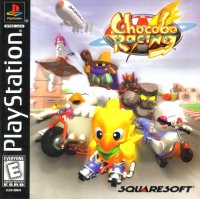
The story begins with Chocobo on a journey to find the truth about a mysterious Blue Crystal. As the adventure progresses, Chocobo meets new friends, and the number of Abilities they can use increases with each new Blue Crystal found.
To continue the story, you must defeat the new challenger in each race. Remember to save your progress regularly onto your MEMORY CARD.
To continue from where you last played, load the save data from your MEMORY CARD. Ensure your MEMORY CARD is inserted into your PlayStation game console before starting the story.
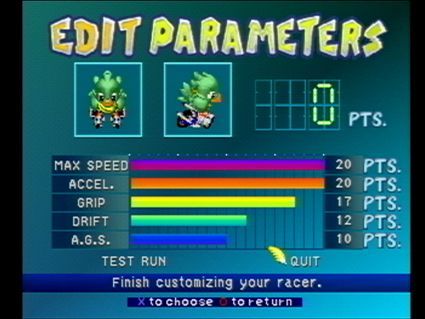
Many secrets can be found each time you complete the story. For example, you can create your own racer at Cid's lab in the special Edit Parameters Screen. A good racer will help you find other surprises.
HOW TO PLAY THE STORY MODE
•
1. Storybook (Section One)
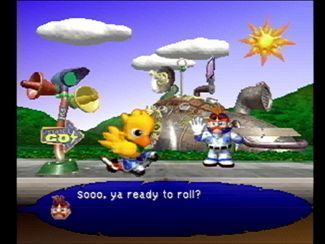
Chocobo's adventure is shown as "Chapters" of a pop-up book. In each Chapter, a new character will challenge you to a race. Pay close attention to conversations between characters for hints on how to win.
Before starting a race, choose which character from your current party you will use. Select the racer best suited for each racetrack.
After choosing your racer, select which Ability to use in the race. You can only choose from Abilities of the Blue Crystals you've collected so far.
Race! You only need to defeat this course's challenger to continue the story, not necessarily come in first place.
•
5. Storybook (Section Two)
The remaining half of the current Chapter of the pop-up picture book is shown.
At the end of each Chapter, you can save your current data. You can also stop playing the story at this point. If you continue in Story Mode, the next Chapter will begin.
BUILDING YOUR OWN RACER
Upon completing the story, you are rewarded with the ability to "customize" or "build" your own racer. You can build one new racer each time you finish Story Mode.
Once created, you can save your custom racers on your MEMORY CARD and use them in other Game Modes besides Story Mode.
EDIT PARAMETERS
Using the directional button, highlight a character to become your new racer, then press the button to choose.
Now select your character's color. Highlight the desired color using the directional button and press the button to choose it.
At the end of Story Mode, you receive a score. Use these points to change the 5 different "parameters" or "stats" of your new racer.
•
Pick a parameter by pressing UP and DOWN on the directional button.
•
Press LEFT/RIGHT to decrease/increase the amount of points given to each parameter.
•
To test your racer, choose the <TEST RUN> option at the bottom of the screen. You can drive on Cid's Test Track for as long as you want.
•
Press the START button to return to the Edit Parameters Screen to make changes.
•
Once finished building your racer, choose <QUIT> to go to the next step.
Give your racer a name. Move the cursor using the directional button and press the button to choose letters. After naming your racer, you can save it on your MEMORY CARD for use in other Game Modes.
CID'S TIP #1
There are two types of data in this game: "System Data" and "Best Race Data" for each course. You can see these on your PlayStation game console MEMORY CARD Screen.
The "Best Data" (looks like little Mogs) records your fastest race on each course. The "System Data" (looks like Chocobo) contains your Story Mode progress, best scores, and so on. The "System Data" also stores up to 10 of your customized racers.
TIME ATTACK MODE
Number of Players - 1
This mode allows you to select a racer and course for a "Time Trial" to achieve the fastest time. Magic Stones do not appear, so your time depends solely on your racing skills.
Your best times and "Best Race Data" for each course can be stored on a MEMORY CARD. You can compete against your best previous race data in the form of a "Phantom Racer."
HOW THE TIME ATTACK MODE WORKS
Choose the racer you want to use. You can use one of your "customized" racers by selecting either of the MEMORY CARD slot pictures at the top of the Select Racer Screen.
Choose the Ability you want to use. Note that you cannot select Abilities that affect other racers or Magic Stones, as these do not appear in this Mode.
Choose the racetrack you want to race on. You will race three laps on the selected course.
•
4. Choose to Compete Against a "Phantom Racer"
If you have raced on the course before and have "Best Race Data" saved on a MEMORY CARD, you can choose to race against your previous "Best Data." A ghost-like version of your previous racer will appear and run the course exactly as you did. If you have no "Best Data" or do not wish to compete against a "Phantom Racer,"
.png)

.png)

.png)
.png)
.png)
_1.png)
.png)
.png)
.png)


_1.png)









.png)
.png)