BIG AIR
This mode allows you to perform tricks off a huge jump. It can also be used to practice tricks. Once you are comfortable, challenge the Trick Master Mode.
BOARD PARK
This is a course where you can ride as you please. Customize your own riding style here.
OPTION
Set various game options such as Auto Save, Sound/Volume, and Board Edit. If you have a Memory Card, it is highly recommended to set the Auto Save option to On.
CHARACTER SELECTION
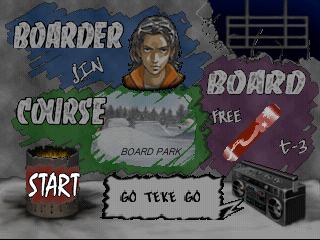
When starting the game, you can choose from four different characters. Each character has unique strengths and weaknesses. Understand their abilities before making a selection.
CLOTHING
Clothing choice does not affect a character's ability.
•
Select top and bottom clothing using the Direction Buttons.
•
Accept with the X Button.
TYPE AND DESIGN OF BOARD
There are three types of boards, each with three different boards that have varying strengths and weaknesses.
Freestyle
Very stable and easy to control, recommended for beginners. Top speed is fairly slow, but it's the best board for performing tricks.
All-Around
A balanced board that doesn't favor stability or speed. It's a good middle ground for both speed and tricks.
Alpine
Excellent top speed. However, it is difficult to turn quickly and is not very stable. If you switch to the Fakie position on this board, your speed will decrease quickly.
Once the board type is chosen, select the design. The chosen board design has no impact on capability.
COURSE
There is no course selection in Tour Competition mode. You can select only 3 courses when you begin playing Freestyle. The course selection will increase as you progress through Tour Competition Mode.
•
During course selection, view the course ranking screen by pressing down on the Direction Button (excluding Tour Competition Mode and Freestyle 2P).
•
Press the Triangle or Circle Button to return to the previous screen.
SOUND
Adjust the sound using the left and right Directional Buttons. You cannot adjust the sound or music for Tour Competition mode.
QUICK DEFAULT
Simplify your Boarder and Board Selection by holding down the R1 Button and using the left and right Directional Buttons in the setup screen.
Once your selection is complete, select Start to begin the game!
TOUR COMPETITION MODE
Tour Competition Mode is a combination event consisting of the Big Air jump and Boarder Cross straight time racing.
HOW TO PLAY
•
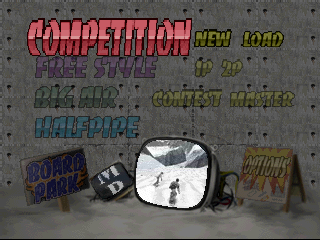
Select Competition on the Mode Selection Screen.
•
Select New to start a new game.
•
To resume a previously saved game, select Load.
•
Select the Character and Board on the Character Selection Screen.
•
Press Start once your selection is completed.
1ST STAGE - BIG AIR
Perform two big air jumps. Your rank (1st - 8th) will be decided by adding the scores of both jumps.
The starting position is staggered by the amount of time (Seconds) determined by the difference in score in the Big Air Jump. After your 1st and 2nd jumps, the ranking will be displayed. Check your position.
2ND STAGE - BOARDER CROSS (STRAIGHT-TIME RACE)
This is a competition among 8 riders. You start in the order determined in the Big Air Event. The final ranking is determined by the order in which you cross the finish line.
Competition Mode points are accumulated based on your finishing position. After you complete 9 rounds, the rider with the highest number of points is the winner.
Note: This is straight racing, and you will not receive extra points for making tricks off jumps.
COMP CLEAR POINTS
Comp Clear Points are predetermined in each round. If the player does not exceed the Comp Clear Points at the end of a round, the game is over. If the player already exceeds the Comp Clear Points at the beginning of each round, they can proceed in the game regardless of their ranking.
If you run out of time (TIME UP), you will be disqualified and receive 0 points. If the game is over, select either Retry or Exit. If Exit is selected, the Title Screen is displayed. If retry is selected, you will start a race on the most recently saved track.
FREESTYLE (1 OR 2 PLAYERS)
FREESTYLE 1P (ONE PLAYER)
If you reach the goal within the time limit, you clear the level. The time is increased when you pass a checkpoint. If the time goes down to 0, the game is over.
There are 5 areas for tricks on each course. When you perform a trick at these areas, you will be marked and receive points. There are 3 rankings on each course: Time, Speed, and Total. Try to get the highest on all rankings.
•
Time: Compete for the quickest time.
•
Trick: Compete for the total points on the trick areas.
•
Total: Compete for the total points of the time and tricks.
GHOST
This system allows you to save your ride and then compete with your past rides. It can be saved as replay data, so you can save your good rides.
To create ghost data:
•
First, ride to the finish line.
•
After reaching the finish line, select Ghost Update on the menu. The data will be deleted if it is not updated.
•
Save the data onto the Memory card using Ghost Save on this option.
GHOST OFF/ON
Set whether or not you want the ghost to appear on the screen. The ghost will only appear on the course it rode on. To
.png)

.png)
