Console Setup
Set up your PlayStation® game console according to its Instruction Manual. Ensure the power is off before inserting or removing a compact disc. Insert the JumpStart™ Wildlife Safari Field Trip disc and close the Disc Cover. Insert game controllers and turn on the PlayStation® game console. Follow the on-screen instructions to start a game. Console Components
Title Screen
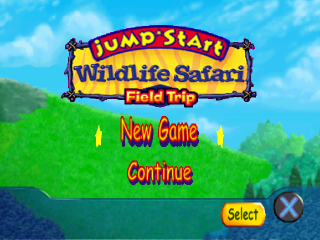
When you load JumpStart™ Wildlife Safari Field Trip, the Title screen appears first. You will see the following choices:
•
New Game: Choose this to start a new game from the beginning.
•
Continue: Choose this to resume a previously saved game.
When you choose to continue a game, a list of previous players is displayed. The save game file allows a player to save game progress and settings. The save will automatically occur when the player enters a name or exits a level.
Note: Each saved game requires one block of memory on your MEMORY CARD.
Sign-in Screen
At the Sign-in screen, use the directional buttons to choose letters and enter your name. Pressing the button will add the highlighted letter to the field at the top of the screen.
After you sign in, select OK and press the button to proceed to the Game Type Menu. If you would like to skip the introductory video sequence and go directly to the Title screen, press the START button.
Game Type Menu
Once you've entered your name at the Sign-in screen, it's time to choose a mode of play.
•
Single Player: This mode is for playing the game on your own. You will have full command of all the controller buttons.
•
Family Play: This mode lets you play along with friends and family if you choose to plug in an additional controller. It allows you to split the controller functions so that one controller manages character movements and the other manages character actions.
•
Taking Turns: This mode allows you and your friend to control different characters. Game play is similar to the Single Player mode, but players alternate tasks as they play through the levels.
Once you've picked your game mode, it's time to pick a character!
Pause Menu
The pause function is available at any time during the game. Press the START button to bring up the Pause overlay, where you will have these choices:
•
Records: This screen gives you a clear visual indication of your progress in the game.
•
Controls: This screen provides information about the controller buttons for the area you're playing in.
•
Options: This screen allows you to customize game sound and music levels.
•
Exit Level: This choice allows you to quit the area in which you're playing.
•
Exit Game: This choice allows you to quit the entire game so that you can play later.
World Selection Menu
You'll begin playing from a central hub, which allows you to choose one of five areas to explore. Use the left and right directional buttons to cycle between the different area choices. Press the Ⓧ button to select the area.
These are the five different areas to explore:
Progress Indication
At the entrance to each area is a progress indicator for the number of remaining stars within the level. Use this to see the progress made in any given area.
Playing the Games
Keys and Letters
For each level that you complete, you'll be rewarded with a key that gives you access to subsequent levels.
At the end of the third level of an area, you'll earn a letter. There are five letters to collect: C-A-S-E-Y. Once you've collected them all—in any order you choose—Casey will be unlocked as a playable character.
Bonus Stars
Throughout many of the levels, bonus stars help guide and challenge you. If you collect a given number of stars, you'll be rewarded with a theme pack of images that can be used in the Photo Booth.
As you collect bonus stars, an on-screen counter will indicate how many remain in the level. Collected bonus stars are retained when you exit a level, providing a running total as you explore various areas.
Monkeys
Monkeys are the main opposition throughout the game. They reside within the levels, tossing coconuts and banana peels at you as you progress. If a coconut strikes you, you'll fall to the ground.
A dropped banana peel will remain on the ground until you step on it, so be careful. If you do step on a peel, you'll slip and fall. You won't be able to do anything to stop the monkeys, so your best plan is to watch your step when they're near.
Teeter-totters
The teeter-totter is a simple device consisting of a plane and a fulcrum. It has a simple function: when you stand on the raised end, that end will begin to fall. Teeter-totters can be used to get to higher areas in the level.
Bouncy Mushrooms
Bouncy mushrooms found in various locations in the game provide you with a method of reaching higher locations. A mushroom acts as a trampoline of sorts. When you jump on it, you'll be bounced high into the air. While standing on the mushroom, hold the jump button down in order to reach the additional height.
**Saplings (