CONSOLE INSTRUCTIONS
Top View
Front View
Set up your PlayStation® game console according to the instructions in its Instruction Manual. Make sure the power is off before inserting or removing a compact disc. Insert the KICKBOXING™ disc and close the Disc Cover. Insert game controllers and turn on the PlayStation® game console. Follow on-screen instructions to start a game. Title Screen
Press the START button at the TITLE screen to display the following menu selections:
•
START: Select this option to begin a new game.
•
CONTINUE: Select this option to continue a saved game.
Main Menu Screen
•
RANKING: One-player championship mode.
•
STORY: One-player story mode. Gain access to new boxers here.
•
VS: Versus mode, play against the CPU or a friend.
•
RECORDS: View character records here.
•
NOTES: View character information and practice moves here.
•
MEMORY CARD: Save/Load game data here.
RANKING MODE
Select Character
Enter twelve different tournaments and compete for a shot at becoming the champion. Initially, only four playable characters are available in this mode. To play as the other characters, they must first be defeated in Story mode.
Select Tournament
Once a character has been selected, the tournament selection screen appears. At first, only the local tournament will be available. More tournaments become available after the player completes the initial tournament and earns points.
Ranking Menu
•
Cancel: Cancel tournament entry.
•
Retire: Retire the character. Ranking records will be reset.
Ranking List
Displays a list of tournament opponents. Your next opponent will be highlighted, press the button to begin the match.
Story
Gain access to new characters and character notes by defeating opponents in Story Mode. Matches will become progressively harder as you advance.
VS
Compete against a friend or the CPU.
•
Select character: If the character selected meets the requirements, their weight class (L1/L2 buttons) and stats (R1/R2 buttons) can be adjusted.
•
Select glove: If competing against a friend, both players will be able to make selections from gloves of various weights. The lighter the glove, the more powerful a character's punch.
•
Set CPU difficulty: Set the difficulty level of CPU opponents.
•
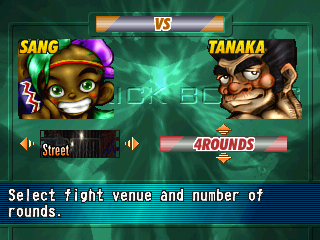
Select fight venue & number of rounds: Choose a fight venue with the (➡) directional buttons and set the number of rounds with the (↑↓) directional buttons.
Records
View character records. Choose between Ranking Mode records and Hall of Fame records.
Viewing records:
•
L1/R1 buttons to switch between different weight class records.
•
L2/R2 buttons to switch between current and total records.
Notes
View character notes and practice different moves.
•
View character information and practice moves.
•
Press the start button to Exit.
.png)

.png)



.png)
