Main Menu Navigation
Use the D-pad to highlight menu options.
•
Circle button: Cycle through available options.
•
X button: Bring up the next menu.
•
Triangle button: Return to a previous menu.
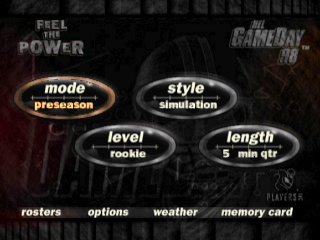
Mode
Choose between preseason or season competition. Preseason games cannot be saved and statistics are not recorded.
•
Select Preseason and press the X button to bring up the Team Select screen.
Team Select
Play with any NFL team, including Super Bowl and All-Star teams. Choose your team based on the team rating.
•
D-Pad Left/Right: View team ratings in offense, defense, and special teams.
•
L1/L2 and R1/R2: Cycle through home and away teams. The controller on the right is the home team.
•
Super Bowl or All Star Teams: Home Team press up on the D-Pad to select these teams. Away Team press down on the D-Pad to select these teams.
•
Press the X button to bring up the next screen and D-Pad Left/Right to choose your team.
•
Leave one controller in the middle to play the computer.
•
Press the X button to start the game.
Level
NFL GameDay '98 offers four different player levels. Master Rookie and Veteran levels before attempting All-Pro or Hall of Fame. Style
•
Simulation: Ultra-realistic game play. Highly recommended for beginners. Advanced controls can be utilized.
•
Total Control: Simulation mode with advanced controls. Highly recommended for advanced gamers.
•
Arcade: Faster game play with exaggerated special moves.
Length
Set the length of the game by choosing the number of minutes to play per quarter.
Rosters
View the entire player rosters of every NFL team.
Team Rosters
View the player profiles of any team.
•
Press R1/R2 to choose a team roster.
•
D-Pad Up/Down: View the entire roster.
•
D-Pad Left/Right: Cycle through player profiles. Higher numbers indicate greater ability.
•
Red Cross next to name indicates injury.
Create Player
Create a football player to dominate the field. Your player will move from combines to training camp and can be placed on any team roster.
•
D-Pad Up/Down: Highlight the player name attribute.
•
Press the X button: Bring up the alphanumeric chart.
•
D-Pad Left/Right: Highlight a letter or number.
•
Circle button: Select a letter or number.
•
Press the X button: When finished spelling the player name.
Change Player Name
•
D-Pad: Highlight the name.
•
Press the X button: Start the naming process over.
Customize Player
•
D-Pad down: To other player attributes.
•
D-Pad Left/Right: Make a selection.
•
Press the X button: Move from combines to training camp.
•
D-pad Up/Down, Left/Right: Choose position, number, and team.
•
Press the X button: Create your player.
•
Select "YES" from the pop-up box and press the X button to create your player and add him to the team roster or free agent pool.
•
To create a player for the Free Agent Pool, D-Pad Left/Right from the team option to select "Free Agent Pool".
Trade Player
Trade players to and from any team. Players can only be traded on a one-for-one, position-for-position basis.
•
Press L1/L2: Choose a team to trade a player to.
•
D-Pad Up/Down: Highlight a player to trade. A list of available players at that position will be shown.
•
Press the Circle button: Select the player to be traded. The selection cursor will move to the other team.
•
D-Pad Up/Down: Select a player for the trade.
•
Select "YES" from the pop-up box and press the X button to complete the trade.
Draft
Players are drafted at six positions (quarterbacks, running backs, receivers, defensive linemen, linebackers, and defensive backs). You can manually draft, have the computer draft, or manually draft for select teams and have the computer finish. The draft will go six rounds.
Manually Draft
•
D-Pad Up/Down, Left/Right: Highlight a team.
•
Press the Circle button: Select teams you would like to manually draft for.
•
Press the X button: Start the draft.
During Manual Draft
When a team you selected for manual drafting comes up:
•
D-Pad Left/Right: Choose the player position to draft from.
•
D-Pad Up/Down: View available players and their overall ranking.
•
Press the X button: Pick a player.
•
When the draft is complete, press the X button to view the revamped team rosters.
Sign Free Agents
Sign any free agents from the Free Agent Pool.
•
Press R1/R2: Select a team.
•
D-Pad Up/Down: Highlight a free agent.
•
Press the X button: Add the player to a team roster.
•
There is a limit to the number of free agents you can sign. Use the Release Free Agent menu option to make room.
Release Players
Release any players on the current roster.
•
Press R1/R2: Select a team.
•
D-Pad Up/Down: Highlight a player.
•
Press the X button: Release
.png)

.png)

.png)

.png)

.png)





_1.jpg)