Console Top View
Console Front View
Setting Up
Set up your PlayStation game console according to the instructions in its Instruction Manual. Make sure the PlayStation power is off before inserting or removing a compact disc. Insert the Novastorm disc and close the CD door. Insert game controllers and turn on the PlayStation. Follow on-screen instructions to start a game. Flight Configuration
Before your missions start, you may want to configure the flight details to suit your personal requirements. The main menu screen appears after the introduction.
You can skip straight to the main menu by pressing 'Start'. To select menu items, use the 'UP' and 'DOWN' arrows to highlight the word 'Options' then press 'X'.
Main Menu Icons
•
NOVASTORM: Plays the game.
•
: Views High Score Table.
•
?: Goes to the Options Screen.
Options Screen
You can change the following features from the 'Options Screen':
•
Difficulty: Easy, Normal or Hard.
Highlight the above options with the controller arrows and change them by pressing 'X'. Select the exit icon to go back to Main Screen.
When you have the options set to your satisfaction, select the 'Go back to the Main Screen' icon. To start play, simply select the Novastorm icon.
Information Control Console Indicators
•
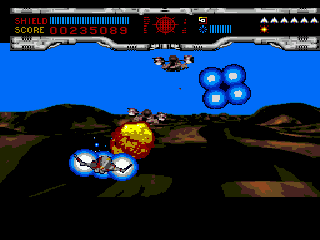
Smart Bomb Status Indicator: Shows how many smart bombs you still have racked and ready for use.
•
Next Weapon Available Indicator: The next weapon upgrade available is indicated by this icon. Once you have collected the required number of tokens, you will be awarded this new weapon. The number of tokens left to collect before the next upgrade can be activated will be displayed by the icon.
The Guardian Health gauge will only appear when the End Of Level Guardian is reached.
Pick-ups and Tokens
Your space fighter is fitted with Enemy Weapons Pod Capture Systems which enable your craft to 'scavenge' tokens and pick-ups from enemy ships. •
'Star' pick up icons: When you collect a star, you will be awarded a smart bomb.
•
'Novastorm' pick up icons: When collected, this pick up has several effects. It adds to your total score, it adds to the burst weapon gauge, and it adds to the token count to help you upgrade your weapons.
•
'Tokens': Tokens are awarded when you collect the 'Novastorm' icons. Once you've collected enough, your ship will undergo an Automatic Weapons Upgrade. See how many tokens you need to get the next upgrade by referring to the icon in the bottom right of the Information Control Console.
Guardian Instrumentation
You have the advantage of some special instrumentation that is keyed to measure power sources of Guardian size, and some limited scouting experience. Details as follows:
•
Guardian Power Assessment: A meter will appear on your Instrument Control Console to indicate the remaining power resources of any Guardian you face.
•
Exposure Limit Alert: An alert message will be heard when the exposure of your Scavenger ship to Guardian attack is reaching dangerous levels.
•
Tracer Fire Feedback: You will be able to seek out 'weak spots' in a Guardian's defenses by looking for the telltale flame explosions that show a direct strike. The Guardians are heavily shielded, and only direct hits on weak spots will have any effect.
Pausing the Game
When the game is paused by pressing the 'Start' button, you will be offered the chance to 'Continue' the game or to 'Quit'.
'Continue' will resume the game in play while 'Quit' will return to the main menu screen. Choose your option using the controller arrows and select it by pressing 'X'.
 (Disc 1).png)

 [NTSC-U] [SCUS-94404].png)
