FORSAKEN BASICS
To reset to the title screen, hold the SELECT BUTTON for 3 seconds while holding the START BUTTON.
•
Up BUTTON: Select option/item
•
Left BUTTON: Toggle settings
•
Down BUTTON: Select option/item
•
Right BUTTON: Toggle settings
•
START BUTTON: Pause/resume game/Access in-game options
•
Triangle BUTTON: Cancel/previous screen
•
X BUTTON: Confirm/next screen
BEGIN YOUR BATTLE
At the title screen, press the START or the X BUTTON to access the Main Menu.
•
Single Player: A single player competes against the computer.
•
Death Match: Two players play on the same console/monitor, using a split screen view.
Password
At certain points in the game, you may receive a password. This allows you to resume play from that point without having to start over. The Notes section at the back of this booklet is a handy place to write down passwords.
To enter a Password:
•
Use the Directional Buttons to highlight a character.
•
Press the X BUTTON to enter the character.
•
Highlight RUB and press the X BUTTON to delete a character.
•
Once you have correctly entered a password, highlight ENTER and press the X BUTTON. You will resume play just where you want to.
•
Options: Set game options.
OPTIONS
To toggle settings, press the Left or Right DIRECTIONAL BUTTONS.
•
Sound Effects: Play with Sound Effects ON (default) or OFF.
•
Music: Play with Music ON (default) or OFF.
•
Sound Effects volume: Use the slider (press the Left or Right DIRECTIONAL BUTTONS) to adjust volume levels.
•
Music Volume: Use the slider (press the Left or Right DIRECTIONAL BUTTONS) to adjust volume levels.
•
Credits: View game credits.
•
Exit: Return to main menu
GAME BASICS
Each level has different objectives/requirements, which are outlined in the Mission Briefing screen prior to each mission. There are lots of levels and it would be impossible to brief you on every nook and cranny.
Basically, you want to survive the constant blasting, sniping and infernal ambushing that makes Forsaken what it is. You need cunning, speed, and a lot of weaponry. You begin each game with 5 lives, which won't last long until you get the hang of the game. Sometimes even then.
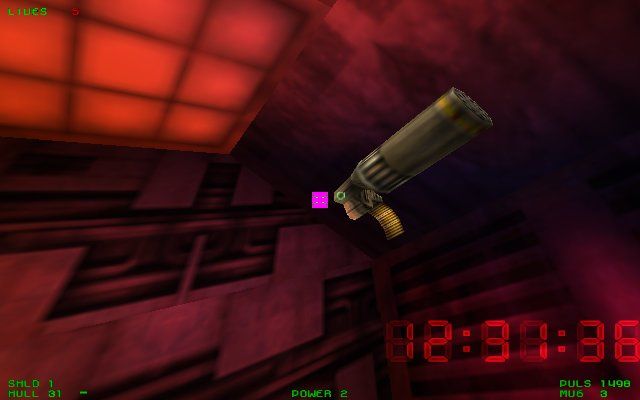
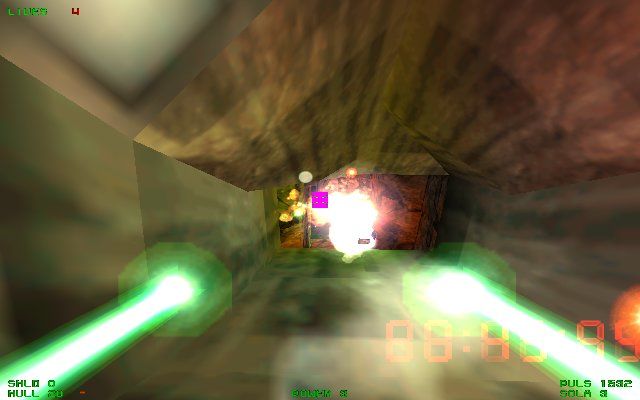
THE SCREEN DISPLAY
•
Shield Energy: Your bike has a tough shield to protect it, but after too many hits it's toast, and so are you.
•
Hull Strength: Like the Colonel's chicken, your bike can only take so much battering. When your hull strength is kaput, that next hit is going to hurt!
•
Target Crosshair: It may take a bit of practice before you become skilled at lining up the enemy right where it smarts, but boy is it worth it!
•
Your Friend Getting Blown Up: This is one of the rewards we discussed in Target Crosshair. It only works in a Death Match game. Otherwise, you will see Something Else Getting Blown Up.
•
Current Weapon: The name of the weapon you are shooting right this minute.
•
Ammo Count: Or the Bullet Duke, if you prefer. This shows how much ammo remains for primary weapons like the Suss-Gun and Trojax.
GAME TYPES
There are two game types, Single Player and Death Match.
SINGLE PLAYER GAME
After selecting a Single Player game, you will see a screen like this:
START
Highlight Start and press the X BUTTON to begin playing a game.
SETUP BIKER
This screen takes you to a sub menu where you can select your bike, change your controls, and change Primary and Secondary Weapon autoselect order.
Change Bike
This is really bike selection. Press Left or Right on the Directional Pad to toggle through the gallery of space bikers and pick the one that suits your style. Press the X BUTTON to confirm. Two players can select the same bike/biker. Change Controls
Press the Directional Buttons to highlight a control you wish to change, then press the X BUTTON to select it. Next, press the button you wish to assign to an action or function. Note that there are more actions/functions than there are buttons, so some controls use a combination of the SELECT BUTTON + an ACTION BUTTON (Select +Circle, for example). Try the default controls to start out. Once you get used to the game action, you'll have a better idea of what is most comfortable for you. When your controls are set, highlight EXIT and press the X BUTTON to return to the Bike Setup menu.
Note: To view and/or change the default Dual Analog Pad controls, make sure that your Analog Button mode is set to RED, then press the X BUTTON when Change Controls is highlighted. Auto Level
Toggle this ON (default) or OFF. When this option is ON, your bike will always attempt to position itself correctly in line with the walls of the environment. This can help you maintain your orientation in the dizzying scrambles that abound in every level.
Primary Weapon Order
Primary Weapons are light weapons which fire bullets or similar ammo. This option allows you to set the order your Primary weapons will autoselect in during a game. The autoselector reads the list from top to bottom, and will fire the next available weapon. During the game, if you pickup a weapon that is higher up on the list than the current one, it will be autoselected.
To reorder your primary weapons:
•
Press the Up or Down DIRECTIONAL BUTTONS
.png)


.png)

.png)