STARTING THE GAME
It is advised that you do not insert or remove peripherals or Memory Cards once the power has been turned on.
Following the Sony, Eidos and Core Design screens, you will then be shown a short introductory FMO sequence. Following this sequence, you will be presented with the Title Screen. TITLE SCREEN
The options available to you here are:
•
START GAME: Takes you to the Game Slot Screen
•
OPTIONS: Takes you to the Options Screen
GAME SLOT SCREEN
Here you may highlight and select the game you wish to load from one of eight game slots.
If you are playing the game for the first time or do not have a memory card, the first time you arrive at this screen all eight slots will read New Game.
If you have Saved Games, they will be displayed as a location description.
OPTIONS SCREEN
The options available to you here are:
•
SOUND OUTPUT: Stereo (default) / Mono
•
SFX VOLUME: Off / Low / Medium / High / Full (default)
•
SFX TEST: Select effect number to test
•
MUSIC VOLUME: Off / Low / Medium / High / Full (default)
•
MUSIC TEST: Select track number to test
•
CONTROL SETTING: Select and you will be presented with 5 pre-set control configurations. Selecting your desired setting will return you to the Options Screen.
•
EXIT: Select to return to the Title Screen
SAVE GAME
Make sure that there are enough free blocks on your Memory card before commencing play.
Please note that if you do not have a Memory card you will not be able to save your game.
Opening the Scarab Cheats throughout the game will not only provide you with invaluable information vital for completing the game but also certain chests will include Save Game prompts. If you have a Memory card inserted, you will be asked if you would like to save your game at that point.
Please note that if you do not have a memory card inserted you will lose all Saved Game information when switching off your console. Your full game configuration will be saved within the Save Game.
QUITTING THE GAME
While playing the game, you can return to the Title Screen by pressing the Start Button (to pause the game) then by pressing the Select Button and following the on-screen prompts.
THE GAME
The game is basically split into two main areas: the Real World and the nightmare lands of the Terrortries. You must explore both lands if you are to free the Dreamflight and return the Real World to normal.
The Terrortries can be accessed via the Mirror Warps. The Mirror Warps look very similar to normal, everyday mirrors and are normally found in the same places, e.g. in a bathroom.
SOURCES OF DREAMDEW
Sources of Dreamdew will be scattered throughout the game, here are some examples:
•
Dreamdew Flowers & Ashplants: Dreamdew Flowers provide you with the main source of Dreamdew. Ashplants however will spray ZackHannah with Dream-Ash, depleting your bar of precious Dreamdew.
•
Dew Pockets: These float in the air and pop dew out when ZackHannah jump at them.
•
Dream Webs: Zack and Hannah can also collect dew from Dream Webs. DREAM LIFE & DREAM REVIVAL
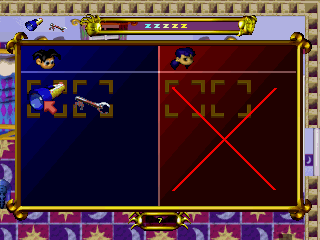
The twins' Dream Life is measured in Zees. Zees can be collected at many points in the adventure as they are emanated from the sleeping folk of Paradise Falls. If ZackHannah takes a hit from a Terror, usually only one Zee is lost. Zack and Hannah's dream life is shared, therefore the Zees are shared also. This will force the player to look after both characters, rather than choosing one. After all, they are brother and sister. At some point the player may lose all of his/her Zees. When this happens, a brief animation sequence will show ZackHannah plummeting through the blackness towards the yawning maw of the Swagman.
As he/she falls, digits will count down from 10 to zero and the Scarab will appear, offering a Dream Revival to allow you to continue the adventure. Pressing the START Button before the digits reach zero will allow the player to continue from the last Save Game point. Not pressing the START Button before the digits countdown to zero will return you to the title screen. .png)

.png)
