GETTING STARTED
Important! Do not insert or remove peripherals or memory cards once power is turned on. You will need a memory card to save your games.
Note: You will need a memory card to save player data, such as high scores and ranking.
•
Set up your PlayStation® game console according to the instructions in its Instruction Manual. •
Make sure the power is OFF before inserting or removing a compact disc.
•
Insert The Next Tetris disc and close the disc cover.
•
Insert the game controllers (and memory card if you have one).
•
Turn ON the PlayStation® game console. The introductory sequence will begin. To skip this sequence and go directly to the Main Menu, press the Start button. Note: You will not be able to save your progress or game information if you don't use a memory card. Make sure there are at least two (2) free blocks on your memory card before beginning your game. You are not able to swap memory cards during play and you must leave the card in the first slot of your multi-tap if you are using one.
When you drop a Tetramino or Multimino, adjacent blocks of the same color will combine. This combined piece is called a Polymino. If a Polymino becomes too big, it is more difficult to Cascade.
Cascades are a special feature of The Next Tetris that make it unique. If you completely fill in one or more horizontal lines, those lines of blocks will disappear. The blocks above those cleared lines will then fall individually, possibly completing their own lines in turn. This phenomenon is called a Cascade. As you get better at playing The Next Tetris, you can even clear more than 5 lines at once by using Cascades.
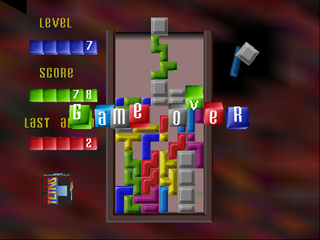
The space in which pieces fall is called the playfield. The playfield is 10 blocks wide by 20 blocks high.
When the playfield fills up with pieces or when you've gone past the time limit, the game is over. In all game modes except Score Marathon, there are garbage blocks at the bottom of the playfield. The basic goal is to clear the bottom line of this garbage so that you finish a round.
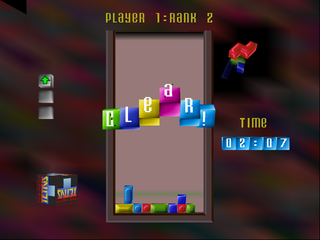
THE BASIC GAME SCREEN
The basic game screen is the same in all modes. For details on specific game modes, please see those descriptions.
STARTING THE GAME
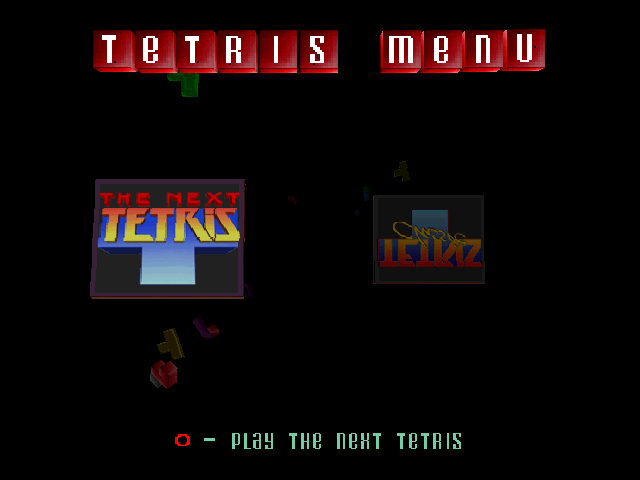
After you load the game disc, the opening movie will play and you will get the choice of either playing The Next Tetris or Classic Tetris. If you choose The Next Tetris, the Main Menu appears. If you don't select anything, The Next Tetris will automatically switch to demo mode. If you press the Start button during the opening movie or the demo, the game will go to the Main Menu.
Main Menu
Use the directional buttons to select the mode you want, then press the button. For more information, please refer to the pages listed below.
•
One Player Game: Standard game for one person
•
Two Player Game: Head-to-head competition for two people
•
Marathon: Single-player sequential game
•
Practice Mode: Single-player game with puzzle-style levels •
Score Marathon: Single-player scoring game
•
Leader Board: Displays records and high scores of registered players
•
Options: Save data, load data and change settings
Player Select
After selecting a game mode at the Main Menu, choose the player name you want in Player Select. Two names ("Player 1" and "Player 2") are always listed. The number next to the name is the current ranking for that player. This rank determines your starting level in the game.
New Entry
If you want to enter a new name, select "New Entry." If you press the button, you will exit this screen without saving the new name.
To confirm the entered name, point to this button with the cursor and then press the button (or just press the Start button).
To delete letters, point to this button with the cursor and then press the x button. You can also delete letters with the button.
Load Player
Select Load Player to load saved individual player data from the inserted memory card.
THE ONE PLAYER GAME
The One Player game is just you against the clock. You complete one round when all garbage on the bottom row is removed. If you complete 3 rounds within the 5-minute time limit, your ranking goes up.
The higher your rank, the more garbage lines you get and the faster the pieces will fall. How many ranks you earn is based on the total time you spend clearing rounds. (Your initial starting rank is 2.)
How many ranks you move up is based on the total time it takes you to clear 3 fields.
THE TWO PLAYER GAME
In the Two Player game, players compete to clear the garbage at the bottom as quickly as possible. Depending on the time taken to clear the garbage, the indicator display changes. When one player wins three consecutive games, the rank goes up or down based on the indicator display.
•
The green arrow appears when you win and it took you less than 2 minutes to clear the field.
•
The blue arrow appears when you win and either you took longer than 2 minutes to clear or your opponent's pieces hit the top of the playfield



.png)
.png)
.png)
.png)