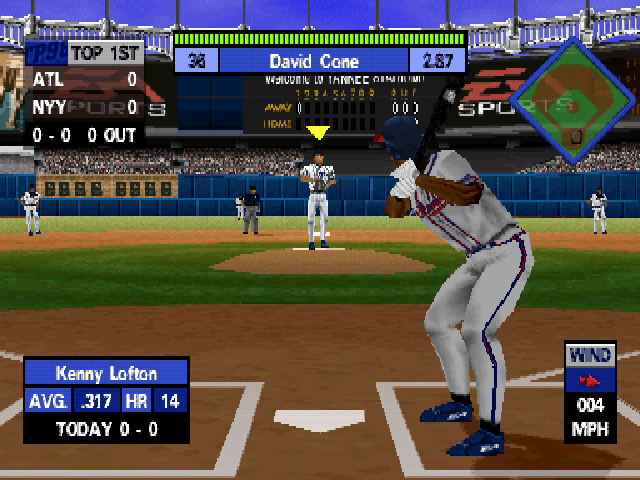
Game Mode
Choose the type of game you want, get in some practice, or go to the Home Run Derby.
Options
Customize your global, playoff, season, or series options.
•
FIELDING AID: Toggle ON/OFF. When ON, ball indicators appear on the field, indicating where a fly ball will land.
•
ERRORS: Toggle ON/OFF. Turning this option OFF ensures that fielders don't drop the ball once they've touched it.
•
RADAR GUN: Toggle ON/OFF. Displays the speed of the pitch.
•
WIND: Toggle ON/OFF. The wind can affect ball drift, distance, etc. In domed stadiums, the wind is not a factor.
•
SKY: Set the appearance to CLEAR, OVERCAST, or RANDOM.
•
TIME OF DAY: Select AFTERNOON, NIGHT, or RANDOM.
•
DH RULE: Set the application of the designated hitter rule (where the pitcher doesn't bat). The choices are AL ONLY (Major League™ standard), ON, or OFF.
•
BASERUNNER WINDOW: Toggle pop-up window for baserunners ON/OFF.
•
MEMORY CARD: Select this option to manage your saved game files.
•
CREDITS: Select this option to view the credits.
•
SOUND: Go to the Sound sub-menu. From this menu, you can set the MENU MUSIC, SFX, CROWD, and ANNOUNCER VOLUME. Set the bar all the way to the left to turn sound for the highlighted option all the way off.
Stats
Check out the stats for the currently selected HOME and AWAY Teams, ALL TEAMS, or LEAGUE LEADERS.
Game Tips
Helpful hints for Batting, Pitching, and Fielding.
Starting an Exhibition Game
To begin an Exhibition game, select the teams you want from the Game Setup menu and press START. The Choose Controller screen appears.
Choose Controller Screen
•
To select the team you want to control, D-Button.
•
To cycle through play modes, D-Button ↑↓:
•
ROOKIE: It's easier to hit and field.
•
PRO: More challenging gameplay, and the computer is more aggressive.
•
ALL-STAR: Toughest gameplay and computer management.
•
MANAGER: Manage from the dugout.
•
To access the options at the bottom of the screen, press and D-Button.
•
When finished, press START. An interactive baseball trivia question is asked and then the game begins. Correct trivia answers give your team a "hot" player.
Stadium Select
•
To select a stadium: D-Button then press START.
•
To view info on each stadium, highlight the stadium you want then select STADIUM INFO.
Lineup Card
D-Button ↑ to select the HOME or AWAY team, and press *. The Starting Lineup screen appears.
Pregame Options
•
BATTING VIEW: Cycle AERIAL/PRESS LEVEL/BOX SEAT/FIELD LEVEL/GROUND LEVEL camera angles.
•
FIELDING VIEW: Cycle AERIAL/PRESS LEVEL/BOX SEAT/FIELD LEVEL/GROUND LEVEL/AUTOMATIC camera angles.
•
POINT OF VIEW: Select behind the BATTER, behind the PITCHER, always the HOME team's perspective (i.e., BATTER view when they bat and PITCHER view when they're in the field), or always the AWAY team's perspective. (The view defaults to HOME or AWAY, depending upon the team you control.)
•
INNING: Choose a 1, 3, 5, 7, or 9 inning game.
•
When finished, press START to accept changes and return to the Choose Controller screen.
•
To exit without saving changes and return to the Choose Controller screen, press SELECT.
Play Ball
Enough about menus and options—let's get to the real ballgame.
Game Flow
You control the player beneath the pyramid. Depending upon the controller you're using and the number of players, the pyramid has a different color. These colors correspond with the color of the controller icon. The pulsing icon represents the player with the ball.
With two controllers:
With three or more controllers:
•
Player 4 Light blue pyramid
•
Player 6 Dark blue pyramid
Start of Inning
An updated score appears, followed by an overlay of the first three hitters due up, and then statistics for the first batter (today's hits/plate appearances, batting average, RBI, and HR).
Press to clear each overlay and continue.
New Batter
An updated score is followed by current stats for the hitter.
End of Game
After a victory celebration by the winning team, the Game Results screen shows the line score, player of the game, and winning and losing pitchers.
Press START to continue when you've finished looking at the results.
Manager Mode
If you'd rather coach from the dugout than get sweaty on the field, you can select MANAGER mode from the Choose Controller screen. If you'd like to pull double duty as a player/coach, you can select options from the Manager pop up menus while in Rookie, Pro Player, or All-Star mode.
**To select a