CAR SELECTION
The Car Selection screen has two showrooms: Showroom 1 for Player Cars and Showroom 2 for Secret Cars. Most cars are unavailable when you first start playing.
Unavailable cars are unlocked as you progress through Tournaments. Secret Cars are not available for Tournament play and can only be accessed from other modes. You will be notified on the Race Results screen when a new car is unlocked.
Car Selection Process
Follow the instructions at the bottom of the screen to select a car. After selection, you will choose between MANUAL or AUTOMATIC transmission.
If the 'wrench' icon in the top right is highlighted, a custom setup is available. You will then choose between DEFAULT or CUSTOM car setups.
•
DEFAULT will use the manufacturer's default car setup.
•
CUSTOM will use the car setup specified in the Tune-up Shop. Refer to the Tune-up Shop section for details on custom car setups.
Tournament Car Icons
When choosing a car for a tournament, three additional icons appear in the top right:
•
The BRONZE VP represents Heat 1.
•
The SILVER VP represents Heat 2.
•
The GOLD VP represents Heat 3.
If any of these icons are highlighted, it means you have completed the corresponding heat with that car.
OPTIONS
This area provides access to in-game settings and options.
MEMORY CARD
Load saved game configuration data.
Save your current game configuration data.
Select the location of the MEMORY CARD slot you've chosen to save your game.
Toggle the Auto Save feature ON or OFF. When ON, the game configuration data will automatically save to your MEMORY CARD when entering and returning from the game.
VISUAL
Choose Vertical or Horizontal split-screen mode for Head 2 Head and Multiplayer games.
Choose to display your speed in miles per hour (MPH) or kilometers per hour (KPH).
Turn on / off markers over rival cars.
Allows you to adjust the position of the display on your television.
Select this option to confirm and accept your new settings.
NOTE: The Visual screen lets you adjust the picture settings on your television. Use your television's color, brightness and contrast controls so that the color bars above the white line are visible and the color bars below the line are black.
GAME MODES
ARCADE MODE
This option provides access to the following single-player game modes.
Tournament
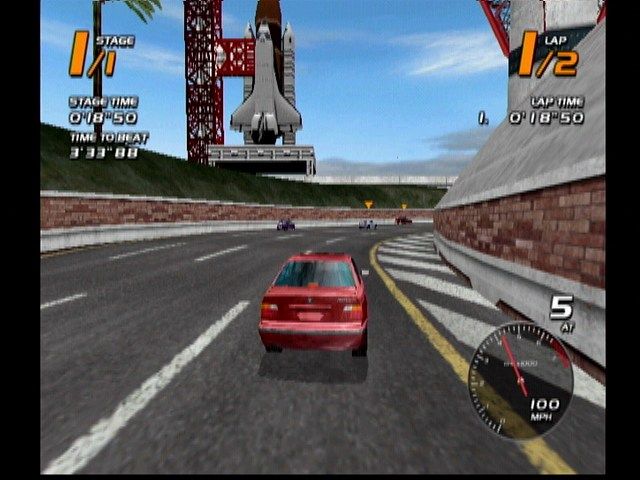
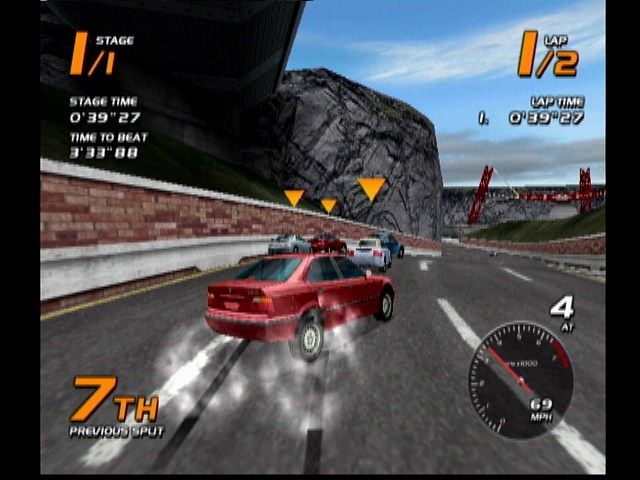
Vanishing Point is about racing on civilian roads, competing with rivals and negotiating unsuspecting civilian drivers. Tournament mode unlocks secret cars and game modes not found elsewhere. Your main competitor is the clock, aiming to be the fastest driver. Competitors do not start together on a grid. Your attempt begins on a rolling start; you start racing as soon as you cross the Start/Finish line. Rival Drivers are recognized by their aggressive driving style and car markers. Overtaking or being overtaken does not necessarily change your ranking, as drivers start at different times and laps. Split Times will appear in the top center of the screen to inform you of your progress. Focus on the road and traffic to achieve the best time.
When you complete a stage, your finishing time is graded. If you gain enough points to qualify, you move to the next stage. Your performance on each stage contributes to your position in the overall Top 40 Standings.
Your global objective is to finish each heat in 1st place to progress. Your overall performance matters, with combined race placement points determining your final place. Check the Race Results screen for points needed to advance.
There are 3 heats that progressively become more challenging. Progressing through each heat unlocks new cars, tracks, and game modes.
| Heat | Tracks | Laps | Difficulty |
| :--- | :----- | :--- | :--------- |
| 1 | 2 | 2 | Easy |
| 2 | 3 | 2 | Medium |
| 3 | 3 | 3 | Hard |
NOTE: Tournament mode is only available to cars in Showroom 1. Restarting from the Pause Menu will restart the heat from the first stage.
Single Race
Single Race mode allows you to compete in a 2 or 3 lap race using any available cars. You will race against civilian traffic and opponent/rival drivers. You must come in first to unlock the next track.
Time Trial
Using any available cars and tracks, Time Trial mode allows you to race alone without interference from civilian or opponent traffic. Use this mode to practice on a track or to break the lap record.
Stunt Driver
Stunt Driver Challenge tests your driving skills through increasingly difficult stunt events. Each event requires completing an objective within a time limit. Stunt Points are awarded based on performance; faster completion earns more points. To unlock an event, you need a required number of Stunt Points.
Early events are easy to unlock, but later ones may require re-trying previous events to increase your Stunt Points. Your best performance is always remembered and won't be overwritten by a worse one.
For detailed descriptions of rules, scoring, and objectives, refer to the on-screen help pages.
CWG Rally
This mode is similar to a multi-stage Time Trial. There are no other cars on the track, and you have 1 lap per stage. Your overall time is calculated and
.png)

.png)

.png)
.png)
_1.png)
.png)
.png)
.png)