System Set Up
Set up your PlayStation® game console according to its Instruction Manual. Make sure the power is off before inserting or removing a compact disc. •
Insert the X-bladez: Inline Skater disc and close the Disc Cover.
•
Insert game controllers and turn on the PlayStation® game console. •
Follow the on-screen instructions to start the game.
Console Top View
Console Front View
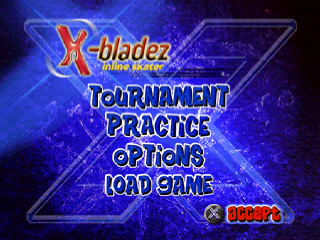
MAIN MENU
There are 4 items on the Main Menu:
•
Tournament - Qualify by performing daring tricks to earn points, then race against the local champ to progress through the tournament!
•
Practice - Practice the tracks before tackling the challenge of Tournament mode.
•
Options - Adjust the Music and Sound volumes, as well as turn Vibration on or off.
•
Load Game - Load a previously saved game (Memory Card with 1 free block required).
MAIN MENU TRACK SELECT
Starting a Tournament Game
After selecting Tournament on the Main Menu, select a character at the Character Select screen.
When you first start the game, you will only have Kevin and Stephanie available to you. As you progress through the levels, other characters will become available. GAME INTERFACE
•
distance 16 ft 32 Points!
•
Position in race/Time remaining
•
Last trick performed and points received
POWERUPS/REWARDS SYSTEM
SCORE MULTIPLIER
Doubles the player's points when performing stunts. The score multiplier lasts 10 seconds, during which "2x trick score" will flash on the screen.
Score multipliers activate immediately when the player hits one. These are only available in the Qualify Tracks.
SPEED BURST
Increases the player's velocity for 3 seconds. Speed bursts activate immediately as soon as the player hits one.
These are only available in the Race Tracks.
WHEEL ICONS
Wheel icons appear in race levels when the player is competing against an AI character. If the player collects all wheel icons in two consecutive races, they can unlock an extra character for play in other levels.
When the player hits a wheel icon, a message comes up on screen telling the player they have X out of X icons. Wheel icons do not regenerate. These are available only in the Race Tracks, and come in sets of 6 per track.
MONKEY ICONS
If the player collects the 36 monkey icons, they unlock Flapjax the monkey. When the player hits a monkey icon, a message comes up on screen telling the player they have X out of X icons. Monkey icons do not regenerate. Monkey Icons are only on the Qualify Tracks and come in sets of 6 per track.
PAUSE MENU
If you press the START button while playing the game, the Pause Menu appears. Use Up or Down on the Directional Button to move through the menu:
•
Return to Game: Un-pauses the game.
•
Options: Adjusts Music Volume, Sound Volume, and lets you turn Vibration On or Off.
•
Restart: Starts the race over.
•
Tricks: Shows a list of tricks for the character you are using.
OPTIONS
•
Music Volume: Adjust the Music Volume by pressing Left or Right on the Directional Button.
•
Sound Volume: Adjust the Sound Volume by pressing Left or Right on the Directional Button.
•
Vibration: Turn the Vibration On or Off by pressing Left or Right on the Directional Button.
.png)

.png)
.png)
.png)
.png)









.png)
.png)