PlayStation Setup
Set up your PlayStation® game console according to its instruction manual. Ensure the power is off before inserting or removing a compact disc.
•
Insert the X-Men Mutant Academy™ 2 disc.
•
Insert game Controllers.
•
Turn on the PlayStation game console.
•
Follow on-screen instructions to start a game.
Important Note
It is advised that you do not insert or remove peripherals or MEMORY CARDS once the power is turned on.
PlayStation Components
•
MEMORY CARD slots (above controller ports)
Game Controls
X-Men Mutant Academy™ 2 supports the DUALSHOCK™ analog controller. When the ANALOG mode switch is on and the LED is lit up, the left analog stick works the same as the directional buttons.
Main Menu
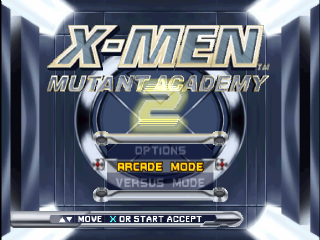
Choose from the following options to begin playing X-Men® Mutant Academy™ 2.
•
Use ↑↓ on the directional buttons to choose the game type.
•
Press the X button to start the game.
•
Two Controllers must be plugged into the PlayStation before playing a two-player game.
Arcade Mode
Select Arcade mode to play a one-player game.
•
Select your character using the directional buttons and pressing the X button.
•
Press the O button to select that character's alternate costume.
Arcade mode involves a series of matches. Advance by winning all matches. Winning matches unlocks secrets. Check Cerebro mode to display unlocked secrets.
Versus Mode
Versus mode is for two players. You can play one-on-one matches against an opponent.
•
Each player chooses a character using the directional buttons and the X button.
•
Set your health to a value between 50%–150%.
After both players select a character and health setting, the player who selected their character first must choose an arena from the available game levels.
Academy Mode
Academy mode teaches you how to use each character's moves and abilities. It's a one-player game set in the Danger Room.
•
Select the character you want to train with using the directional buttons and the X button.
•
Once chosen, you can select the course and lesson.
Professor X will direct your training. The object of the Academy is to refine a mutant's natural instincts into a controlled fighting machine.
Survival Mode
Survival mode is another one-player game where you test your fighting abilities against a never-ending series of enemies. Achieve as many wins as possible with only one life.
For each match won, you will be rewarded with extra health. Choose your character carefully, as their attributes are all that stand between you and destruction.
Cerebro Mode
Cerebro mode provides access to all the secrets you have unlocked by achieving various goals in the game.
•
CYCLOPS - STRICT AND PRECISE FIELD COMMANDER. HE CAN FIRE HIS OPTIC BLASTS WITH DEADLY AIM.
•
CEREBRO ITEMS UNLOCKED: MOVIE X
•
PAY SELECT X ACCEPT & BACK
Memory Card
Choose MEMORY CARD to save or load a saved game. You must have the MEMORY CARD inserted before starting the game.
Note: MEMORY CARDS in MEMORY CARD slot 2 are not supported.
Credits
This screen displays a list of people who contributed to the development of X-Men® Mutant Academy™ 2, along with special thanks.
On-Screen Display
Health Meter
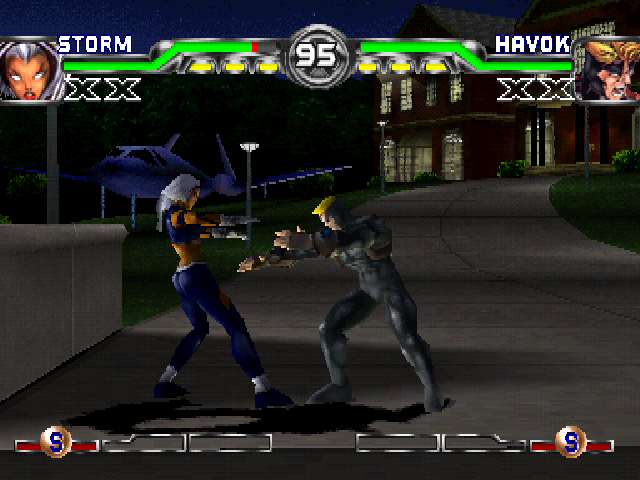
The Health Meter displays the amount of health each character has left for that match.
•
Green indicates remaining health.
•
The empty section indicates unrecoverable damage.
•
The red portion indicates recoverable damage.
Avoiding damage for a period of time will regain recoverable (red) health. If you land hits on an opponent with recoverable damage, their recoverable damage will convert to permanent damage.
Super Meters
The Super Meter displays the number of remaining super uses each character has. There are three bars, each corresponding to a category of Super Move:
•
S Super—The least powerful of the Supers but builds up the fastest of the three.
•
SMI Once the move has been triggered, the SMI Super requires you to follow a directional button input that will increase the damage of the move the more you complete the pattern.
•
X-Treme Super The most powerful of the Supers. If used correctly, it can help you to defeat your opponent with ease.
A meter bar must be full to use that category of super move, and triggering a super move will deplete that category's Super bar. The meters will regenerate power with successful attacks against your opponent.
Note: Meters get used up whether the super or X-Treme move is successful or not. For example, Cyclops hitting or missing his concussion beam still uses up his X-Treme meter.
Advanced Technique: Managing Your Super Meters
It is possible to transfer power from one Super Meter to another. This is useful for quickly activating one of your Supers if no meter is full and there is enough combined power in your meters to fill a specific super meter completely.
Transferring power between meters is a three-step process:
•
First, press the ← or → directional button and hold it down.
•
Second, press the button that corresponds to the specific meter (for player 1: the button for Regular Super, the A button for SMI Super, the O button for X-treme Super) where

_1.jpg)

.png)





.png)


.png)







.png)