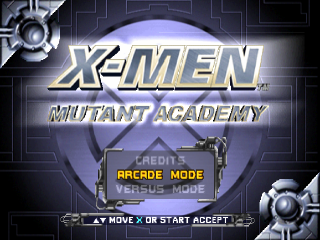
VERSUS MODE
Versus mode is for two players. You can play quick one-on-one matches against your opponent.
•
First, each player must select a character to play by using the directional buttons and the X or button to select.
•
Then set the options for the Versus mode match.
Versus Mode Options
The options are Health, Control Set, Stage, Roundtime, and Rounds. These options can only be set by the player who selects their character first.
•
Set your Health at 150% if you're new to fighting games. Set it to 50% if you're an expert.
•
Choose the Stage you want to play on from the available game levels.
•
Select the Roundtime; the default is 90 seconds.
•
Then choose how many rounds you want to fight in each match.
Both players must accept their selections by pressing the X button to begin the match.
ACADEMY MODE
Academy Mode is designed to teach you how to best use each character's moves and abilities. Select the character you want to train as using the directional buttons then pressing the X or button to accept.
Once you have chosen your character, you may select either Academy Training or Independent Study.
Academy Training
Academy Training is a pre-designed Danger Room session where Professor X will guide you through a series of courses and lessons. After choosing Academy Training, the Report Card screen will appear.
Here, you can monitor your progress and also choose the lesson you want to start with. Make your selection and press the X button to begin Academy Training. If you successfully graduate from Mutant Academy, you will be rewarded. You may retake entire courses you wish to review or to improve your grade.
Independent Study
In Independent Study, you may practice your skills freely on an opponent without fear of reprisal. Press the Start button to access the Practice Settings menu.
•
Full Supers: When ON, gives you max energy in all Super meters at all times.
•
Action: Sets your opponents action to either STAND, CROUCH, or JUMP.
•
Block: Turns opponent blocking ON (always blocking), OFF (never blocking), or AUTO (tries to block when attacked to avoid combos).
All Academy Mode instructions refer to the default controller configuration (preset 1). It is highly recommended that you set your controller configuration to preset 1 before initiating an Academy Mode training session.
SURVIVAL MODE
A true test of nerves and fighting skills, Survival mode is a one-player game where you can test your fighting abilities against a never-ending series of enemies. This intense mode of gameplay challenges you to achieve as many wins as possible with only one life-if you lose a match or are K.O.'d, you're done. For each match won, you will be rewarded with extra health based on how quickly you finish off your opponent.
CEREBRO MODE
Cerebro mode is designed so that you can access all of the secrets you have unlocked by achieving various goals in the game.
Within is a list of unlocked game items, organized by categories which you switch by pressing the left or right directional buttons. Scrolling through the lists displays a brief description and small picture of what the unlocked item is.
Press the X button to view an unlocked item or to get instructions on how to unlock a locked item.
MEMORY CARD
Choose MEMORY CARD to save or load a saved game from your MEMORY CARD. The MEMORY CARD saves unlocked items and records personal setup preferences. Remember to save your progress before powering off or resetting the PlayStation game console. ON-SCREEN DISPLAY
HEALTH METER
The Health Meter displays the amount of health each character has left for that match. Green indicates remaining health. Damage that is unrecoverable is indicated by the empty section of the meter.
Recoverable damage is indicated by the red portion of the meter. Avoiding damage for a period of time will gain back recoverable (red) health. If you land hits on an opponent who has recoverable damage, your opponent's recoverable damage will convert to permanent damage.
SUPER METERS
The Super Meters display the available Super Move power each character has. There are three bars, each corresponding to a category of Super Move: Supers, Stringed Supers, and X-Treme Supers.
A meter bar must be full to use that category of Super move and triggering a Super move will deplete that category of Super's bar. The meters will regenerate power with successful attacks against your opponent.
Note: meters get used up whether the Super Move is successful or not (i.e. Cyclops hitting or missing with his Concussion Blast X-Treme Super still uses up his X-Treme meter). X-TREME METER
The X-Treme Meter indicates whether or not an X-Treme action can be executed. The X-Treme Meter must be fully charged to do an X-Treme move.
Once you have built up your X-Treme meter to full power, quickly tap on the X button to close the arrows until they become an "X." Once the "X" is activated, you will have a short period of time in which you may execute your X-Treme move.
ADVANCED TECHNIQUE: MANAGING YOUR SUPER METERS
It is possible to transfer power from one Super Meter to another. This is useful for quickly activating one of your Supers if no meter is full, but you have enough combined power in your meters.
Transferring power between meters is achieved by pressing left or right and the buttons that corresponds to their specific meters.
.png)

.png)
.png)
 (Demo).png)
.png)
.png)





.png)
.png)