GETTING STARTED
*Note: Illustration may not match all PlayStation®2 console types. For owners of SCPH-70000 series PlayStation®2 systems, refer to the setup instructions supplied with your system.*
Set up your PlayStation®2 computer entertainment system according to the instructions in its Instruction Manual. Make sure the MAIN POWER switch (located on the back of the console) is turned ON.
Press the RESET button. When the power indicator lights up, press the OPEN button and the display will open. Place the Fight Club disc on the disc tray with the label side facing up. Press the (OPEN) button again and the disc tray will close.
Attach game controllers and other peripherals, as appropriate. Follow on-screen instructions and refer to this manual for information on using the software.
MEMORY CARD (8MB) (for PlayStation®2)
To save game settings and progress, insert a memory card (8MB) (for PlayStation®2) into MEMORY CARD slot 1 of your PlayStation®2 system. You can load saved game data from the same memory card or any memory card containing previously saved games.
MAIN MENU
The following four options are available: Game Modes, Theater, Options, and Member Services.
GAME MODES
Arcade Mode
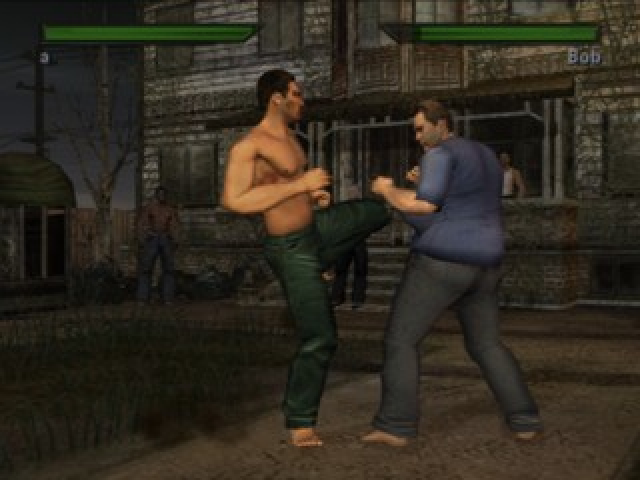
Fight several bouts against random opponents to unlock rewards and characters. Earn Character Development Points (CDPs) for winning fights with a Player-Created Character (PCC).
Versus Mode
Two players choose a Primary, Unlocked, or Customized Character and fight one another. Victorious PCC fighters receive CDPs as a reward.
Story Mode
As a newcomer to Fight Club you'll have to prove yourself, one fight at a time, striving to become a key player in Project Mayhem.
Survival Mode
Fight as many opponents as you can, each one tougher than the last. Between fights your character's health improves a bit, but injuries will not heal. CDPs are earned in this mode with a PCC.
Training Mode
Sharpen your fighting skills and check out your options regarding moves, damage, and combos. There are no injuries or rewards in this mode. Training Mode Options
Training Mode has the following options: Moves List, Space Monkey, and Hit Analysis.
•
Moves List - Find punching and kicking combinations here.
•
Space Monkey - Select this to set various conditions for your opponent, such as "attack high" or "block high."
•
Hit Analysis - Displays controller input, damage per move, number of hits in the combo, and total combo damage.
Network Mode
Connect to the online world to find challengers. Character records and rankings will be shown as status symbols to all who compete.
THEATER
Select Theater to see the rewards you have earned by completing the Story and Arcade Modes. Primary characters' stories can be replayed. Bonus rewards are displayed when you have unlocked the appropriate items during gameplay.
OPTIONS
Game Settings
Adjust Difficulty, Blood, Autoblocking, and Vibration.
Audio Settings
Adjust Music Volume, Effects Volume, Crowd Audio, Playlist and Track.
Video Settings
Adjust Screen Position and Brightness.
Controller Setup
The player can choose from two preset controller schemes. The player also has the option to completely customize their controls.
Save/Load Options
Load Settings, Save Settings, and Autosave.
•
Load Settings - Load and save progress and options settings.
•
Save Settings - Select the memory card (8MB) (for PlayStation®2) you wish to save progress and option settings.
•
Autosave - Toggle Autosave on or off.
Credits
View the list of people who worked on the game.
MEMBER SERVICES
New Member
Join Fight Club with your own personalized fighter.
Modify Member
Select the Fight Club member you wish to modify. Spend Character Development Points (CDPs) to improve his stats.
Save Member
Save your personalized fighter on your memory card (8MB) (for PlayStation®2).
Emergency Room
When a Hardcore Character is too badly injured to continue fighting, it's time to go to the Emergency Room (ER). In the ER, CDPs can be spent to heal your character's injuries. Injuries to Hardcore Characters can only be healed by using CDPs. Character Bios can also be viewed within the ER. PAUSE MENU
•
Resume - Return to gameplay.
•
Music Volume - Adjust Music volume.
•
SFX Volume - Adjust Sound Effects volume.
•
Vibration - Turn Vibration on or off.
•
Quit to Character Select - Exit to the Character Selection screen.
MULTIPLAYER ONLINE
Online HUB Menu
The menu offers several options: Quick Match, Match Search, Create Match, Friends, Players, and Rankings. To access the online menu, you must log onto the Internet via Gamespy Network (Network Option) and select either "Hardcore" or "Normal" mode.
If "Hardcore" mode is selected, you can bet CDPs and upgrade your stats, but be warned that your character can be "retired." These Options apply to Normal and Hardcore Modes. *Note that Member Services already denotes that this option can only be used for Hardcore Mode.*
•
Quick Match - Select Quick Match if you
.png)

.png)


.png)
.png)
.png)


.png)
.png)
.png)