GETTING STARTED
STARTING UP
Set up your PlayStation®2 computer entertainment system according to the instructions in its Instruction Manual. Make sure the MAIN POWER switch (located on the back of the console) is turned on.
Press the RESET button. When the power indicator lights up, press the open button and the disc tray will open.
Place the Guilty Gear X disc on the disc tray with the label side facing up. Press the open button again and the disc tray will close. Attach game controllers and other peripherals, as appropriate. Follow on-screen instructions and refer to this manual for information on using the software. THE RULES
MATCH FORMAT
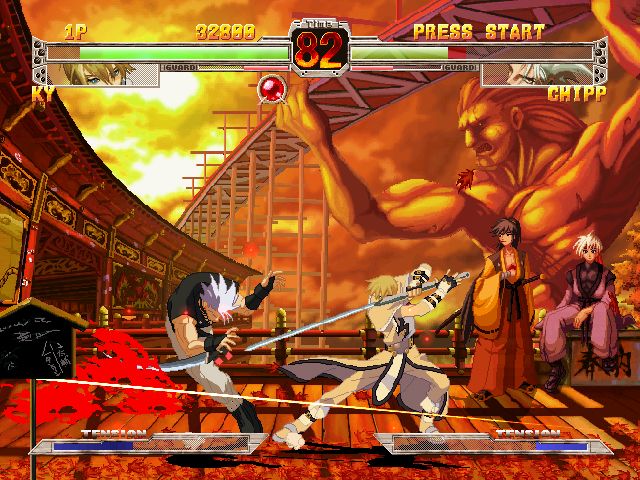
Combatants engage in battle and the first to deplete the opponent's Life Bar wins the round. The first to win the best of 3 rounds wins the match.
*You can change the number of rounds in the Game Options Mode.
TIME LIMIT
One round consists of 99 seconds. If this limit is exceeded, the game ends and the player with the highest remaining strength level wins.
*You can change time limits in the Game Options Mode.
TIES
In the event of a double knockout or when players have the same amount of remaining strength levels when time runs out, the round ends in a draw. If the match cannot be decided in 3 rounds, a fourth round (the final round) begins.
If the match is not decided even in the fourth round, the game ends for both players.
CONTINUE
Even when the game ends in the Arcade Mode, you can resume play by pushing the START Button while the Continue Screen is displayed.
*By switching the Short Cut option to ON in the Game Options Mode, the Continue Screen appears immediately after losing to let you select whether you want to continue and choose a new character. The match will resume if you select Continue, and when you select Character Select, you can choose a new character for the resumption of play.
STARTING THE Game
Push the START Button when the Title Screen appears to call up the Mode Select Screen. Select a mode with the directional buttons and push the START Button to confirm your choice.
*Push the Button while the Mode Selection Screen is displayed to return to the Title Screen.
ARCADE MODE
A mode wherein you take on CPU opponents in elimination battles. Defeat a certain number of opponents to clear the game and reach the ending.
Another player can burst into a one-player game for two-player competition by pushing the START Button on the unused controller.
VERSUS MODE
A mode for two-player battles only. This mode cannot be used unless two controllers are connected to the main console. Once a round ends, the Character Select Screen will again appear.
*Two-player battles require a second game controller, which is sold separately.
SELECTING BACKGROUNDS
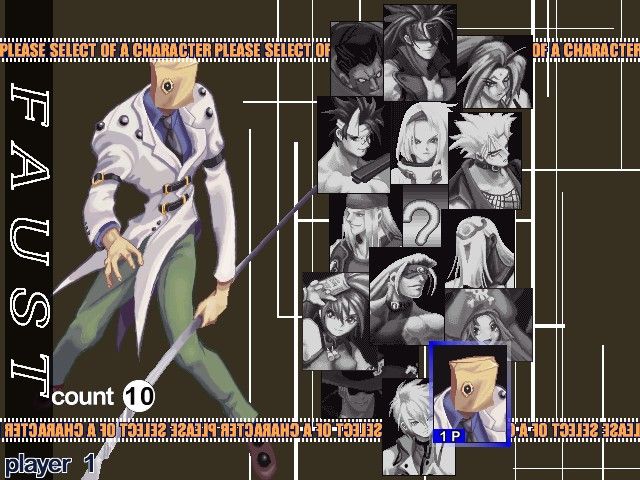
You can select battle venues in the Versus Mode and Training Mode. First, call up the Character Select Screen and move the cursor to the character whose background you want to use.
Then push the L1 Button to call up the "BG" cursor, which shows this background has been selected. If no background is selected, the background of the Player 2 character will be selected automatically.
TRAINING MODE
A mode for practicing basic commands and combo attacks. Select your character and sparring partner to serve as your punching bag.
If you want to adjust various settings during game play, push the START Button to call up the Training Menu. Switch between CONFIG and ENEMY SETTING using L1(L2)/R1(R2) buttons.
TRAINING MENU
CONFIG
Used primarily to change System Screen settings.
•
RETURN: Returns you to the game screen.
•
TENSION MAX: Locks the Tension Gauge in the maximum position.
•
GUARD LEVEL: Lets you adjust the initial position of the Guard Level Gauge.
•
DAMAGE DISP: Displays information such as character damage and numbers of combos used.
•
CHARACTER SELECT: Lets you change the character for training.
•
KEY CONFIG: Lets you rearrange attack buttons to your preference.
•
COMMAND LIST: Displays the move commands for your character.
•
DEFAULT: Returns all CONFIG settings to their initial state.
•
TITLE: Returns you to the Title Screen.
ENEMY SETTING
This is used primarily for changing sparring partner settings.
•
RETURN: Returns you to the game screen.
•
MODE: Lets the CPU control your sparring partner.
•
ENEMY STATE: Lets you adjust the condition of your sparring partner to 1 of 3 settings.
•
GUARD: Lets you determine whether your sparring partner can guard against attacks or not.
•
RECOVERY: Lets you set your sparring partner's ability to recoil from attacks at 1 of 4 levels.
•
ATTACK MEMORY: When you switch this item to ON and exit the menu, "STANDBY" appears on the screen to prompt recording. Then push the Memory Button (L1 Button) to begin recording.
Recording time lasts 15 seconds. You can control the sparring partner during the recording period. Recording is completed when 15 seconds pass or you push the Memory Button a second time.
Once recording is complete, you can make the sparring partner perform the recorded moves each time you push the Memory Button. This recorded action can be used indefinitely, as long as .png)

.png)
.png)
.png)