ATTACKS
BATTLES
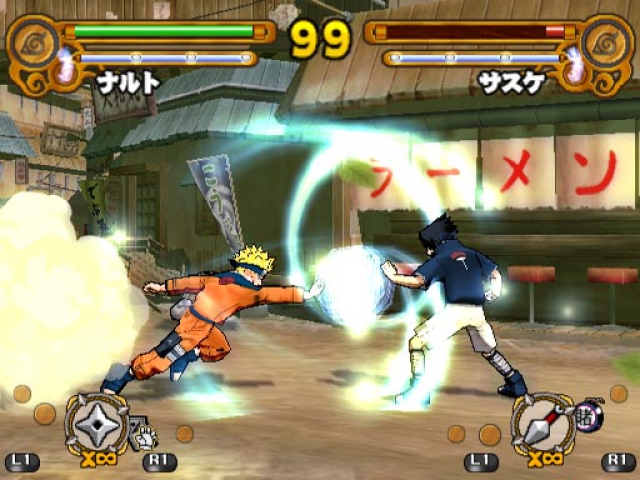
VIEWING THE BATTLE SCREEN
TIME LIMIT
This is the amount of time remaining until the end of the battle.
STATUS CHANGE
This shows any change in status. See page 10 for more details about status change.
HEALTH BAR
This indicates your character's remaining strength.
CHAKRA BAR
This is the amount of chakra your character has left.
ITEM
This shows the currently selected item and the quantity held.
BASIC BATTLE RULES
The first player to reduce the opponent's strength to zero within the time limit is the winner.
If both players defeat each other simultaneously, the battle is a draw.
If a battle exceeds the time limit, it will come to an end, and the player with more strength is the winner.
MOVEMENT IN BATTLE
QUICK MOVEMENT
This will cause you to dash towards your opponent. While you are dashing, you cannot be hit by kunai, shuriken, or any other projectile weapons that players can start with. However, items thrown due to ninjutsu or stock projectile weapons can hit you. Some stock items will not be able to hit you.
JUMP BACKWARDS
•
DIRECTIONAL BUTTON + BUTTON TWICE
This will let you jump quickly backwards away from your opponent.
COMBO
•
COMBINATION OF BUTTON AND DIRECTIONAL BUTTONS
Combos are performed by pressing the button and the directional buttons multiple times and in multiple directions in a certain pattern. Combo commands differ depending on the character used. You can check how to perform combos in the 1P (or 2P) Command Chart, accessible from the Pause Menu. See page 6 for more details.
COUNTER
•
DIFFERENT COMMAND FOR EACH CHARACTER
Characters can perform their own, individual counter attacks after their opponent has performed any attack besides a throw. Counter commands differ depending on the character used. You can check how to perform your character's counter in the Command Chart accessible from the Pause Menu. See page 6 for more details.
NOTE: Only certain characters are capable of performing counters.
THROW
•
DIRECTIONAL BUTTON + BUTTON
This lets you grab your opponent and throw them through the air.
NOTE: If performed in mid-air, this will result in an aerial throw.
NINJUTSU
•
DIRECTIONAL BUTTON + BUTTON / DIRECTIONAL BUTTON + BUTTON
This lets you use chakra to attack with jutsu or special moves.
NOTE: Certain characters are able to perform more powerful attacks by holding down the button.
WALL-RUNNING JUTSU
Run in the direction of a wall to run up the side of the wall.
EXTRA HIT
•
DIRECTIONAL BUTTON TOWARD THE DIRECTION YOU KNOCKED YOUR OPPONENT + BUTTON
After you've knocked an opponent through the air with an attack, you can instantly circle around the opponent and deal an extra hit before they come to their senses.
MOVE TO FOREGROUND
•
DIRECTIONAL BUTTON + BUTTON
MOVE TO BACKGROUND
•
DIRECTIONAL BUTTON + BUTTON
These controls allow you to move between the stage's background and foreground.
WATER-WALKING JUTSU
You can use chakra to walk on the surface of water. If you run out of chakra, you'll fall into the water and take damage.
EXTRA HIT COUNTER
While your opponent is performing an extra hit on you, an icon will be displayed at the bottom of the screen. If you press the button while the icon is being displayed, you will evade the extra hit and perform an "extra hit counter." It is also possible, when your opponent is performing an extra hit counter on you, to perform an "extra hit counter."
JUTSU CLASH
Depending on the characters being used in battle, if the characters perform jutsu at the same time, the jutsu can smash against each other, resulting in a "jutsu clash." In a jutsu clash, both players will engage in a button-pressing contest to determine whose jutsu hits successfully.
VIEWING THE DOMINANCE BAR
The dominance bar shows who's currently winning in the jutsu clash. After the button-pressing battle has gone on for a short period of time, the jutsu of the player who has made the dominance bar move farther will hit successfully.
PAUSE MENU
Press the START button in battle to bring up the Pause Menu, from which you can select a number of different options. The items on the Pause Menu vary somewhat depending on the game mode that you're playing.
•
Control Settings: This option allows you to change the button configuration and turn vibration on or off.
•
1P (or 2P) Command Chart: This lets you see the button combinations for character combo techniques, jutsu, Ultimate Jutsu and other special moves.
•
Basic Command Chart: This lets you see the basic battle controls.
•
Easy Display Setup: This option allows you to turn on and off messages.
•
Mission Conditions: Here, you can view the completion requirements of the battle currently being fought.
•
NOTE: Mission Conditions only appears on the Pause Menu in Ultimate Contest mode.
•
Item Stock: Here, you can equip items that you've received in Ultimate Contest and other modes.
•
NOTE: Item Stock cannot be used in Iruka's Training, or when playing two-player VS. Duel mode.
•
Practice Settings: This selection brings
.png)

.png)
.png)
.png)
