GETTING STARTED
Set up your PlayStation®2 computer entertainment system according to the instructions in its Instruction Manual. Make sure the MAIN POWER switch (located on the back of the console) is turned on.
Press the RESET button. When the power indicator lights up, press the open button and the disc tray will open. Place the P.T. O. IV™ disc on the disc tray with the label side facing up. Press the open button again and the disc tray will close.
Attach game controllers and other peripherals, as appropriate. Follow on-screen instructions and refer to this manual for information on using the software.
ABOUT PACIFIC THEATER OF OPERATIONS IV
Pacific Theater of Operations IV is a simulation game centering on the naval battles of World War II.
GAME FEATURES
Naval Combat in seas all over the world
Four countries participate in Pacific Theater of Operations IV - Japan, the United States of America, Britain, and Germany -- vying for naval superiority in seas all over the world. Countries on the same side (Axis or Allies) operate as an alliance, cooperating with their allies and joining to fight against the opposition.
Thrilling real-time 3-D Combat
Ships and aircraft are rendered with 3-D graphics during naval combat for thrilling battles resemble a movie. A camera function allows you to view scenes from multiple angles.
Every battle takes place in real-time. The clock is always ticking -- even when you give orders to each fleet. Take the entire battle zone into consideration, effectively judge battle conditions, and quickly issue the right orders for your situation.
Develop the best ships and aircraft
Over three hundred different ships and aircraft appear in Pacific Theater of Operations IV. In addition, you can design and build powerful ships and aircraft that were never produced in real life.
2 Game Modes
Pacific Theater of Operations IV has two modes of play: Campaign and Scenario.
GAME BASICS
50 Regions and 14 Key Bases
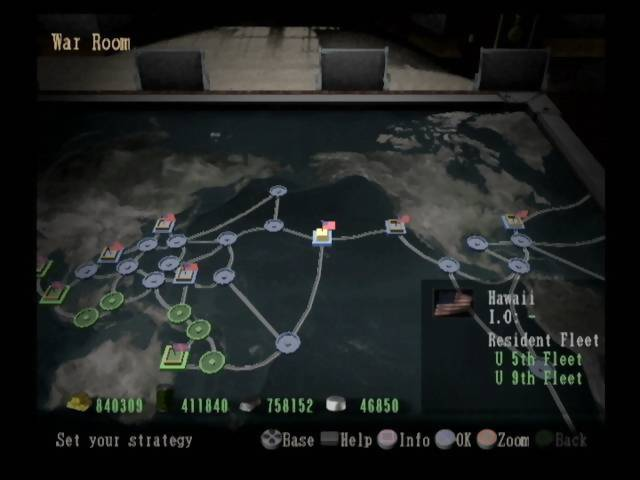
During the Campaign Mode, naval battles unfold across the seas of the world. The oceans are divided into 50 "Regions." Occupy regions controlled by enemy countries, and defend your own regions against enemy aggression.
There are 14 Key Bases. Each country selects one of these Key Bases as their Home Port. A country is eliminated when it loses its all Key Bases and have no Home Port.
Increase Production by controlling Regions
When you achieve control over a new region through victory in naval combat, you acquire its funds, oil, steel, and aluminum. Transport these resources to your Home Port where they can be used to fuel ships and produce new ships and aircraft. Every region you control is one step closer to victory for your country.
PTOIV Menu
Continue
Loads saved game data and allows continued play.
New Game
Starts a new game. Allows selection of Campaign Game or Scenario mode.
Training
An explanation of the Tactics, Strategy and Camera aspects of the game.
Settings
Allows setting of music and sound effects.
Starting the Game
•
Turn on the power of the PlayStation®2 Computer Entertainment System and insert the Pacific Theater of Operations IV™ disc.
•
Pressing the START button during the opening sequence displays the title screen.
•
Pressing the START button on the title screen opens the menu.
SAVING AND LOADING
Saving data during Campaign play
•
Select "Options" from the Strategy Screen.
•
Select the location to save. If you select previously saved data, it will be overwritten.
Loading during gameplay
To load saved data, select "Continue" from the menu, and select the data to be loaded.
•
Select "Options" from the Strategy Screen.
•
Select data to be loaded.
SETTINGS
•
MUSIC: 10 levels from OFF-MAX (default setting is at 7)
•
SE: 10 levels from OFF-MAX (default setting is at 7)
•
TACTICAL PANEL: Y/N (Explains Strategic Commands. Select a command to display explanation when this is turned on.)
*Highlighted items are the default settings.
CAMPAIGNS AND SCENARIOS
CAMPAIGNS
Assume the role of Commander of the Japanese, American, British, or German fleets and wage war for global naval supremacy. Choose from any country on either side, Axis or Allies.
Campaign Scenarios
There are two scenarios in Campaign mode.
•
BRITAIN vs GERMANY (September 1939): World War 2 begins in Europe; Britain and Germany bring it to the Atlantic. Japan and the U.S. do not participate when the game begins. Alliances can be freely changed.
•
JAPAN vs USA (December 1941): War breaks out between Japan and the U.S. and spreads to the rest of the world. War has not been declared between Japan and the U.S. when the game begins. Alliances can be freely changed.
Winning and Losing
If the player's Home Country or an allied Home Country controls
.png)

.png)
.png)
.png)



.png)

.png)

.png)




.png)
 (Rev 1).png)
.png)

.png)

.png)
_1.jpg)