GETTING STARTED
Set up your PlayStation®2 computer entertainment system according to the instructions supplied with your system. Check that the system is turned on (the on/standby indicator is green).
Insert the Teenage Mutant Ninja Turtles™: Smash-Up disc in the system with the label side facing up. Attach game controllers and other peripherals as appropriate. Follow the on-screen instructions and refer to this manual for information on using the software. Memory Card (8MB)(for PlayStation® 2)
To save game settings and progress, insert a memory card (8MB) (for PlayStation®2) into MEMORY CARD slot 1 of your PlayStation®2 system.
You can load saved game data from the same memory card or any memory card (8MB) (for PlayStation®2) containing previously saved games.
THE GAME
Menus
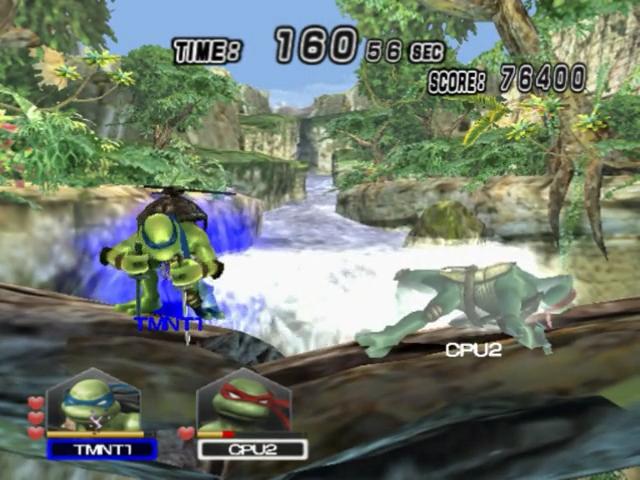
Begin your adventure as a hero and take down the evil Shredder!
RULE SETTINGS
The last fighter standing is the winner.
Main Menu
Select the mode you want to play via the Main Menu. There are many options to choose from.
Character Select
After selecting the game mode, you will be able to select your character from this screen. You can set your player name, change your team color, and – depending on the situation – add opponents.
Singles Match and Tag Team settings can be changed. Tag Team will allow you to play as a team against another team or individual.
From the Character Select screen, you can also change the rules of the Match by going to Match Rules. Set the parameters of the battle on this screen.
How to Play with Unlockable Alternate Costumes
When on the Character Select screen, if you have unlocked a special costume for a specific character, there will be an icon showing a button over that character's image. Press and hold the button shown while selecting the character to play with this new costume.
The image to the left shows icons that can appear.
If you press and hold the correct button, an “SP” will replace the button icon as shown below. Selecting the character while this “SP” is displayed will allow you to play with this new costume!
Stage Select
From this screen, you can select the stage you wish to play in. The stage selected is randomized between the choices of the players in the Match.
Items
Ninja Powers
There are nine ninja power orbs that can be used to help you in battle. A few are outlined below:
•
Fire: Give your opponents the hot foot with this fire power.
•
Lightning: Shock the bad guys with this electrifying lightning shield.
•
Tornado: Blow them away with this wind shield.
Once you pick up a ninja power orb, it replaces the one you had previously - so be careful when picking them up! There are even more items and ninja powers that you can use in addition to these!
Moves
Basic Moves
•
Standard Combo: Press the button three times consecutively.
•
Dash Attack: Double-click the left analog stick and press the button to execute the dash attack.
•
Pick Up Item/Ninja Power: Press the button when standing over an item or press while pressing the button to pick up items.
•
Ninja Power: Press the button to use Ninja Powers
Leonardo
.png)

.png)


.png)
.png)
.png)


.png)
.png)
.png)