GETTING STARTED
*Note: Illustration may not match all PlayStation 2 console types. For owners of SCPH-70000 series PlayStation 2 systems, refer to the setup instructions supplied with your system.* Set up your PlayStation®2 computer entertainment system according to the instructions in its Instruction Manual. Make sure the MAIN POWER switch (located on the back of the console) is turned on. Press the RESET button.
When the power indicator lights up, press the open button and the disc tray will open. Place the Worms Forts: Under Siege disc on the disc tray with the label side facing up. Press the open button again and the disc tray will close. Attach game controllers and other peripherals, as appropriate. Follow on-screen instructions and refer to this manual for information on using the software.
MEMORY CARD (8MB) (for PlayStation®2)
Worms Forts: Under Siege supports MEMORY CARD slot 1. 10KB of free memory space is required to save the Worms Forts: Under Siege file. Insertion or removal of the memory card (8MB) (for PlayStation®2) after switching the console on may cause data to be overwritten or lost.
WORMS FORTS: UNDER SIEGE
Historically, castles have provided the backdrop to the most dramatic battles of all time. Now it's your turn to take part in your own epic struggle in WORMS FORTS: UNDER SIEGE. Pitting fort against fort, worm against worm, and Catapult against Trojan Donkey, WORMS FORTS offers more features, weapons, options and hours of crazy game-play than ever before, taking it to a new level.
Take command of a worm Stronghold and battle your way through time, from Ancient Egypt, to the epic struggle for Troy, to meeting the might of the Samurai, or aiding King Arthur on his knightly Quest! If you want to master all 30 different weapons, as well as unlock the huge array of hidden maps, speech banks, missions, and challenges, you'll need skill, strategy and a healthy dose of WORMSTM attitude, not to mention unleashing destruction on a scale never seen in a WORMS game before.
What's more, with up to 4 teams battling it out on the same PlayStation®2, WORMS FORTS is the ideal party game. It doesn't matter how you play it, once you're hooked, you'll always come back for more!
GAMEPLAY
WORMS FORTS is a turn-based strategy game, where 2 - 4 teams battle it out with the help of mighty fortresses and weapons. Each team takes turns to pick off opposing worms and buildings, utilizing siege weapons, constructing fortifications and using whatever dastardly strategies they can imagine.
When worms lose all their energy or fall into the water, they die. You'll be defeated if you have no worms left or if your Stronghold is destroyed.
MOVING WORMS
To move your worm around use the left analog stick. Your worm can be moved in all directions. The directional buttons will rotate your worm on the spot.
If your selected worm encounters a small obstacle on the landscape, it will 'auto-hop' to clear the obstruction. If blocked by a larger obstacle, your worm will stop.
JUMPING
To jump an obstacle blocking your path, try using the button. Tap the button twice to perform a back-flip over it. Tapping the button twice while your worm is doing a back-flip will perform a double back-flip, great for getting on top of really tall buildings!
It is also possible to perform a forward flip by applying forward worm movement while tapping the button twice. Make your worm perform a forward jump by pressing the button. You can also make your worm jump straight up in the air by pressing and holding the button.
Pressing the jump button twice in rapid succession makes your selected worm perform a back-flip. Pressing the button twice while your worm is doing a back-flip will make it perform a double back-flip, taking it even higher into the air! All jumps can be steered while your worm is in the air by using the left analog stick. Use the shadow under your selected worm to judge your landing position.
OTHER MOVES
Some of the weapons and utilities have nifty little tricks that can aid your worm in its progress. Check out the Fortapedia section in the game for more details and tips.
CONSTRUCTING BUILDINGS
To construct a building, simply select it from the weapon panel button, choose where to place it and press the fire key button. As long as it connects to your Stronghold, everything's fine.
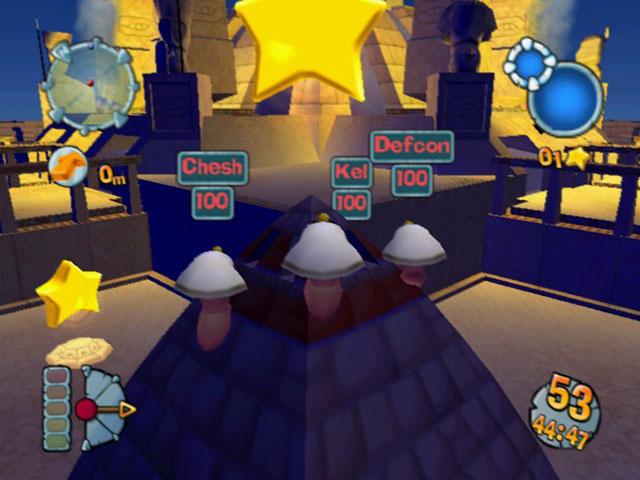
Some buildings require a specific number of victory locations in order to build them. The bigger the building, the more victory locations are needed. To obtain more victory locations, construct buildings in places that contain yellow stars.
SETTING UP A SHOT
To setup a shot, press the directional buttons to rotate your worm or weapon until it's pointing in the desired direction, and choose a trajectory by pressing the directional buttons. Fire by pressing the button.
With some weapons the longer you press the stronger the shot will be. Take into account the strength and direction of the wind when aiming your shot, as some weapons can be blown off course. Remember, most weapons require your worm to be on top of a building to fire. The bigger the weapon, the bigger the building you will need to fire it from.
.png)

.png)
.png)
.png)

_1.png)
.png)
.png)

 (Disc 1).png)


.png)
.png)



.png)




 (En,Fr,De,Nl,Sv,No,Da).png)


.png)



.png)