STARTING THE GAME
GAME BOY SYSTEM
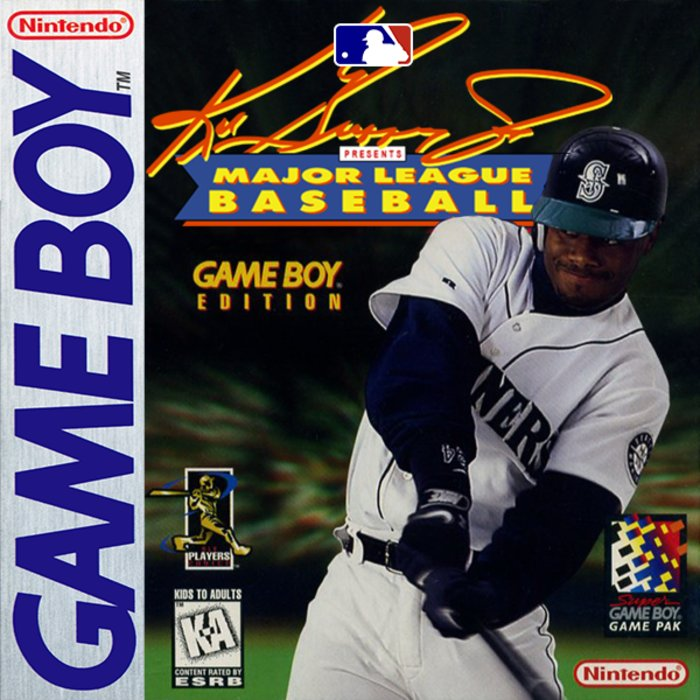
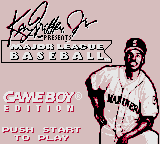
Correctly insert the Ken Griffey Jr. Presents Major League Baseball: Game Boy Edition Game Pak into the Game Boy system. Turn the power on. Press START after the Title screen appears.
SUPER GAME BOY® ACCESSORY
Correctly insert the Ken Griffey Jr. Presents Major League Baseball: Game Boy Edition Game Pak into the Super Game Boy accessory. Insert the Super Game Boy accessory into your Super NES. Turn the power on. Press START after the Title screen appears.
EXHIBITION
The Exhibition Game allows you to match any two teams in a single contest without affecting your saved games. Use this mode with the 2-PLAYER LINK mode to challenge a friend.
•
On the Title screen, press START
•
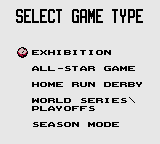
You will have the choice of five different Game Modes. Use the + Control Pad to highlight "Exhibition," and press the A Button.
•
Use the Control Pad to move between teams, and press the A Button to choose a team for Player One and Player Two (CPU or Human).
•
On the "Today's Game" screen, press the A Button to begin. You can also press Left and then the A Button to enter the Options screen.
ALL-STAR GAME
The All-Star Game features a collection of top players from the American and National Leagues in an exhibition game. This mode will not affect your saved games. Use this mode with the 2-PLAYER LINK mode to challenge a friend.
•
On the Title screen, press START
•
You will have the choice of five different Game Modes. Press Down on the Control Pad to choose "ALL STAR GAME," and then press the A Button.
•
Use the Control Pad to move between teams, and then press the A Button.
•
NOTE: If you're playing in the TWO-PLAYER LINK mode, Player Two will have to select his team after Player One has chosen his team.
•
The "Today's Game" screen appears. Press the A Button to begin. Press Left on the Control Pad and then the A Button to enter the Options screen.
HOME RUN DERBY™
This lets you challenge some heavy hitters to a battle of the bats. You can pick any batter. Each player tries to hit the most homeruns before making ten outs. Any swing that does not result in a home run, is an out. This mode will not affect your saved games. Use this mode with the 2-PLAYER LINK mode to challenge a friend.
•
On the Title screen, press START
•
You will have the choice of five different Game Modes. Press Down to choose "HOME RUN DERBY"," and then press the A Button.
•
Use the Control Pad to move between teams, and press the A Button to choose a team for Player One and Player Two (CPU or Human).
•
Use the Control Pad to move between players, and then press the A Button.
•
NOTE: If you're playing in the TWO-PLAYER LINK mode, Player Two will have to select his batter after Player One has chosen his batter.
•
The HOME RUN DERBY™ begins.
WORLD SERIES/PLAYOFFS
The World Series /Playoffs mode is a best-of-seven series where you match any two teams. The first team to win 4 games, wins the World Series / Playoffs Championship. After each game, the Game Pak will save your progress.
•
On the Title screen, press START
•
You will have the choice of five different Game Modes. Press Down to choose "WORLD SERIES," and then press the A Button.
•
Use the Control Pad to choose "NEW WORLD SERIES." If there is a saved game, "CONTINUE" will appear as a second option. Press the A Button to make your selection.
•
If you choose "CONTINUE," the saved game that is described at the bottom of the screen will be loaded. On the "Today's Game" screen, press the A Button to begin. Press Left, then the A Button to enter the Options screen.
•
If you choose "NEW WORLD SERIES®," use the Control Pad to choose "YES" or "NO" to indicate whether or not you want to delete a saved game. Press the A Button to make your selection.
•
Use the Control Pad to move between teams, and press the A Button to choose a team for Player One and Player Two.
•
NOTE: If you're playing in the TWO-PLAYER LINK mode, Player Two will have to select his team after Player One has chosen his team.
•
The "Today's Game" screen appears. Press the A Button to begin. Press Left on the + Control Pad and then the A Button to enter the Options screen.
SEASON MODE
This is a one-player mode. The Season Mode offers you the choice of playing three lengths of seasons: 26 games, 78 games or the traditional 162 games. The three division champions and one wild card team from each league will qualify for the league playoffs (best-of-five and best-of-seven series) and a possible trip to the World Series (best-of-seven series.)
•
On the Title screen, press START
•
You will have the choice of five different Game Modes. Press Down to choose "SEASON MODE", and then press the A Button.
•
Use the + Control Pad to choose "CONTINUE SEASON" OR "START NEW SEASON", and then press the A Button.
•
If you choose "CONTINUE SEASON", the saved game that is described at the bottom of the screen will be loaded. On the "Today's Game" screen, press the A Button to begin. You can also press Left and
.png)

_2.png)
 (SGB Enhanced).png)





.png)




.png)