Starting Up
1. Set up your Genesis 32X and other Sega systems by following the instructions in the system instruction manuals. Plug in Control Pad 1. 2. Make sure the power switch is OFF. Then insert the Space Harrier™ cartridge into the console. 3. Turn the power switch ON. You'll see the Sega logo. Then in a few moments, the Title screen appears. 4. If the Sega logo doesn't appear, turn the power switch OFF. Make sure your system is set up correctly and the cartridge is firmly inserted in the console. Then turn the power switch ON again. 5. Press the Start Button when the Title screen appears.
Important
Always make sure the power switch is OFF before inserting or removing the cartridge.
Getting Started
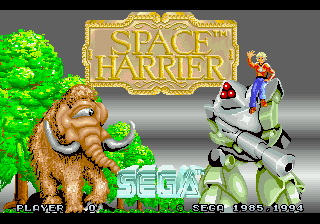
After the Sega logo, the Space Harrier Title screen appears. Press Start. A short demo appears if Start is not pressed. Press Start at any time during the demo to return to the Title screen. Select START to begin game play, or OPTION to change features of the game. Press the D-Pad UP or DOWN to highlight either START or OPTION. Press Start to continue.
Options
Highlight an option by pressing the D-Pad UP or DOWN, then press LEFT or RIGHT to select the option.
•
LEVEL: Select EASY, NORMAL, HARD, or HARDEST to change the difficulty level of game play.
•
PLAYER: Start the game with either 3 or 5 Tries.
•
MUSIC TEST: Take a break from battle and listen to the tunes found in Space Harrier. •
UP/DOWN: With NORMAL selected, Harri moves in the direction the D-Pad is pushed. With REVERSE selected, pressing UP during game play lowers Harri towards the ground, and pressing DOWN makes Harri rise towards the sky.
When finished, press Start at any time, or highlight EXIT and press Button A, B or C to return to the Title screen.
Fire Away!
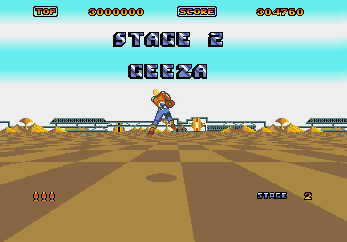
Now it's time to blast away! You'll be engaged in high-speed battle from the moment you enter Moot, the first province on your journey in Dragonland.
All of the creatures and ships are affected by your laser cannon. Some objects explode when hit by your laser. Others, like your opponents' fire and some of the ground obstacles, can't be destroyed. If an object isn't affected by your fire, don't remain in front of it for long!
To fire your powerful laser, press Button A, B or C. Hold the button down for automatic fire.
During the game, press Start to pause the game. Press again to resume play.
Note
Harri runs at the same speed he flies.
Bonus Stages
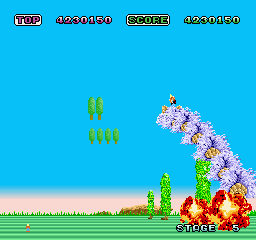
When you reach a Bonus Stage, you fly your faithful steed, the Uriahan Wind Worm. Ride this creature and direct it to flatten obstacles. The more obstacles you flatten, the more points you receive.
Press the D-Pad LEFT or RIGHT to move the creature.
Reaching a Bonus Stage gives you a Continue.
Note
After completing a Bonus Stage, the Uriahan Wind Worm gives you an extra Try to help you in your quest to defeat Valda.
Game Play Assistance
Call 1-415-591-PLAY.
French Instructions
Instructions en français, téléphoner au: 1-800-872-7342
High Score
After the game ends, either the Best Seven Scores list or the Ranking List appears. If your score is one of the top seven scores, you are invited to enter your initials on the honorary Best 7 Scores list for all to see, until the game is turned off.
Press the D-Pad LEFT or RIGHT to highlight a letter, and Button A, B or C to select it. If you would like to erase a letter, highlight the return arrow next to END and press Button A, B or C. When finished, press Start at any time, or press Button A, B, or C when END is highlighted to exit. The Best Seven Scores List appears during the game demo.
Ranking List
The Ranking List contains all of the scores played during the current session. If your score is not one of the top seven scores, the Ranking List appears.

.png)
.png)