STARTING UP
•
Set up your 32X System as described in its instruction manual.
•
Make sure the power switch is OFF.
•
Insert the Tempo cartridge into the console.
•
Turn the power switch ON. The Sega screen appears, then the Title screen. If the Sega screen doesn't appear, turn the power switch OFF. Make sure your system is set up correctly and the cartridge is firmly inserted. Then turn the power switch ON again. Press Start when the Title screen appears.
Important
Always make sure the power switch is OFF before inserting or removing the cartridge.
Note
Tempo is for one player.
•
Genesis 32X cartridge (sold separately)
GETTING STARTED
The Tempo introduction and Title screen follow the Sega logo. Wait a moment to see the game demo, or press Start at any time to bring up the Title screen. Press again to see the Game Menu. Make your selections by pressing the D-Pad UP or DOWN, then press Start.
Start the game by pressing Start, or enter your Password (select PASSWORD) or look at the Options menu (select OPTIONS). For more about passwords, see page 17.
SETTING THE TEMPO (OPTIONS)
Select an option by pressing the D-Pad UP or DOWN. Make choices within the selected option by pressing LEFT or RIGHT.
Exit the Options menu by pressing Start. Or highlight EXIT and press Button A, B or C.
•
Difficulty: Select between Easy, Normal and Hard.
PAD TYPE 3
Control Pad
This customizes the button functions on your Control Pad. Select this option and press Button A, B or C to see the Control Pad screen.
Press LEFT or RIGHT to cycle through the six configurations available. To return to the Options menu, press Start.
Sound Monitor
This lets you sample the music tracks, voices and sound effects used in the game. Select this option and press Button A, B or C to bring up the Sound Monitor screen.
•
Selection Previous Track Play Next Track Pause Stop
The box in the lower left corner displays the track number. Press the D-Pad UP or DOWN to cycle through Music, Voice or S E (Sound Effect) categories.
Then press the D-Pad LEFT or RIGHT to select a function button, and press Button A, B or C to perform the function. Highlight EXIT and press Button A, B or C, or press Start to return to the Options menu.
THE CURTAIN RISES
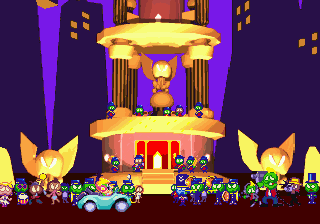
After you select START or enter your password, the Major Minor tower appears. There are four levels on the tower—three levels of normal stages, and one level of Bonus Games.
You start the game at the first level, and can select any of the three stages on that level. Once you complete a level, the pedestal before the entrance disappears and the stage can no longer be entered. You must successfully complete all stages on a level before you can enter any of the stages on the next level.
Press the D-Pad UP or DOWN to travel from level to level, and press LEFT or RIGHT to select a stage within that level. To enter the stage, press Button A, B, C or Start. Tempo hops onto the pedestal to the cheers of the crowd, and the stage begins.
THE GAME SCREEN
Strength Bar
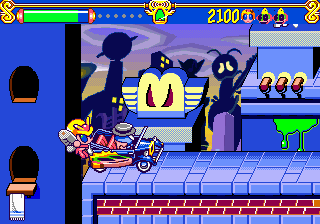
Grab Notes to fill this bar up, and grab a Headphones Item to make the bar grow. The Strength Bar empties every time Tempo takes damage, and when it runs out, you lose a Life. Lives Left
A Tempo icon appears for every Life you have remaining in the game. If you get more than three Lives, a number replaces the icons. Whenever Katy joins you on the screen, a Katy icon appears here as well. You start the game with three Lives, and get a 1UP with the first 5,000 (Easy mode), 10,000 (Normal mode) or 15,000 (Hard mode) points you score.
Press Start to pause the game and see how many Gold Coins you have (for information on Gold Coins, see page 11).
SNAP ATTACKS
Press Button A, and snap a note that stuns any enemy it touches. While an enemy is stunned, it's harmless, and you can finish it off with a kick or jump attack.
At first, Tempo can only use one hand for a Snap Attack. Pick up Snap Items to use more hands (Tempo has four to snap with) and extra power. Whenever Tempo takes a hit, he drops the Snap Item he is carrying and goes back to using one hand. But fear not—you can pick the Snap Item back up later... unless it's in a very dangerous spot.
BONUS GAMES
Between stages, you can use the Coins you collected during your previous stages to play one or more of the Bonus Games and pick up extra points.
Place Tempo in front of the Bonus Game you want to play, and press Button A, B, C or Start. If you have enough Coins, Tempo will enter the game. An introduction screen appears. Press Start to begin play.
TASTY VITTLE SESSION (2 COINS)
Press Button A to sneak a slice of pizza. How many slices can you grab before you get caught? Timing is everything



.png)
