Introduction
This is a bass fishing simulation game, designed for all types of players. Select from among three play modes: "Quick Fish," "Tournament," and "Practice."
Quick Fish Mode
Use this mode when you want to enjoy fighting for your bass, without having to find a spot or select a lure first. Just start looking for a lively fish. You cannot save games while playing in Quick Fish mode.
Tournament Mode
In Tournament mode, you can play first in Regional Tournaments and later in National Tournaments as you work your way up from amateur status toward the No. 1 Bass Pro spot. You can proceed to the next stage when you earn a place in the Tournament's official prize ranking.
Practice Mode
Select any of the available lakes and enjoy "free play" while in Practice Mode. You can end the game at any time, without having to clear any settings. Games cannot be saved, however.
Starting a Game
Place the Game Pak in the Game Boy® Advance and set the power switch to on. The title screen will appear. Press START to switch to the data selection screen.
Data Selection Screen
Use this screen to select the data to be used when playing. "From start" is displayed if no previous data has been saved. After selecting the data, press the A Button to play starting from the point where the previous data was saved. If you select "From start," the next step will be to create a character.
Character Creation Controls
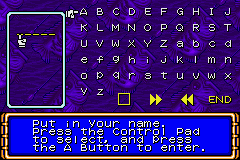
Use the following controls when creating a character:
•
Delete: Use this to delete the letter that is currently selected by the cursor in the name entry window.
•
Forward: Use this to move the cursor once to the right in the name entry window.
•
Back: Use this to move the cursor once to the left in the name entry window.
•
End: Use this to close the name entry window.
Enter the character's gender, left/right handed preference, and colors (clothes and skin) after entering a name. The above selections have no impact on skill values. Create whatever kind of character you like.
•
Use the R Button to display the next screen.
•
Use the L Button to display the previous screen.
•
When done with settings, the mode selection screen will appear.
Modes Overview
Select either "Quick Fish" mode, "Tournament" mode, or "Practice" mode.
Quick Fish Mode Details
Select a spot, then start from the casting screen. There is no need to move the map or select a lure. Note that games cannot be saved while in this mode. You can be sure there will be some active fish. Enjoy fighting the fish as much as you want.
•
You can fish from a different spot if you like. Spots are always randomly selected.
Tournament Mode Details
In this mode, you compete in terms of the total weight of the bass you catch within a certain amount of time. Only the five largest bass that you catch in that time are counted in the weight total.
•
If you finish within the tournament's official prize ranking, you can go on to the next stage.
•
If you do not finish within the ranking, you must start over again at the same stage.
Practice Mode Details
Eventually, you can enjoy fishing at the lake of your choice. At first, however, only one lake is available. Each time you clear a stage in Tournament mode, one more lake is added to the number of available lakes for Practice mode.
•
Although you cannot save practice games that are in progress, your top scores for each type of fish are saved automatically.
Boat Movement
The boat can be moved only when in Tournament mode or Practice mode. When in Quick Fish mode, you will start from the cast screen. Move your boat to any spot where you think bass are, based on the given weather and structure information. Be sure to watch the depth finder as you are moving your boat.
When fish are beneath the boat, fish shadows will appear in the depth finder display and you will hear a sound signal. When you reach your desired spot, press SELECT to bring up the command icons. Next, select the CAST icon to go to the Cast screen.
HUD Information
•
Water temperature: Shows the temperature of the water at the current spot.
•
Weather: Shows the current weather conditions.
•
GPS: Shows the player's current position.
•
Depth finder: Shows underwater information at the current spot.
•
Boat: Shows the player's bass boat.
•
Time: Shows the current time.
Move Commands
•
CAST: Brings up the Cast screen.
•
CATCH: Displays the current catch information.
•
SAVE: Saves the current game under the current conditions (Tournament mode only).
•
QUIT: Returns to the Mode Select screen. The current data will not be saved.
Catch Information
When in Tournament mode or Practice mode, you can view your current catch information. Press SELECT while moving your boat to bring up the command icons. Next, select the CATCH command icon.
•
Livewell: This feature is available only during Tournament mode. Up to five black bass can be placed in the livewell for your tournament ranking.
•
Personal Record: This feature displays your personal record weight for each type of fish.
Search for a spot to cast from. Next, press SELECT to display the command icons. Select the MARK icon to start searching for fish in the water.
Casting Commands
•
MOVE: This returns to the screen where you can move the boat (Tournament mode or Practice mode only).
•
LURE: This enables you to


.png)

.png)
.png)
