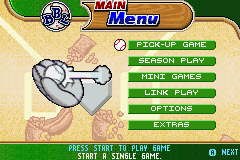
MAIN MENU
From the Main Menu, you can select from the following:
GAMEPLAY MODES
Pick-up Game
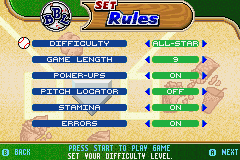
Select PICK-UP GAME from the Main Menu to play a single game. You can choose gameplay rules, select teams and a field, pick players and set your team strategy. Note: When choosing gameplay rules, you can turn the Pitch Locator ON / OFF (shows where a pitch will cross home plate).
Quick Start
Just press START if you want to jump right into a game with a pre-selected team, team name and opponent.
Season Play
Select SEASON PLAY from the Main Menu to play through an entire Backyard Baseball season. You can sign in as the coach, choose a home field, set the game options, pick your team and pick your players. Your game, team and player statistics are tracked as you advance through the season. The winner advances to the Backyard Baseball playoffs! Saving & Loading
When you quit a season game, you are asked to save. Your season and any custom rookie players will be saved from that point in the game under your coach name. Saving also occurs when you unlock goodies such as fields and players.
When starting a game in Season Play, select LOAD to load a previously saved season.
Creating Custom Rookies
To create your own custom rookie player, select an empty player slot on the Pick Player screen (any player slot showing a "?" icon). Create a name for your rookie, and then customize him or her by choosing their hair style, body type, nickname, theme song and more.
To finish your rookie, distribute the skill points across the following abilities: batting power, batting contact, pitching, running and defense.
•
20 points if the "Take Turns" Draft Style is chosen.
•
15 points if the "Me First" Draft Style is chosen.
Once you create a rookie, you can pick him or her for your team.
Certificates
Certificates are awarded to players and teams that perform specific feats such as hitting a grand slam, pitching a shut-out, earning the game MVP title and more. Certificates unlock goodies such as pro players and special players.
Also, as your custom rookie earns certificates, you receive skill points which can be used to improve their abilities.
MINI GAMES
Select MINI GAMES from the Main Menu to play the Home Run Derby™ and Fielders' Challenge games.
Home Run Derby™ (1-8 Players)
Home Run Derby™ is an exciting contest between batters to determine the top power hitter. You can play a single-player game, or up to eight players can take turns in a Hot Seat game sharing the same Game Boy Advance.
You can choose from scoring based on most home runs, total distance or longest home run. Each round of play uses either a pitch limit or an out limit.
Fielders' Challenge (1 Player)
The goal of Fielders' Challenge is to score 40 points before the other team scores three points.
Basic Scoring
You will receive one point for getting an out on a runner advancing toward first base, two points for getting an out on a runner advancing toward second base, three points for getting an out on a runner advancing toward third base and four points for getting an out on a runner advancing toward home plate. You will always receive one point when you catch a fly ball for an out.
Scoring Multiplier
If you make two, three or four outs in a single play, your points will be multiplied accordingly by 2, 3 or 4. For example, getting a double play by making outs at second base and third base scores (2 + 3) x 2 for 10 points.
LINK PLAY
Link Play (2 Players)
Backyard Baseball™ 2006 offers a multiplayer mode for two players. Two Backyard Baseball™ 2006 Game Paks, two Game Boy Advance systems and a Game Boy® Advance Game Link® Cable are required for multiplayer linked games. Note: The Game Boy Advance system connected to the purple connector on the Game Link Cable is Player 1 and controls the game settings. Link play is not supported on the Nintendo DS™ system.
Connecting Game Boy Advance Systems
•
Before connecting the Game Link Cable, all Game Boy Advance systems must be switched OFF.
•
Connect the Game Link Cable to each of the systems.
•
Insert a Backyard Baseball™ 2006 Game Pak into each system and switch the systems ON. •
From the Main Menu, both players must select the LINK PLAY option. Select PICK-UP GAME to play regular baseball against your opponent, or choose HOME RUN DERBY™ to challenge your friends to a home run-hitting contest.
Trade a Custom Rookie
Select TRADE A CUSTOM ROOKIE to trade custom players with a friend on another Game Boy Advance. Once both your custom player selection and your opponent's selection are displayed, both players must press the A Button to confirm the trade.
As needed, you can press the B Button to cancel the trade and return to the Trading screen.
OPTIONS
Select OPTIONS from the Main Menu to turn the following settings ON / OFF:
EXTRAS
Select EXTRAS from the Main Menu to display the player cards, BBL Championship trophies and game credits. You can also view information about how to unlock players and new


.png)


 (En,Fr,De,Es,It).png)
.png)
_1.png)
.png)

.png)