HOW TO CATCH PUZZLE FEVER
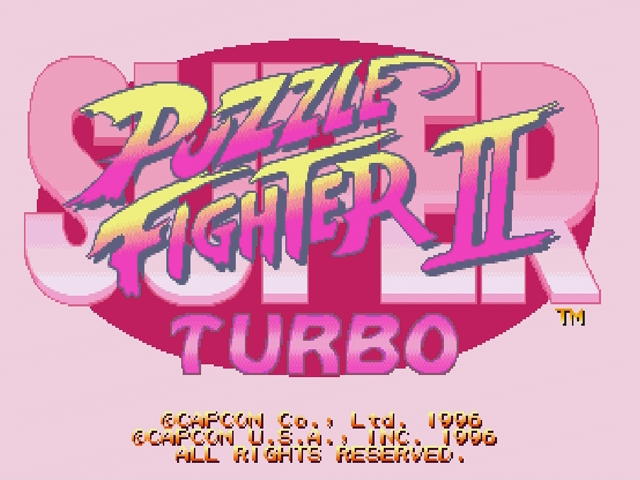
Just when the battle was heading towards a complete free-for-all, the Puzzle War breaks out and you're cast into the conflict to drown your opponent in gems. CAPCOM's awesome new puzzler has rules so basic and play that's so catchy and fun you can't help but get hooked. Beat your opponent to the punch by stacking gem after gem on their side of the screen. Use the special Crash Gem to break gems on your side and drop them on your weary foe. Fill your enemy's side before they do the same and KO! You win.
Puzzle Fighter Rules
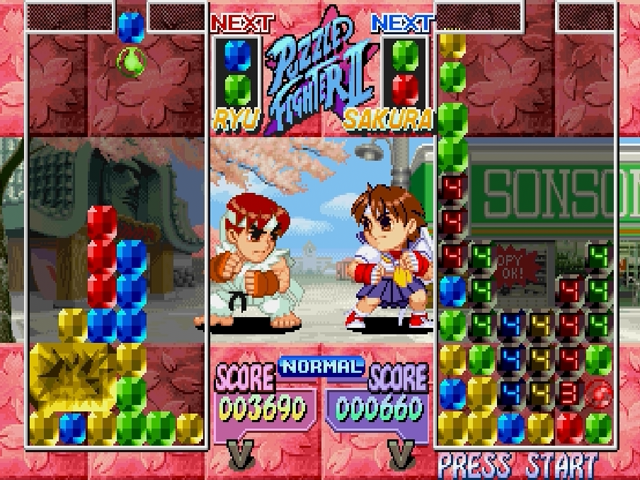
Each round will drop two attached gems from the top of the screen to the bottom. Arrange the gems strategically to prepare for the drop of a round Crash Gem. Touch a Crash Gem to a gem of the same color then all the gems of that color that are linked vertically and horizontally to that gem will break.
These will then create Counter Gems that will be sent to your opponent's playfield. Counter Gems will land on your opponent's side in the pre-determined pattern of your character. The more gems you break, the larger the number of Counter Gems you drop on your enemy. If the gems pile up to the top of the screen right into the gap where the new gems fall, you lose the game.
Mode Overview
•
In Arcade Mode (vs. CPU only) each match is 1 round.
•
VS. Mode (2 Player) is a 3-round match.
•
Change the number of rounds for Arcade and VS. Mode in the Option Mode.
•
Street Puzzle Mode is 1-Player only. •
Each round of gems that falls is previewed at the top of the screen.
•
Win Icons will appear as you win rounds. In Street Puzzle Mode you can win special Icons. •
Warning Messages appear to let you know how many Counter Gems are about to drop on you.
Warning Message Key
•
CAUTION: 1-10 Counter Gems
•
WARNING: 11-30 Counter Gems
•
DANGER: 31 or more Counter Gems
STREET PUZZLE MODE
Fun and prizes abound with the Street Puzzle Mode. There are a number of secret options available here, and to see these features you must play to win. Fight the computer in a 1 round match, and if you win, you take home the prize! Highlight the Street Puzzle Mode from the Mode Select screen using Controller #1 and press START, A or C to select it. Next highlight a character you want to use and press A, B, C, X, Y or Z. Select EXIT to return to the Mode Select screen. After selecting your character you can pick the prize you will play for. Highlight the prize and press A, B, C, X, Y or Z. You will fight one round of intense puzzle action. Difficulty, damage level, game speed and CPU Round are constant in Street Puzzle Mode. If you lose, you will return to the Street Puzzle Mode character select screen. If you win, you will see on-screen how to use the prize. After you win your first prize, the "Goodies" menu will appear on the Mode Select Screen. This menu shows you the prizes you have won and how to use them. You will lose these items if you do not save before you quit. Note: Some prizes will add options to the Mode Select screen. Battle tough on the Street to find out all the secrets!
OPTION MODE
To adjust your options highlight OPTION MODE from the Mode Select screen and press START, A or C. Press the Directional Button ▲ or ▼ to highlight an option, then ◄ or ► to change the setting. Choose from:
•
DIFFICULTY: There are 8 levels to choose.
•
DAMAGE LEVEL: This determines the amount of Counter Gems that fall on your opponent. There are 4 levels.
•
GAME SPEED: Gems can fall at 1 of 4 different speed levels.
•
CPU ROUND: Change the number of rounds for a match against the computer between 1, 3 or 5.
•
VS. ROUND: Change the number of rounds for a match in VS. Mode between 1, 3 or 5.
•
AUDIO: Adjust your sound between Stereo and Mono depending on your sound system.
•
BGM: Switch between Original and Remixed background music.
•
CONTROLLER CONFIG: Change the order of your action buttons.
•
EXIT: Back to Mode Select Screen.
PAUSE MENU
Press START to pause gameplay, then press A or C to bring up the Pause Menu. Then highlight one of the following options and press START, A or C:
•
CONTINUE: Unpauses game and returns to gameplay.
•
CONTROLLER CONFIG: Same as OPTION MODE.
•
SCREEN ADJUST: Changes the location of the game screen on your monitor. After selecting this, use the Directional Button to move the screen around. When finished, press B to return to the Pause Menu.
•
QUIT: Quits game and returns to the game title screen. Select Yes or No.
BACKUP DATA
Select BACKUP from the Mode Select screen and press START, A or C to bring up the Backup Menu. Highlight one of the following and press START, A or C to select it:
•
SAVE DATA: Saves the Hi-Score Ranking for Arcade Mode only, plus any items obtained in Street Puzzle Mode. •
LOAD DATA: Loads data. Select CANCEL to return to Backup Data menu.
•
EXIT: Returns to Mode Select Screen.


.png)
.jpg)