Connecting the Game Boy® Advance
Game Link® Cable Games
To play multiplayer, you need:
•
2 Game Boy® Advance systems
•
2 SUPER PUZZLE FIGHTER II™ Game Paks
•
1 Game Boy® Advance Game Link® Cable
Connection Instructions
1. Make sure the power of both Game Boy® Advance systems is OFF. Insert a SUPER PUZZLE FIGHTER II Game Pak into each system.
2. Connect the Game Link® Cable to the external extension connector on both Game Boy® Advance systems.
3. Turn on the systems.
Important: The system connected to the smaller plug is 1P.
Note: The Game Link® Cable may malfunction if:
•
It is not for the Game Boy® Advance system.
•
It is not connected correctly.
•
More than two Game Boy® Advance systems are connected.
Gameplay Basics
Beat your opponents to the punch by stacking gem after gem on their side of the screen! Use the special Crash Gem to break gems on your side and drop them on your weary foe. Fill up the other side before your enemy does the same and KO! You win!
In each round, sets of two attached gems drop from the top of the screen to the bottom. Use the controls to arrange the gems in color lines to prepare for the drop of a CRASH GEM.
When the CRASH GEM drops, touch it to a gem of the same color. All the gems of that color that are linked vertically and horizontally will crumble. These create COUNTER GEMS that are sent to your opponent's playfield. COUNTER GEMS land on your opponent's side in the pre-determined pattern of your character. The more gems you break, the more COUNTER GEMS you drop on your enemy.
Watch out! If gems pile up to the top, you lose!
•
The next round of gems to fall is previewed at the top of the screen.
•
Change the number of rounds for Arcade and VS. Mode in Option Mode.
•
WIN icons appear as you win rounds. Win special icons in Street Puzzle Mode!
•
Messages show special moves you've just accomplished.
Counter Gem Warnings
Warnings tell you how many COUNTER GEMS are about to drop:
•
CAUTION: 1-10 COUNTER GEMS
•
WARNING: 11-30 COUNTER GEMS
Gems
Normal Gems
These regular gems fall round by round from the top of the screen.
Power Gems
When 4 or more same-color NORMAL GEMS are placed together in a certain manner, they form large POWER GEMS. These gems can be as big as you can make them. Use a CRASH GEM or RAINBOW GEM to break POWER GEMS and drop many gems on your opponent while increasing your score.
Crash Gems
The round gems are CRASH GEMS. When dropped on a gem of the same color, a CRASH GEM breaks. Try to link lines of same-colored gems to create a huge chain-reaction of broken gems. This will drop lots of COUNTER GEMS on your opponent!
Counter Gems
COUNTER GEMS fall on you or your opponent in a pattern based on your character.
•
COUNTER GEMS contain a colored number that counts down as each new round of gems falls.
•
Normal COUNTER GEMS start at 5. When they count down to 0, they transform into NORMAL GEMS of the same color as their number.
•
You can destroy COUNTER GEMS before they fall by counter-attacking with COUNTER GEMS of your own.
•
Break a CRASH GEM or RAINBOW GEM on as many NORMAL GEMS as you can, and the number of COUNTER GEMS about to drop will be reduced.
•
COUNTER GEMS that still drop after some are countered start with number 3.
•
Drop a CRASH GEM paired with a NORMAL GEM of the same color, and any COUNTER GEM that comes into contact with them will be destroyed no matter what color it is.
Modes
Press START during the introduction to jump to the Title screen.
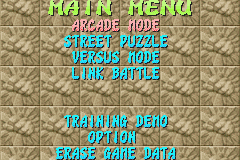
Press START again to display the Mode Select screen. Use the Control Pad to highlight a mode and press the A or B Button to select it.
Arcade Mode
Play against the computer. Each match goes for 1 round (you can change the number of rounds in Option Mode). Choose the initial level of difficulty:
•
EASY: Defeat 3 opponents.
•
NORMAL: Defeat 8 opponents.
•
HARD: Defeat 8 super-difficult opponents.
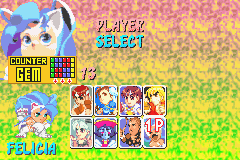
After choosing a difficulty, select your character with the Control Pad. Then press the A or B Button to begin play.
VS. Mode
This is a classic 2-player, 3-round contest (you can change the number of rounds in Option Mode).
1. Select a character.
2. Select your console setup.
3. Choose a handicap (choose from 5 levels; the higher the number, the faster the gems will drop).
After each match, you can change your character and review the Result screen.
Controls
PLAYER 1:
•
◄/►: Control gem direction
•
L Button (tap): Rotate gem
•
L Button (press and hold): Quick drop
PLAYER 2:
•
A/B Buttons: Control gem direction
•
R Button (tap): Rotate gem
•
R Button (press and hold): Quick drop
Link




.png)




.png)



.png)
 (En,Ja).png)

.png)


.png)