LOADINg
1. Make sure the power switch is OFF.
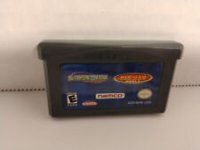
2. Insert the Dave Mirra Freestyle BMX™ 3 Game Pak into the Game Boy® Advance slot as described in your Nintendo Game Boy® Advance instruction manual.
3. Turn the power switch ON.
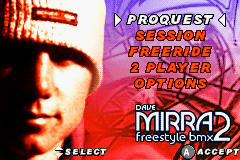
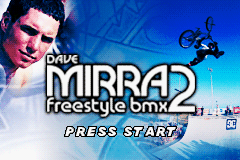
At the title screen, press START to advance to the Main Menu.
NOTE: The Dave Mirra Freestyle BMX™ 3 Game Pak is for Game Boy® Advance ONLY
Dave Mirra Freestyle BMX™ 3 is for up to two players. Each player must have a Dave Mirra Freestyle BMX™ 3 Game Pak. A Nintendo Game Link® cable (sold separately) is required to play with two players.
INTRODUCTION
Welcome to the biggest, baddest BMX fest yet: Dave Mirra Freestyle BMX™ 3! It's all here, and it's all about big air, grinding rails, riding ramps, jumping gaps and pulling the SICKEST tricks imaginable. And it's all in the palm of your hand! Dave Mirra Freestyle BMX™ 3 offers 1000+ tricks and four modes of game play. Take on all the gritty challenges of a complete Proquest, rack up some points in Session mode or just ride easy in Freeride. For extra fun, join a friend for fantastic Multiplayer madness! There's tons of outrageous riding ahead, so master your tricks and show the world you're the BMX boss! Good luck!
MAIN MENU
At the title screen, press START. You will advance to the main menu. Use the Control Pad to make a selection, and then press the A Button or START to confirm your choice.
•
PROQUEST: Your quest to prove you're the best.
•
SESSION: Tune up your riding and earn points.
•
FREERIDE: Practice your freestyle skills.
•
MULTIPLAYER: Compete with a friend using a Game Boy Advance Game Link® cable.
•
OPTIONS: Set game options.
OPTIONS
Select CONTROLS to choose from four pre-set control schemes. Type A is the default.
The menu displays:
Button Actions:
CONTROLS
Grinds and Manuals
Perform `A Button + Hold ↓ + B Button` (while near a grind rail or edge) to Enter Rear Wheel Grinds.
Rear Wheel Grinds:
Balancing
Press `←` `→` (while grinding) to Balance Left and Right.
Rear Manuals
Quick Tap `↑` `↓` (while in Air) to Enter Rear Manuals (rhythmically tap B Button to change grind pose).
Rear Manual Tricks:
Flips and Rotates
Use the L Button for Flips and Rotate.
•
Hold ↑ + Tap L Button: Front flip
•
Hold ↓ + Tap L Button: Back flip
•
Tap L Button: Rotate 180+
•
Hold → + Tap L Button: Right 180+
•
Hold ← + Tap L Button: Left 180+
Any Big Air or Quick Trick can be combined with Flips and rotates. Enabling you to go for even sicker tricks... go on try it and watch those trick scores go massive...!
BALANCING
Holding that mass of metal and rubber steady while you grind, manual and stall isn't easy in real life, and it isn't easy here. To help you know how close you are to falling, there's a handy little balance meter just for you.
The balance meter consists of two parts; the balance bar, and the balance ring. The bar shows you the ideal balance, and...
SCORING
The scoring system is based on tricks performed with bonus modifiers (including Spins, Flips, Transfers and Gap jump bonuses).
CHALLENGES
As you complete challenges you're rewarded with Money. As you earn money new environments become available. You can use money to buy stat ups and new bikes.
To beat the game you have to complete all challenges across AMATEUR, PRO and HARDCORE environments.
THE ENVIRONMENTS
There are 8 wild environments in Dave Mirra Freestyle BMX™ 3. To start with, the AMATEUR levels are open:
Once new levels are unlocked, they become available in all game modes. Unlock additional levels by meeting the challenges and objectives on the early levels.
Each environment has the relative amount required to open it displayed in the front-end.
GAME MODES
Proquest
Show the world your skills in Proquest mode. Start in the Amateur circuit, completing the challenges and objectives to progress on to the Pro circuit. If you can keep up and complete the objectives here, you'll be allowed to join the hallowed ranks of the truly Hardcore riders on the Hardcore circuit.

.png)
 (En,Fr,De,Es,It).png)
 (En,Fr,De,Es,It) (Rev 1).png)
_1.png)










 (En,Fr,De,Es,It).png)
.png)
_1.png)
.png)

.png)


 (En,Fr,De,Es,It).png)

.png)

.png)

