Getting Started
Click the left mouse button to move onto the next screen. If left in this screen it will enter the attract mode.
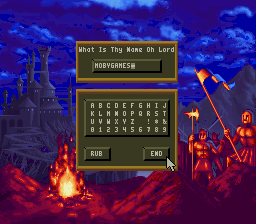
After the opening sequence, a screen will appear asking "What Is Thy Name, O Lord?" Type in the name you want to use in the game, either your own or one you make up, and then click on the END box with the left mouse button. If you don't want to use a name, just click on the END box.
Next, the Option Screen will appear. This lists the options you have at the beginning of the game. Click on the option of your choice:
•
Start New Conquest: Start the conquest from the beginning. This will be the Standard game with 195 pre-set territories to conquer.
•
Continue Conquest: Allows you to select the next area of conquest.
•
Restore Conquest: Password feature allows you to access previously saved game.
•
Play Random Land: Enter a random computer generated territory.
The Path to Conquest
There are 195 territories to conquer in the world of Powermonger in the Conquest mode. After the map is generated, the Map Selection Chart will appear displaying the various territories you can conquer.
At the beginning of the game, the only territory you can conquer is the island in the top left hand corner; if you cannot immediately find this island, move the On Screen Pointer around in that corner of the Chart. The red Selection Rectangle will appear when the pointer is over it. Select this territory by clicking the left mouse button.
To survive and prosper in a territory you will need to conquer settlements, get food and men, and invent both weapons and trading items. But keep in mind there are enemy armies prowling about who are after the same resources and doing the same things you are. These armies are as strong as yours, and some of their commanders are at least as aggressive and clever as you.
You have conquered a territory when you bring a significant portion of the population under your control. When all the gold in the Conquest Balance is on the right side you have conquered the current territory. (You don't always have to bring all the population of a territory under your control to conquer the territory).
When you have conquered a territory, click the left mouse button on the Option Symbol, then on the Retire box. The computer will then tell you that you have won. Click the left mouse button to go back to the Option Screen.
After you have conquered the first territory, you can move to any adjacent territory. To enter a territory, place the On-Screen Pointer over its map; when the red Selection Rectangle appears around the territory, click the left mouse button. (Note that you can only move into territories which are highlighted in red when the On-Screen Pointer is over them).
In the case of this first territory, you can move to territories to the right and below; in more centrally located territories away from the corners or the edge, there will of course be more directions in which you can move and more territories to choose from. To help you keep track of where you've been, a dagger will appear in the map of each territory after you conquer and leave it, and a yellow Selection Rectangle will appear around them when the On-Screen Pointer is over them.
When you move to a new territory, you will effectively be starting all over again. The Captains you recruited will stay behind to administer your conquest. You may not have as many men or as much food as you had before; building up vast armies and enormous hoards of food may help you in the territory you were in, but not in the one you're going to. You can't take your spoils with you.
As you get farther from the first map, the going will get tougher and tougher; the armies will get more aggressive and better equipped, and resources will become increasingly difficult to find and secure, let alone manage. (You can move back to easier territories you haven't conquered yet if the going gets too tough). The most formidable territory of all, and the one you must finally conquer to rule the world, is in the lower right corner of the Map Selection Chart.
The Overview Map
The Overview Map shows the territory you are currently attempting to conquer. On this map you can see roads, bodies of water, forests, settlements, and their occupants.
Overview Map Controls
The White Cross on the Overview Map indicates the center of the area currently shown in the Close-Up Map. By changing the position of the cross on the Overview Map, you change the view in the Close-Up Map. You can move the White Cross in two ways:
•
Compass: Use either mouse button or click on the Compass to indicate in which direction you want the White Cross to scroll. If you click the left mouse button, the cross will move a short distance with each pressing of the button; if you press and hold down the right mouse button, the cross will continue to scroll until you release the button.
•
Joypad: The left and right mouse buttons are the same as pressing "A" and "B" on the joypad. When using the joypad press the "Y" button to select AREA 2 (Compass), then use the joypad to scroll the map in the desired direction.
•
Overview Map: Click on the Overview Map with either mouse button to move the White Cross to whatever location you want to view.
The Compass can move the White Cross in eight different directions: North, South, East and West, as well as North-east, North-west, South-east and South-west. Note that
.png)

.png)






 (En,Fr,De).png)


 (En).png)




.png)

.png)
_1.png)



.png)


_1.png)
.png)
.png)
_1.png)



_1.jpg)
