GETTING STARTED
1. Turn OFF the power switch on your Nintendo® Game Boy® Advance. Never insert or remove a Game Pak when the power is on.
2. Insert the Game Pak of GT Advance Championship Racing into the slot on the Game Boy Advance. To lock the Game Pak in place, press firmly. 3. Turn ON the POWER switch. The credit screens will appear (if you don't see them, begin again at step 1).
4. When the title screen appears, press START to proceed to the Main Menu.
MAIN MENU
All of the game modes and options can be accessed from the Main Menu.
•
Championship: The main one-player game: compete through a season of courses to unlock hidden cars and upgrades. See page 16 for more information.
•
Quick Race: Don't have enough time for a season? Compete for first place in a quick race. See page 18.
•
Time Attack: Challenge the best times for each course. See TIME ATTACK on page 18 for more information.
•
Practice: Not able to beat the best? Use the Practice mode to become accustomed to a car's handling before heading to a course.
•
Extra 1: Race through the Championship mode to unlock an extra game mode.
•
Extra 2: Unlock another hidden game mode in the Championship mode.
•
VS: Choose VS for some 2-player, head-to-head action! See page 19 for more information.
OPTIONS MENU
Customize the game settings.
•
Records: View your best lap times from the Time Attack mode.
•
Password: Load a previously saved game. See SAVING AND LOADING on page 22 for more information.
SOUND
Alter the following sound options.
•
Music: Toggle the in-game music ON or OFF.
•
Sound Effects: Select a number and press the A Button to listen to the sound effect.
•
BGM Test: Select a number and press the A Button to listen to the background music.
PLAYING A GAME
Select a game mode from the Main Menu to begin a game. In Championship mode, you must select a class to race in before heading to the Garage.
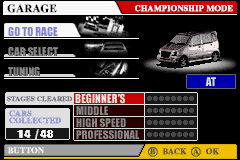
When not racing, the Garage is where you will spend the rest of your time fine-tuning the cars. You can make adjustments to your car, select a new car, or head to the racetrack from the Garage. GARAGE OPTIONS
•
Go To Race: Take your selected car to the track for some high-speed racing. •
Car Select: Choose a vehicle from the available list of cars.
CAR SELECTION STEPS
1. First select a manufacturer and press the A Button.
2. Next, scroll through the available cars by pressing LEFT/RIGHT on the Control Pad, then press the A Button to confirm. You can change the car's body color by pressing UP/DOWN.
3. Finally, choose to have an Automatic (AT) or Manual (MT) transmission by pressing LEFT/RIGHT on the Control Pad.
4. When done, press the A Button to continue. Press the B Button at any time to return to the previous menu.
CAR HANDLING VARIABLES
Each car will handle differently on the track - use the following variables to make your selection:
•
Handling: The more handling a car has, the better it will control through the corners and turns.
•
Top Speed: The higher the top speed, the faster a car will go.
•
Acceleration: A car with high acceleration will be quicker off the line.
TUNING
Fine-tune your car before heading to the track. Upgrades will not be available until you've unlocked them in the Championship mode. When an area of the car can be upgraded, a black star will appear above the car part. Use the Control Pad to highlight the car part and press the A Button to select it. Now press RIGHT on the Control Pad to upgrade the part. The car parts available to upgrade are listed on the next page.
PAUSING THE GAME
Press START at any time to pause the game and access the following options.
•
Cancel: Return to the race!
•
Restart: Start the race over from the beginning.
GAME MODES
The mode select screen lists the following options: Championship, Quick Race, Time Attack, Practice, VS, and Options.
CHAMPIONSHIP
The Championship mode is the main one-player game. While playing through a Championship season, you will be able to unlock new cars, better parts, and additional race tracks - all of which can be used in the other game modes!
CLASS SELECT
When entering the Championship mode, you will need to determine the difficulty level by selecting a class to race in. Choose from Easy (Beginner's Class) to hard (Professional Class). The more difficult classes will not be selectable until you've completed the easier classes.
After selecting a class, you will enter the Garage. In addition to the standard information, the Garage in Championship mode also shows statistics on your car collection and the stages you've been able to complete.
GARAGE STATISTICS
•
Car Collection: Although you begin with 14 selectable cars, you will be able to unlock more cars for a total of 48 playable cars in GT Advance Championship Racing! The number you've unlocked is shown in the bottom/left corner of the Garage 

.png)

 (En,Fr,De,Es,It).png)










 (En,Fr,De,Es,It,Nl).png)
_1.png)


 (En,Fr,De,It).png)