Setting Up
•
1 Set up your Super NES system, and make sure the Power switch on the Control Deck is turned OFF.
•
2 Plug in one or two controllers, depending on the number of players.
•
3 Load the Game Pak into the top of the Control Deck. Push it all the way down.
•
4 Turn on your TV and then slide the Power switch on the Control Deck to the ON position. The game's opening screens will appear.
•
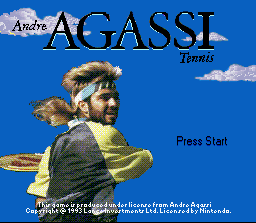
5 Press the Start button at the Title screen to bring up the first Options screen.
•
6 Press the Control Pad on your controller up or down to mark your choice on each Options screen.
•
7 Press the Start button to make selections.
Note: Slide the Reset switch forward to start the game over.
Menu Options
•
Use the Control Pad to mark your choices.
•
Press Start to make selections and go on to the next screen.
Player Modes
•
PROFESSIONAL: You must choose the appropriate shot: volley, overhead smash, lob or drop shot/punch. Also, your computer opponents are more skilled than in Amateur mode.
•
AMATEUR: The computer will automatically select and control the appropriate shot, such as a volley, backhand, forehand or overhead smash.
Game Modes
•
PRACTICE: Practice your returns on random shots from a ball machine, or practice volleying with a computer-selected player. One player only.
•
EXHIBITION: Choose Normal or Skins competition, or enjoy a computer vs. computer match.
•
TOURNAMENT: Play a four-round tournament in singles or doubles, and in men's or women's competition. One player or two-player cooperative.
Exhibition Details
•
Normal matches can be played for either 1 set or 3 sets. Skins matches are always played for 3 sets.
•
One player can compete against the computer or a friend in singles or doubles.
•
Two players can team up and challenge the computer in doubles.
•
Computer vs. computer demonstration matches can be either singles or doubles.
Tournament Details
•
In singles tournaments, you choose your player and the computer chooses your opponent.
•
In doubles tournaments, you choose your player and partner, and the computer chooses the opposing team.
•
In both singles and doubles, the other players compete behind the scenes. Winners are paired for the following matches.
Players
•
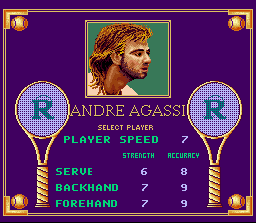
Andre Agassi delivers a blistering, deadly accurate baseline smash.
•
Carol Ark has the corner on accuracy with pin-point serves and returns.
•
Tiger Ball plays a strong, fast game.
•
Ron Pepper dishes up a ballistic serve.
•
Count on Don Matt for accurate shots.
•
Cassie Nova puts 'em where she wants 'em.
•
Bob Chin is the fastest player.
•
George King makes accuracy look simple.
Court Select
Choose to play on clay, grass or an indoor court.
Practice
"Develop the weapons and eliminate the errors." — Andre Agassi
Practicing develops devastating drives, explosive baseline smashes, and a cool mental game. Choose Practice from the Options screen for state-of-the-art training sessions.
You can choose to polish your returns on random shots from the automatic ball server. Or you can practice volleying with a computer-selected opponent.
During practice, use the same button controls as for playing a game. After practice, hold down the Select button and press Start to exit.
Exhibition Mode
"This is the definition of pressure." — Andre Agassi
In Normal play, you can compete against the computer or a friend in singles or doubles. Two friends can team up and challenge the computer in doubles. You can also choose to watch the computer play demonstration matches in singles or doubles.
Normal matches can be played for either 1 set or 3 sets.
Skins Matches
A Skins match is totally unique and addictive. Watch your winnings add up fast!
•
Starting at $100, the stakes increase by $100 with each return.
•
The point winner takes the pot.
•
The maximum purse in each game is $55,000.
•
Only the game winner keeps the money!
Skins matches are always played for the best of 3 sets. Watch the screen for the purse results at the end of each match.
Tournament Mode
"Focus on one match at a time, but keep the vision of being the champion." — Andre Agassi
Take the challenge — play Tournament mode! You'll take part in a 4-round tournament in either singles or doubles and in men's or women's play.
The computer chooses your opponent in singles. In doubles, you choose your player and partner, and the computer chooses the opposing team. The other players compete behind the scenes, simultaneously with you. Winners are paired for the matches that follow.
The tournament ladder appears before each match, and at the end of a tournament.
Serving Rules
"Getting the first serve when playing on hard court is everything." — Andre Agassi
You always serve from behind the baseline. Player 1 always serves first.
•
You must serve to the opposite side of the opposite court (cross court), and your serve must land in the service court. The serve is a fault if the ball lands outside the service area. If you commit a double-fault (two faults in a row), the other player wins the point.
•
Your first serve is from the right side, on the near court
.png)

.png)



.png)


.png)
.png)
.png)

.png)





.png)

