Starting the Game
1. Flip OFF the power switch on your Super Nintendo Entertainment System. WARNING: NEVER TRY TO INSERT OR REMOVE A GAME PAK WHEN THE POWER IS ON.
2. Make sure a Controller is plugged into the Controller Socket 1 on the Super NES. If you’re playing against a friend, plug the other Controller into Controller Socket 2.
3. Insert the Game Pak into the slot on the Super NES. Press firmly to lock the Game Pak in place.
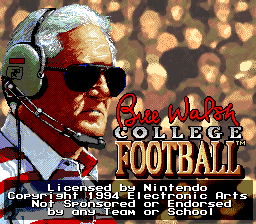
4. Turn ON the power switch. The EA Sports and High Score logos appear. If you don’t see them, begin again at step 1. 5. When Coach Walsh’s picture appears, press START to bring up the Game SetUp screen.
Setting Up the Game
Use the Game Set-Up screen to customize your contest.
•
Cycle through options: Control Pad UP/DOWN.
•
Cycle through choices for the selected option: Control Pad LEFT/RIGHT. (Defaults in Bold type)
Game Setup Options
•
GAME: Select from REGULAR GAME (play against the computer or a friend; stats and records don't count), NEW SEASON (available only for 1993 teams; play a season from beginning to end), or PLAYOFFS (1993 Playoffs with 12 1993 teams, or All Time Playoffs with 12 National Championship teams from the '70's, '80's and '90's).
•
RESTORE PASSWORD: Resume a season or tournament in progress at the next scheduled game. (You must have already won a tournament game or have played a season game to select this mode.)
•
HOME: Select the team playing for the home crowd.
•
VISITOR: Select the visiting team.
•
QUARTER: Choose between 15 MINUTES, 5 MINUTES, or 10 MINUTES.
•
WEATHER: Choose between FAIR, WIND, RAIN, SNOW, NIGHT, or VARIABLE.
NOTE: WHEN YOU'RE PLAYING IN A TOURNAMENT, THE COMPUTER DECIDES WHICH PLAYER IS THE HOME TEAM.
When you've set up the game to your liking, press START to bring up the Player Select screen.
Player Select Screen
•
Players select your teams: Control Pad LEFT/RIGHT to move the controller icon under the team of your choice. Press START to exit.
The Scouting Report
When you exit the player select screen, the scouting report appears. Here both teams are compared in nine major areas.
The higher the yellow bar in a team's rating graph, the more talent the team has in that area. Press START to go to the Coin Toss.
Coin Toss
Before the referee can start the game, the coin must be tossed. The winner must choose to kick or receive, and the loser must choose which goal his team will defend in the first half.
•
Toggle between heads and tails: Press the Control Pad LEFT/RIGHT before the coin hits the ground.
Wind Direction Screen
If you lose the toss, you must choose a goal to defend. Look at the wind sock to see which direction (if any) the wind is blowing.
Make sure to note which goal the wind is blowing toward, and remember that the wind blows with the same force and in the same direction for the entire game.
•
Defend the home team's goal: Press Y.
•
Defend the visiting team's goal: Press B.
Receiving the Kick
If you're receiving the kick, your return man automatically catches the ball. If the return man catches the ball in the end zone he will remain in place until you run him out.
If you do not run him out, the referee will signal a touchback. If the return man catches the ball in front of the endzone he will automatically move up-field.
•
Take control of the return man: Press the Control Pad in the direction you want the player with the star to move.
Kicking
The following kicking instructions apply to kickoffs, punts, and field goals.
1. Press B to snap the ball and start the strength meter moving upward.
2. To aim the kick, press Control Pad LEFT/RIGHT after you press B.
3. Press B again to stop the meter and strike the ball. The higher the meter is at the time when you stop it, the farther the ball will travel.
Passing Plays
After you snap the ball, wait for the passing windows to pop up before you press any buttons or the control pad. You can let the computer execute the play or you can press the button that matches the window of the intended receiver.
If you move the quarterback out of the pocket or off his designed roll-out by pressing the control pad in any direction, the computer will no longer execute the play. Then it's up to you to press B to bring up the passing windows, choose a receiver, and pass the ball.
Once the ball is in the air, the passing windows disappear. The target spot where the ball is headed appears on the field as a yellow, circled cross.
•
Switch control to the intended receiver: Press B. Use the control pad to guide the receiver to the spot if he's not already there.
•
Raise the receiver's hands (increases catch chance): Press X.
Broken Passing Plays
If you press the control pad (i.e., take control of the quarterback) before the passing windows pop up, the passing windows will not appear automatically.
•
Show passing windows: Press B.
.png)

.png)