Getting Started
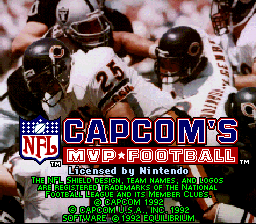
1. Insert your Capcom MVP Football Game Pak into your Super Nintendo Entertainment System. Turn the power on. 2. Press the Start button to advance to the Game Selection Screen. Press the Control Pad to highlight a game mode. Press the X, Y, A, or B button to enter your selection. Scout the following sections for details on each mode.
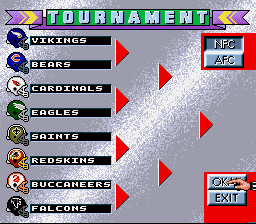
3. Screens with OKAY and EXIT buttons: The OKAY button confirms your selection and advances you to the next screen. The EXIT button will return you to the previous screen. Pressing the Start button will automatically select OKAY regardless of where the cursor is.
Custom Mode
You call the shots. When you select this mode you control the variables.
•
From the Game Selection screen press the Control Pad to select CUSTOM. Press any button to advance to the Custom Setup screen.
•
Press the Control Pad up/down to select from the following options:
Custom Setup Options
•
Number of Players: Choose from a ONE or TWO player game. One player is the default setting.
•
Level: Choose from SEMI-PRO or PRO mode. In SEMI-PRO mode the plays the computer has chosen are shown. In PRO mode the plays are not shown. PRO mode is the default setting.
•
Execution: Choose from COACH or PLAY. PLAY mode allows you to call plays and control the players on the field. COACH mode allows you to only call plays.
Game Mode Scenario Setup
•
After setting up your game press OKAY to advance to the Game Mode Scenario screen.
•
Press the Control Pad to choose from the following selections:
•
Team: Choose your favorite NFL team.
•
Venue: This feature controls home and visitor status of the teams.
•
Quarter Length: Choose from 5, 10, or 15 minute quarters.
•
Field Conditions: Choose from RANDOM or SET. Selecting RANDOM to have the computer create the conditions. Select SET if you wish to control the weather and field surface.
Field Conditions Setup
•
Press the Control Pad to select the following conditions:
•
Surface: Choose from Natural or Artificial turf.
•
Climate: Choose from DRY, MUD, RAIN, or SNOW. MUD is not an option on artificial turf.
•
Wind: Choose wind direction and speed. The arrow buttons control the direction the wind will blow. The numbers control the wind speed.
Playoffs Result Diagram
Follow the progress of the playoffs on the Playoffs Result Diagram screen.
You'll compete with teams in your conference for a slot in the Super Bowl. Teams paired by red arrows compete. Winners of the game advance to the next stage of competition. The NFC/AFC button allows you to check the progress of the playoffs in the other conference.
MVP Mode
It's second and twenty on your own 10 yard line. You're down by two and there's only 1:24 on the clock. Can you come through in the clutch?
Test your football skill in twenty scenarios of one player action.
•
From the Game Selection screen press the Control Pad to select MVP.
•
Press any button to advance to the MVP password screen.
•
Press the Control Pad to enter a password. (Note: After winning a game this screen will appear with a password. Write it down!)
•
If you do not have a password select OKAY to advance to the Scenario information screen.
Penalties
•
Kick out of bounds: If a kickoff is kicked out of bounds without being touched by either team the receiving team has the option of taking the ball where it went out of bounds or 30 yards from where it was kicked.
•
Delay of Game: If the offense doesn't hike the ball before the 45 second play clock expires they receive a 5 yard penalty. Over two consecutive delays result in an unsportsman-like conduct penalty.
•
Unsportsman-Like Conduct: Tackling a player before the ball is hiked is unsportsman-like and carries a 15 yard penalty. The offense also receives a first down.
•
Personal Foul: Tackling a player not carrying the ball after the ball is hiked is a personal foul. Personal fouls have a 15 yard penalty and a first down for the offense.
•
Off-sides: This is called when a defensive player is on the offensive side of the line of scrimmage when the ball is hiked or if a defensive player touches an offensive player before the hike. There is a 5 yard penalty for being off-sides.
•
Pass Interference: Tackling a receiver before they catch the ball is pass interference. If the offense accepts the penalty they receive a first down at the spot where the interference occurred.
•
Offensive Holding: This occurs when an offensive player grabs or holds a pass rusher. This penalty results in a 10 yard penalty.
•
Half Distance Rule: Penalties that would move the ball more than half the distance to the goal line will move the ball to half the distance to the goal line.
Injuries
A couple of players may get injured during the course of the game. The computer wil make automatic substitutions for those that go out.
Offense - Weak Side Formation Plays
•
Dive Left: The dive is a short yardage running play aimed through the left of the line of scrimmage at the inside area between the two tackles. It is the simplest type of running play, as the halfback is not lead blocking interference and the offensive linemen execute straight ahead "man blocks". At the snap, the left guard, left tackle, and tight
.png)

.png)
.png)
.png)




.png)
.png)


_1.png)


.png)