Game Modes Menu
On the Game Modes menu screen, you are given four different choices to choose from. Use the ↑ and ↓ arrows on the +Control Pad to select the desired Mode and then press any Button to start.
Competition Mode
This is the 1-player game, in which the player helps guide Kirby to his ultimate dream of winning the Dream Fountain Cup. Selecting Competition brings up a stage select screen. Depending on your skill level, you may choose to start off with the Training levels, Level 1 or Level 4. Choose a level by using the ← and → arrows on the +Control Pad, and then press any Button.
Each level begins with a Boss introduction screen in which a picture of the Boss is shown and a voice states the Boss's name. This is followed by a conversation screen in which Kirby and the Boss get acquainted. Then the game commences. Practice Mode
This is the practice mode. You may practice alone or with a friend. In this mode, the Avalanches are turned off, which means that regardless of how well or poorly you play, you can not affect your partner's screen. Competition is not a factor.
In the practice mode, each player has the option of setting their own difficulty level. The choices are similar to that of the 2-player game. Once a player selects a difficulty level, the practice session begins.
•
Spicy (#3): Intermediate
Blobs
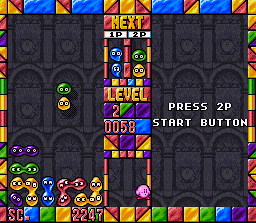
Blobs always appear in pairs. Sometimes the Blobs will be the same color, and sometimes they will be different colors. Check your NEXT box to clue in on what will be the next pair to fall into the playing field.
The first of the pair to appear on the screen will be the dominant one. The dominant one can be identified by its flashing white edge. When you spin the pair of Blobs, the dominant one will maintain its position while the other Blob will revolve around it like a satellite.
The Blobs come in five glorious colors. Anytime two or more Blobs of the same color end their moves adjacent to each other (either horizontally or vertically), they glom together. If four or more of one color glom together into a single group, they explode and disappear.
Boulders
Boulders are obstacles that clog up the playing fields. They do not act like Blobs, and can only be eliminated when Blobs adjacent to them are exploded.
Boulders are produced when large amounts of Blobs are made to explode with the drop of a single pair.
Moments before these Boulders avalanche down upon the playing field and disrupt normal play, the Boulders appear above the playing field in the form of Boulder warning icons.
The Options Screen
Unless otherwise specified within the option's explanation, the +Control Pad does all the work while on the Options Screen. ↑ and ↓ scroll through the Options menu, while ← and → change the setting of the option currently selected.
•
Exit: Sets all the changes made while on the Option Screen and returns the player to the Title Screen. Press any Button to Exit.
•
Vs. Com Level: Alters the difficulty of a 1-player game. Choose between "Easy", "Normal", "Hard" or "Hardest."
•
1P vs. 2P Mode: Sets the length of a 2-player vs. game. Choose between a 1, 3, 5, 7, 9, 11, 13 or 15 Game Match.
.png)

.png)
