Block Types
There are different blocks that appear in Tetris 2: Flash Blocks, Fixed Blocks and Falling Blocks. Each of these block types appear in three colors.
Flash Blocks
The Flash Blocks play a key role in this game. They also have a different effect in the 1-player and 2-Player games. Try eliminating these blocks to see how they can help you win.
Fixed Blocks
These blocks appear on the screen before the game begins and restrict movement of the Falling Blocks. To win the game or advance to the next stage, you must eliminate all Fixed Blocks from the screen.
Falling Blocks
These blocks drop from the top of the screen and help you eliminate Fixed Blocks. Falling Blocks appear in nine forms. All Falling Blocks consist of four smaller blocks connected on one side.
The circles on the Falling Blocks (as shown in diagrams 7, 8, and 9) indicate the point where the blocks separate after landing on a Fixed Block in the playing field.
Eliminating Blocks
To eliminate blocks from the screen, move the Falling Blocks so they match up with other blocks and create a horizontal or vertical line. The blocks disappear each time you create a row of three or more similarly colored blocks.
You can arrange the Falling Block so you can make a row of three red blocks disappear, or drop a Falling Block so the blue blocks make a vertical line and disappear.
Chain Reactions
A Chain Reaction occurs if you eliminate two or more rows using one Falling Block. The red blocks disappear, causing the blue blocks to drop and create a new match.
Chain Reactions are worth many extra points in the 1-Player game and help you sabotage your opponent's playing field in a 2-Player game.
How to Play the 1-Player Game
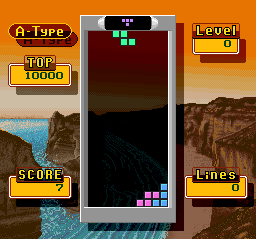
To advance in the 1-Player game, you must move the Falling Blocks and position them in rows and columns causing similarly colored Fixed Blocks and Flash Blocks to disappear. Your game ends if you allow at least one block to touch the top of the playing field.
If you eliminate all Flash Blocks, all Fixed Blocks will disappear and you will advance to the next level. For example, removing the red Flash Block makes all red Fixed Blocks disappear.
As you do on the Game Selection Screen, press the A Button or the START Button to make a selection on the Round Selection Screen.
1-Player Round Selection Options
•
SPEED: The rate that the Falling Blocks drop.
•
ROUND: The higher rounds will challenge you with more Fixed Blocks and faster Falling Blocks.
•
MUSIC: Lets you select the background music. Select OFF to turn off the music.
Scoring System (1-Player Game)
•
Falling Blocks: 10 points each
•
Fixed Blocks: 20 points each
•
Flash Blocks: 40 points for each Fixed Block erased following Flash Block.
How to Play the Puzzle Game
Although the basic rules of the Puzzle Game are similar to those of the 1-Player game, the object of this mode is to eliminate all blocks from the playing field using a predetermined number of Falling Blocks. During the Puzzle Game, you can quit and try again by pressing the SELECT Button. This feature is useful if you realize that you've made a mistake before using all of your Falling Blocks. Selecting "Puzzle" on the game selection screen will make the continue screen displayed below appear: Puzzle Game Options
•
NEW: Selecting a "New" game will cause the Round Selection screen to appear.
•
PASSWORD: Once you complete the 31st stage in the Puzzle Game, you'll receive a password that will let you continue from above stage 30. •
Next: Determines how the Falling Blocks appear on the screen. Select "Auto" for Falling Blocks to drop automatically, or "Manual" for Falling Blocks to drop after you press down on the +Control Pad.
•
Round: The higher rounds will challenge you with more Fixed Blocks and faster Falling Blocks.
•
Music: Lets you select the background music. Select OFF to turn off the music.
How to Play the 1-Player vs. 2 Player Game
Both players start the game simultaneously. You win the game if you eliminate all blocks from your game screen or if the blocks on your opponent's screen stack up to the top of the playing field. The first player to win three games wins the match.
If you erase a Flash Block in the 2-Player Game, a similarly colored Fixed Block will change into a Flash Block.
How to Attack Your Opponent
•
Lowering the Water Level: Each time you eliminate a Flash Block, the water level in your opponent's playing field decreases. If your opponent erases a Flash Block in his or her field, the water level will increase to its original position. This action works like a game of "Tug of War." •
Make Your Opponent's Blocks Drop Faster: Your opponent's Falling Blocks will temporarily drop faster each time you get a Chain Reaction to occur on your playing field. The number of your opponent's blocks that are affected is proportionate to the number of chains that disappear from your screen.
How to Play the 1-Player vs. 2 Com Game
You can also play a 2-Player game against the computer using the 1-Player vs. COM game. The rules and strategies are similar to the 1-Player vs. 2-Player game.
Before you play, you must first select a computer opponent on the Player Selection Screen:
To select
 (Rev 1).png)

.png)
 (En) (Rev 1).png)
 (En).png)
