Game Modes
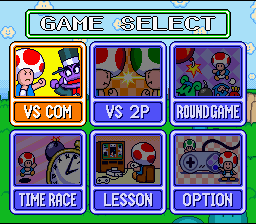
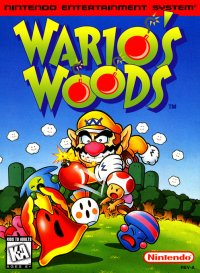
Wario's Woods features two modes in which you can face an opponent. The first mode is one player versus a computer player (VS COM). The other mode is a two player game (VS 2P). There are some strategies that apply to both the VS COM mode and the VS 2P mode. In both games, you can win by either clearing your screen of monsters first, or by filling your opponent's screen with monsters and bombs. There are attacks that each player can utilize to help them defeat their opponent.
The VS modes feature a best three out of five match to determine the winner.
VS COM
In the VS COM mode, you will face a series of computer opponents. Progress toward your climactic struggle with Wario as you dispatch his henchmen along the way. You may choose from three difficulty settings at the beginning of your battle. Can you go all the way to Wario? Here are a few of Wario's minions that you must face on your way to confronting Wario himself: VS Mode Attacks
Use the following attacks to help you defeat your opponent. Use the attacks to clear your screen as quickly as possible or fill up your opponent's screen.
•
Chain Reaction Attack: Create Chain Reactions to help you in your battle with your opponent. A Chain Reaction occurs when a match of bombs and monsters directly results in further matches as pieces fall into place. The attack outcome would be one of the following:
•
Your Bomb Time is increased
•
A stack of monsters appear on your opponent's playing field
•
The ceiling in your playing field rises by one row per reaction, plus one.
•
Ceiling Attack: If you make a match of four or more pieces, your opponent's ceiling will sink. The more pieces in the match the farther your opponent's ceiling will sink.
•
Diamond Attack: A diamond will appear if you make a match of five or more monsters and bombs. If you make a match with the diamond, all of the bombs in your opponent's field will become monsters.
•
Egg Attack: If, by placing a single bomb or monster, two matches explode simultaneously, an egg will fall into your opponent's field. The egg will hatch and more monsters will fall onto your opponent's field. If an egg is on your field, you can stop the extra monsters from falling onto your field by breaking the egg before it hatches. To break the egg, pick it up and put it down again.
Round Game
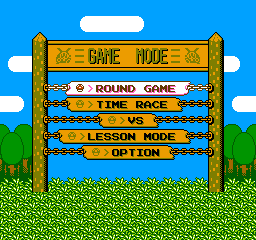
The Round game is a chance for you to see how far you can go into Wario's Woods. In the Round game, you must simply clear the screen of all monsters to progress to the next level. Your progress will automatically be saved every five levels. You can also earn coins by clearing a screen as quickly as possible. If you collect 50 coins, you will be awarded a Continue. A Continue will allow you another chance at beating the level where you lost.
Time Race
In the Time Race, your challenge is to complete five sets of screens in the quickest time possible. You can establish times in Easy, Normal or Hard mode.
To establish an overall time in each mode, you must first complete four separate rounds, with a time record being set in each round. For example, if you select the Easy mode, you must play through four rounds, the first being a two screen race, the second being a three screen race—the third being a four screen race and the fourth being a five screen race.
A time record will be kept when you complete each round. The times you set in each round are totaled to give you an overall time. Check your overall time to see if you can finish in bronze, silver or even gold medal time. You can replay any round in order to improve your overall time mark. Try each different level to see which one gives you the greatest challenge.
Options Screen
In the Options menu, the player can enter a name for one player and Vs. battles, view record times from the Time Race, choose either the A or B type controller set up, erase saved data, or change from stereo to mono sound and vice versa. As with the main menu, use the A button to register a choice and the B button to cancel.
In the Name menu, you will find four data files where two-player action can be saved. For single player action, a name can be entered by choosing the 1P Mode.
Choose the game settings on this screen:
The controller set up can be selected in the Button Select screen. Player 1 and 2 have a choice between the A and B type controller set up.
You can erase saved data in the Data Clear screen. You can choose to delete information from the 2P Vs mode, Round Game or the Time Race.
Making Matches
The following information is explained as though the player is using the A type controller set up. The B type set up changes the buttons used to perform the following maneuvers.
•
Picking up stacks of monsters and bombs: Press the A button to pick up a stack of monsters or bombs. Press the A button to place a stack in front of Toad. Toad cannot place a stack onto another stack of three or more pieces, unless he is jumping down from another stack. If you press the A button while climbing, you can pick up the piece that is the closest to Toad, as well as all the pieces above it.
•
**Picking up and placing single monsters and
.png)

.png)
.png)
.png)


.png)


.png)

.png)
.png)





.png)

