Getting Started
To begin championship play, insert the Game Pak into the Super Nintendo Entertainment System® and turn the power ON. Press Start to get past each credit screen and into the option screen. You must use the control pad to set play options by highlighting the desired settings. Play Modes
•
Playoffs: This feature allows you to select a team to compete against other randomly selected teams. If you have a password, a screen will appear allowing you to enter it. Use the control pad to scroll through numbers and digits and to move from space to space, then press Select when finished. Press Start to play.
•
Exhibition: This feature allows you to select both your team and your opponent's team.
Players Options
•
1 Player: Player's team competes against a computer team. After selecting this mode, highlight your team on the Team Selection Screen, then highlight the opponent team and press Start.
•
2 Players: Player's teams compete against each other. Highlight your team and press Start, then your opponent will highlight their team and press Start.
•
Auto Play: Allows the player to view two teams of their choice compete against each other.
Game Options
•
Fouls: Choose if fouls will or will not be called during game play by setting the Foul option to On or Off.
•
Music: Setting the Music option to On plays music at all times except during game play.
Team Selection
When you have finished setting the options, press Start to bring up the Team Selection Screen. Use the control pad to highlight your desired team, then move to the opponent team list to highlight their selection. Press Start to initiate game play.
If you wish to return to the options screen from either the Playoffs or Team Selection Screen, press the L button.
Scoring
•
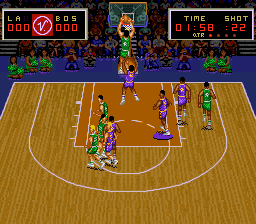
Field Goals: Any shot made within the outer arc or "three point line." Worth 2 points.
•
Three Pointers: Any shot made outside the outer arc or "three point line." Worth 3 points.
•
Highlighted player is on 3 point line.
Passing
Face the player with the ball in the direction you wish to pass, and press the B button. The longer the button is held, the trickier the pass will be. Passing is a good way to move the ball quickly, but beware of interceptions by the opposing team.
You will encounter two different types of passes in gameplay:
Defensive Gameplay
•
Stealing: Take the initiative to get the ball back so you can score.
•
Set Screens: Don't give the offense a direct route to the basket; make them go around you.
•
Switch Player Control: Use the X button to switch control to the player nearest to the ball.
•
Rebound: Wait for the ball under the hoop whenever a shot is taken, then go for the Fast Break.
•
Defensive Fouls: A foul at a critical moment can turn the momentum of a game in your team's direction.
Time Outs
You will have an unlimited number of Time Outs. They help advance the ball down-court without losing playing time and give your team members a few minutes of rest.
To call a Time Out while on offense, press the Start button to pause, then press Select. To return to gameplay, press Start again.
Violations
The same rules apply to SUPER SLAM DUNK as the real national teams follow. A turn-over will occur in any of the following situations:
•
24 seconds on the shot clock expires before an attempt to score is made.
•
Any offensive player spends more than 3 seconds in the "key."
•
The player with control of the ball jumps up and lands without attempting a shot.
•
After gaining possession, a team fails to bring the ball to their side of the court before 10 seconds have elapsed.
.png)

_1.png)

_2.png)
_3.png)
.png)
.png)
.png)
