Game Start—The Tip-Off
The referee will toss the ball up. You have to time your jump so that you hit the ball at the peak of the toss. Press A, B, or Y to make your player jump and knock the ball toward one of your teammates.
Game Length
The game is made up of four quarters of two minutes each. If there is no winner at the end of the game, overtime periods of two minutes each are played until one team wins. The overtime periods are not sudden death. Game length can be changed on the Options screen.
Court
The far end of the court is Player 1's home end, and the near end is Player 2's home end. The teams change ends at half-time. However, when playing against the computer (in 1P mode, for example), your home end is normally the far end of the court.
Scoring
Shots from inside of the three-point line score 2 points, and shots from outside score 3 points. Free throws score 1 point. (You are awarded free throws when your opponent commits certain fouls against you. Free throws are not in the Arcade mode.) Player Change (Not Included in Arcade Mode)
During a game, when you are on offense, you can call time-out to change players by pressing the Start button (up to 8 times per game).
Instant Replay
The best shots of the game will be automatically replayed for you on screen. Press A, B, X, or Y to cancel.
Shooting Technique
The height of your shots depends on how long you hold down the Shoot button. The higher and closer to the basket you are when you press the Shoot button, the more likely it is that you'll hit your shot.
•
Dunk: Get close to the basket, hold the Control Pad towards it and press the Shoot (Y) button. (This may change into a lay-up shot.)
•
Fade away shot: Hold down the Control Pad in the opposite direction of the basket and press the Shoot (Y) button.
•
Double clutch: Tap the Shoot (Y) button again when you are dunking.
•
Alley-oop: Press the Alley-oop (X) button when the player you are passing the ball to is under the goal.
•
Rebound dunk: Carefully coordinate your timing for this power move! When the ball bounces off the backboard, press the Rebound (B) button.
•
Fake: Tap the Shoot (Y) button lightly.
Starting the Game
Correctly insert the game pak into your Super NES and turn the power switch on. When using the Multi-Tap™, be sure to connect it to the Super NES into control port 2 before turning the power on.
Press the Start button at the Title screen to move to the Mode Select screen. Choose a mode with the Control Pad and press the A button to continue.
•
Arcade: Based on Konami's arcade game, this mode emphasizes speed and thrilling game-play. •
Exhibition: A one-game mode.
•
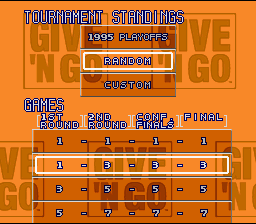
Playoffs: Experience all the thrills of the NBA playoffs and finals! You can choose the teams yourself or have them chosen randomly by the computer.
Arcade Mode
An exciting, fast-paced game mode with no fouls; based on our arcade game. •
1) Player Setup: Select the number of players (1P VS COM, 1P & 2P VS COM, 1P & 2P VS 3P & 4P, 1P vs. 2P, or 1P & 2P VS 3P).
•
2) The Playoffs: If you choose to play against the computer, you will be able to select a team in the playoffs to control. After your selection, the game begins!
•
3) Team & Court: If you choose to play against a human opponent, then you will both be able to select a team to control. You can also select where the game will be played. After your select your teams and court, the game begins!
•
Note: There are no lay-ups, so all players can dunk.
•
Note: Time-outs cannot be called, and no player changes can be made.
•
Note: The only violations are shot clock violations and out-of-bounds.
Exhibition
In this mode you play only one game. Both players (in 2P mode) can select the same team, if they wish.
•
1) Player Setup: Select the number of players.
•
2) Team & Court: Select your team and court.
Player Changes
You can substitute players before the start of the game. You can also change players during the game when you call a time out.
•
Select OK to start the game.
•
There is a star (☆) mark on each player which shows his condition. (No star: Bad condition, ☆: Average condition, ☆☆: Good condition, ☆☆☆: Excellent condition.)
•
If you put a player in a position different from the position he normally plays, his ability decreases. (C=Center, F=Forward, G=Guard)
•
During the game, you can check the substitution screen to see how many more times you can call time out and the number of fouls each player has gotten.
•
A players stats are at the bottom of the screen. Use the cursor to highlight a player you want to change, then press the A button. Highlight another player (and compare their stats), then press the A button to finish the substitution, or B to cancel
.png)

.png)
.png)
.png)





.png)
.png)












_1.png)



.png)