The Goal of the Game
The object of the game of hockey is easy for anyone to understand: cause the puck to cross your opponent's goal as many times as you can while preventing your opponent from doing the same to you. Despite the seeming complexity of the game's rules to the novice, they are actually quite simple.
In NHL Stanley Cup, you won't have to worry about rules regarding equipment, rink dimensions, etc. You will, however, encounter Icing, Off-sides and a variety of penalties.
Rink Elements
Game Rules and Flow
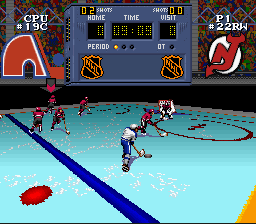
Icing is the one constant rule that is always enforced in NHL Stanley Cup. For Icing to occur, the puck must cross the center red line from the player's own half of the ice and travel beyond the goal line of the opposing team. As soon as the puck is touched by a defending player other than the goalie, a face-off at the end face-off circle of the offending team will be called.
Speed, finesse and power are integral elements of the sport of hockey. The puck can travel at up to 100 miles per hour. Players routinely receive bone-crunching body checks.
Endurance is also a factor, as "Line Changes" rotate fresh players onto the ice without slowing down the tempo of the game at all. In NHL Stanley Cup, you can turn the Line Changes off and always play with your best players, or you can manually select when to switch lines as your players tire.
Game Play Modes
There are three different game play modes in NHL Stanley Cup. To select a game play mode, use Up and Down on the + Control Pad and press A, B or START when the desired mode is highlighted. On all menus, the X and Y Buttons will take you back to the previous screen.
Note that the two-player modes (2-player EXHIBITION and BEST OF SEVEN) can only be selected if you have two controllers plugged into your Super NES.
•
EXHIBITION: In EXHIBITION mode, you play a single game against the computer or a human player.
•
SEASON PLAY: SEASON PLAY can only be played against the computer. In this mode, you must complete an entire 84 game season in an attempt to make it to the play-offs. The game will save your progress as you play through the season, including your win-loss-tie record, as well as the accumulated statistics for your players.
•
BEST OF SEVEN SERIES: BEST OF SEVEN SERIES pits two human players against each other in a seven game series. Although this is meant to simulate the Stanley Cup play-offs, you can choose any team you want to play. The game will save both teams' accumulated statistics during the series.
Game Play Options
The OPTIONS bar on the first menu allows you to adjust game play settings to your preference. To change the setting, use Up or Down on the + Control Pad to select the desired option and Left or Right on the + Control Pad to change the setting. Press A, B or START when the settings are the way you want them.
The battery-backed memory in the Game Pak will automatically save any changes you make to the options.
•
PENALTIES: You can select to have no penalties called (ALL OFF), or to have line penalties only (OFFSIDES ON). Selecting ALL ON activates all penalties. As explained earlier, the refs will always call Icing.
•
LINE CHANGES: Select line changes ON if you want to manually substitute players. If line changes are OFF, you will always play with your best players.
•
PERIOD LENGTH: You can select a period length of 5, 10 or 20 minutes.
•
LANGUAGE: You can select either the English or French language.
Exhibition Mode
In EXHIBITION mode, you will play a single game against one opponent. You can play against the computer or another human opponent.
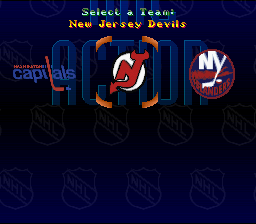
After you have selected EXHIBITION mode and the number of players, you can select your team. Use the + Control Pad to select a division and press A, B or START to see the teams in that division. When the logo of the team you want to play is inside the brackets, press A, B or START to select that team. Player Two can simultaneously choose his or her team. Once you've selected your teams, the action begins!
•
OPTIONS: After you choose EXHIBITION, you will see an option menu. On this menu, you can select the number of players and the difficulty. Note that you can only select a two player game type if you have two controllers plugged into your Super NES. Once you have the options set, press A, B or START.
•
PLAY LEVEL: There are three difficulty levels: Junior, NHL and NHL Pro. Junior is the easiest and NHL Pro is the most intense. In the higher difficulty levels, the computer controlled players are much more intelligent and they react more quickly.
•
SPORTSCASTER WRAP-UP: Between periods and at the end of each game, the sportscaster will appear and wrap up the action. He will summarize scoring and also note any special accomplishments during the game, such as hat tricks and shutouts.
Season Play
To truly test your hockey skill and determination, you must experience a full season of action. In SEASON mode, you can do just that. You will play a full 84
 (En,Fr).png)

 (En,Fr).png)



.png)






_1.png)
