Object of the Game
•
Up to 5 players can battle computer or rival opponents.
•
Each race consists of 8 heats across up to 7 different courses.
•
Earn prize money to buy parts and increase car power after each heat.
•
The player with the highest number of race points after all 8 heats is the winner.
Multiplayer Requirements
•
A TurboGrafX-16 TurboTap accessory is required for more than one player. •
Each additional player requires a TurboPad controller.
•
These items are typically available where your TurboGrafX-16 Entertainment SuperSystem was purchased. Starting the Game
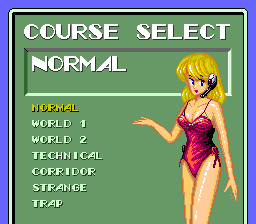
Course Selection
•
Press the RUN Button to select a race course.
•
Use the Direction Key (up/down) to indicate your choice.
•
Press Button I to enter your selection.
Car Selection and Driver Registration
•
Press Button I before the number in the upper right-hand corner reaches "0".
•
Register names by selecting letters with the Direction Key and entering them with Button I.
•
Enter up to 5 letters per name.
•
Two players cannot use the same name.
Course Preview
•
Press the RUN Button to view the race course from a helicopter.
•
Press the RUN Button again to skip the preview.
Parts Selection
•
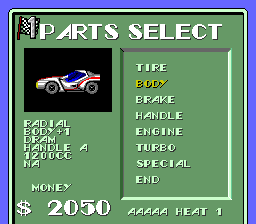
Press the RUN Button to buy parts, add power, or rebuild your car.
•
You can only buy parts you can afford with your prize money.
•
Your current money amount is displayed in the lower left-hand corner.
•
Use the Direction Key (up/down) and Button I to select and enter enhancement choices.
•
Your current parts description is shown on the left side of the screen.
Race Start
•
Press the RUN Button to begin the race ("GO!").
•
Monitor the gasoline level at the bottom left of the screen.
•
If you run out of gas, you are out of the race unless you purchased an extra gas tank.
Rankings
•
Rankings for each heat are announced when all players reach the finish line.
•
Pay attention to the money and points awarded.
•
After the 8th heat, the overall champion is declared based on total points.
Controls and Functions
Pausing and Resetting
•
Press the RUN Button during a race to pause.
•
Hold RUN Button and press SELECT Button simultaneously to reset to the title screen.
•
Note: "Pause" and "Reset" affect all players' cars.
TurboPad Operation
•
Direction Key (4-Way Controller): Serves as the steering wheel during races; used for selections otherwise.
•
SELECTION Key: Resets the game when pressed with the RUN Button.
•
RUN Button: Pauses the race; proceeds to the next screen before each heat.
•
Button II: Accelerator (gas pedal) during the race; releases brakes when held; cancels selections.
•
Button I: Operates "special items" during the race; enters selections otherwise.
•
TurboSwitches: Set to the down position for this game.
Steering
•
The car moves in the direction indicated by the Direction Key (up, down, left, right).
•
Using only left and right directions mimics a real steering wheel for potentially more precise movement.
•
Purchase "handle items" to imitate left-to-right steering.
TurboTap™ Accessory
•
Required for 2 or more players to play Moto Roader.
•
Follow instructions when attaching the unit to your TurboGrafx-16. •
Your car's color is determined by the selected TurboTap Accessory port:


.png)
.png)







.png)

.png)




 (Alt 1).png)


.png)